Disclosure: As an Amazon Associate, kajuandouglas.com earns from qualifying purchases. Links on this page are affiliate links; they cost you nothing extra. Prices and availability change often, so check the current Amazon listing before you buy.
The hall effect vs mechanical switches argument is really an argument about what a keypress is. A mechanical switch treats a press as an event: two metal contacts meet, the circuit closes, the character fires. A Hall effect switch treats a press as a measurement: a magnet moves toward a sensor, the board reads how far it has travelled, and software decides what that distance means. Everything people argue about — rapid trigger, adjustable actuation, switch swapping, sound, longevity — flows downstream from that single difference in philosophy.
This comparison refuses the lazy conclusion that the newer technology simply wins. Hall effect boards do things mechanical boards physically cannot, and for competitive players those things are real advantages rather than marketing garnish. Mechanical boards answer with a universe of switches, a mature modding culture, soldered and hot-swappable ecosystems at every tier, and a typing feel that twenty years of refinement have polished. Which side deserves your money depends on whether your keyboard is primarily a game controller that also types, or a typing instrument that also games.
One honesty note before the picks. The board that popularised this category, the Wooting 60HE, has no verified Amazon listing available to us, so it is discussed in prose throughout this page and never linked. In its place, the Hall effect picks below are verified alternatives that implement the same core features — magnetic switches, rapid trigger, adjustable actuation — across compact, 65 percent, 75 percent, and full-size formats. They are framed as alternatives openly, because pretending any of them is the Wooting would help nobody.
Key Takeaways
- Hall effect switches sense magnet position continuously, which enables adjustable actuation points and rapid trigger — a key can reset the instant it starts rising, without travelling back past a fixed reset point.
- Mechanical switches register at a fixed point with a fixed reset, but they offer hundreds of switch designs, true hot-swap experimentation on standard boards, and the best typing feel in the hobby.
- For competitive shooters and rhythm games, rapid trigger is a genuine, feel-it-in-a-day advantage; for typing, coding, and mixed use, it changes almost nothing.
- Hall effect switch choice is narrow and mostly proprietary to each board family, while mechanical switch choice is an entire marketplace.
- Neither technology wears out quickly in human terms; contact-free sensing removes one failure mode, and mechanical contacts are rated for lifetimes most owners never approach.
In this guide
Hall Effect vs Mechanical Switches: How Each One Works
Inside a mechanical switch, a stem pushes a gold crosspoint contact against a leaf. The moment the metal touches, the press registers. That architecture fixes two numbers at the factory: the actuation point, where the contact closes, and the reset point, where it opens again on the way up. Between those two numbers lives hysteresis — a small dead zone that prevents chatter but also means a key must travel a set distance upward before it can fire again. Every mechanical switch you have ever used, from the crispest tactile to the smoothest linear, lives inside that arrangement.
A Hall effect switch replaces the contacts with a magnet in the stem and a sensor on the circuit board. As the key descends, the magnetic field at the sensor strengthens, and the board knows the stem’s position continuously through its whole travel — not just at one blessed millimetre. Firmware turns that stream of positions into behaviour. It can declare actuation at a whisper of travel or near the bottom. It can reset the key the moment upward movement begins, which is the entire trick behind rapid trigger. It can even read two thresholds on one key, so a half press walks and a full press runs. The switch stops being a switch, in the electrician’s sense, and becomes a tiny analog joystick that happens to be shaped like a key.
Optical switches sit between these worlds and get their own hearing in optical compared with mechanical switches; the short version is that they keep the fixed-point logic but trigger it with light. This page stays with the two technologies in its title, because the Hall effect approach is the one currently redrawing the competitive gaming map.
Quick Verdict
| Criterion | Hall Effect | Mechanical |
|---|---|---|
| Actuation | Adjustable per key, in software | Fixed by switch design |
| Rapid trigger | Yes — resets on upward movement | No — fixed reset point |
| Switch variety | Narrow, board-family specific | Hundreds of designs, one socket standard |
| Typing feel ceiling | Good and improving | The best in the hobby |
| Sound tuning | Limited by switch supply | An entire modding culture |
| Contact wear | No electrical contacts to wear | Contacts rated for very long service |
| Best arena | Competitive gaming | Typing, modding, mixed use |
If you play tactical shooters seriously and your current board is the oldest part of your setup, the Hall effect side of this table is calling your name. If you type for a living, collect switches, or suspect you would enjoy lubing something at a desk on a Sunday, the mechanical side remains the deeper hobby. The detailed board reviews below give both camps their strongest verified representatives.

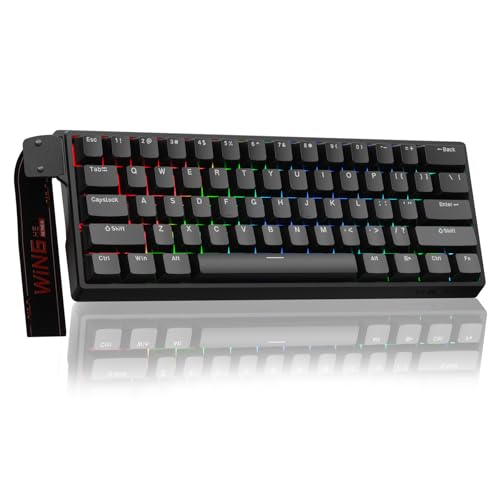
Aula WIN60 HE — the Accessible Hall Effect Entry
Badge: Rapid trigger without the flagship toll
- Format: 60 percent wired board
- Switches: magnetic, hot-swappable within its ecosystem
- Headline features per its listing: adjustable actuation, rapid trigger mode, high polling rate
- Best matched player: competitive gamer testing whether magnetic switches suit them
Strengths
- Brings the defining Hall effect features — rapid trigger and per-key actuation tuning — to the most approachable tier of the category.
- The compact footprint leaves maximum desk room for low-sensitivity mouse sweeps.
- Acts as a low-regret experiment: if magnetic switches click with you, the upgrade path is clear; if not, little was wagered.
Trade-offs
- Fit, finish, and software polish trail the premium boards in this roundup.
- The 60 percent layout demands layer discipline from anyone who uses arrows or a function row daily.
- Its switch ecosystem is its own; do not expect to drop standard mechanical switches into the sockets.
Best for: competitive players who want rapid trigger now and can accept an entry-tier chassis. Not suited for: typists who need a full key set or builders who plan to swap switch brands weekly.

Keychron Q1 HE — the Enthusiast’s Magnetic Board
Badge: Custom-board manners, magnetic heart
- Format: 75 percent wireless custom board
- Switches: Gateron double-rail magnetic, hot-swappable
- Configuration tools: QMK-based launcher, per its listing
- Connections: 2.4 GHz wireless, Bluetooth, and wired
Strengths
- Carries the custom-keyboard experience — solid case, gasket manners, respectable stock sound — into the Hall effect world.
- Wireless freedom plus rapid trigger is a combination the pure esports boards rarely offer.
- Double-rail magnetic switches feel steadier under the finger than early single-rail designs.
Trade-offs
- Costs what a premium custom board costs; the magnetic features are not the only thing in the price.
- Heavier than the esports decks, so it is a desk fixture rather than a tournament traveller.
- Its keymap and actuation tuning live in Keychron’s launcher, a different workflow from QMK files.
Best for: enthusiasts who want one board that satisfies both the gaming desk and the typing desk. Not suited for: minimalists who want the lightest possible tournament kit.

MelGeek MADE68 Pro+ — the FPS Specialist
Badge: Built around the shooter use case
- Format: 65 percent wired Hall effect board
- Listing highlights: rapid trigger, adjustable actuation aimed at FPS and rhythm play
- Extras: SOCD handling and an RGB lightbox design with aluminium sides
- Switches: magnetic, hot-swap within the board’s ecosystem
Strengths
- The feature set reads like a tactical-shooter wishlist, including the SOCD behaviour competitive players configure first.
- A 65 percent footprint keeps dedicated arrows while surrendering little mouse territory.
- The chassis has genuine design ambition rather than parts-bin anonymity.
Trade-offs
- Wired only, which will end the conversation for cable-free desks.
- The styling is assertive; a quiet office may find the lightbox easier to notice than the typing.
- MelGeek’s software is capable but less battle-tested than the biggest names’ suites.
Best for: FPS and rhythm-game players who want a purpose-built magnetic deck. Not suited for: wireless devotees or understated workspaces.
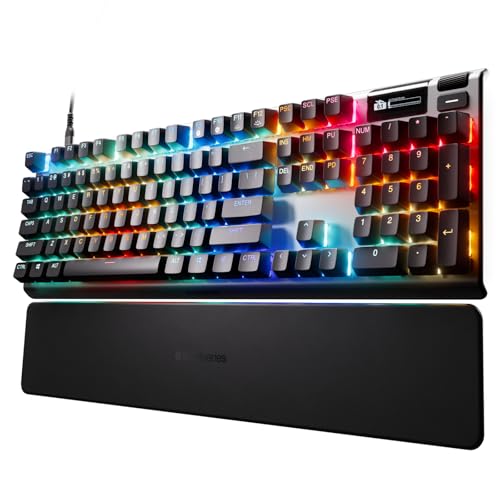
SteelSeries Apex Pro Gen 3 — the Mainstream Flagship
Badge: Magnetic switches with big-brand software
- Format: full-size flagship with OLED display
- Switches: OmniPoint 3.0 HyperMagnetic with adjustable actuation
- Listing highlights: rapid trigger, protection mode, rapid tap / SOCD features, game-ready presets
- Keycaps: double-shot PBT, per its listing
Strengths
- The most polished software ecosystem on this page, with per-game presets that make adjustable actuation genuinely convenient.
- Protection mode addresses the real anxiety of ultra-light actuation: neighbouring keys registering from a resting finger’s tremor.
- Full-size layout with media controls suits players who refuse to give up the number pad.
Trade-offs
- Flagship pricing, and the OmniPoint switch line is SteelSeries’ own — replacements come from one orchard.
- The feature depth can overwhelm players who wanted a keyboard rather than a control panel.
- Its sound profile is tuned for a gaming product, not for the deep tones custom boards chase.
Best for: competitive players who want magnetic performance inside a mainstream, well-supported product. Not suited for: modders who treat switch swapping as the hobby itself.
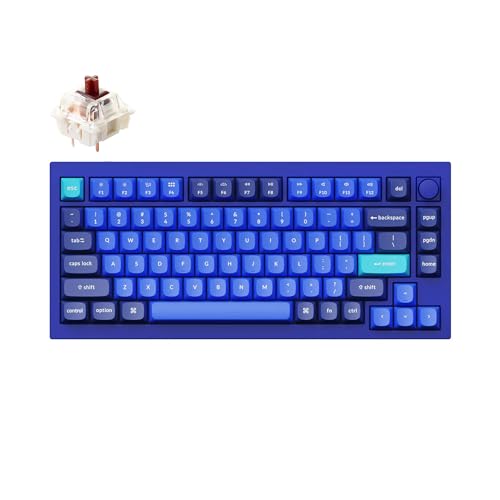
Keychron Q1 — the Mechanical Benchmark
Badge: What the mechanical side does best
- Format: 75 percent wired custom board, gasket-mounted
- Switches in this configuration: hot-swappable Gateron G Pro Brown
- Firmware: QMK/VIA programmable
- Compatibility: Mac, Windows, and Linux, per its listing
Strengths
- A genuinely satisfying typing instrument stock, and a blank canvas for any MX-style switch you will ever meet.
- QMK/VIA remapping remains the gold standard for people who bend a keyboard to their workflow.
- Shares its chassis philosophy with the Q1 HE above, which makes the technology comparison unusually pure.
Trade-offs
- No rapid trigger and no actuation adjustment — the contacts decide, as contacts have decided for decades.
- Wired in this configuration, and the metal case makes its presence known on the desk.
- Brown switches are a diplomatic middle; enthusiasts will swap them, which is rather the point of the board.
Best for: typists and tinkerers who want the deepest possible mechanical ecosystem. Not suited for: players whose buying reason is rapid trigger.

Ducky One 3 Mini — the Mechanical Purist’s Compact
Badge: Small board, serious switch socket
- Format: 60 percent mechanical board
- Switches in this configuration: Cherry MX Red, hot-swappable
- Keycaps: PBT tripleshot, per its listing
- Design system: Ducky’s Quack Mechanics platform
Strengths
- Excellent stock stabilisers and acoustics for a compact board at its tier.
- Hot-swap sockets accept the full MX universe, so this little board can wear a hundred personalities.
- Ducky’s onboard configuration avoids mandatory software for the essentials.
Trade-offs
- The fixed actuation of its switches is the whole mechanical bargain — no software can move the contact point.
- A 60 percent layout asks for layer fluency from day one.
- Cherry Reds are smooth and light, which some gamers love and some typists find error-prone.
Best for: mechanical loyalists who want a compact, tuneable, well-mannered board. Not suited for: anyone shopping specifically for analog features.
Criterion by Criterion: Where Each Technology Actually Wins
Speed and rapid trigger
This round belongs to Hall effect, and it is not close. Rapid trigger changes how movement feels in a tactical shooter within the first evening: strafing keys reset the moment your finger begins to lift, so counter-strafes sharpen and the character on screen stops feeling like it is wading. Mechanical switches cannot imitate this, because their reset point is a physical address the stem must revisit. The honest qualifier is scope — the advantage lives in games built on rapid key reversals. In a strategy title, a MOBA, or a spreadsheet, rapid trigger is a party trick nobody at the party requested.
Feel and customisation
Mechanical wins this round by acclamation. The MX socket standard means one board can host a featherweight linear on Monday and a heavy tactile on Friday, with the entire back catalogue of switch design — explored in keyboard switches explained in plain terms — available to it. Hall effect boards are improving, and the double-rail designs genuinely feel steadier than the first magnetic generation, but each board family speaks its own switch dialect. You are choosing a board, not a switch platform, and the board’s stock switch is close to a life sentence.
Sound
Sound follows customisation, so mechanical takes this round too. A mechanical board can be tuned toward a deep thock, a bright clack, or near-silence with dampened switches like the subject of the boba u4 silent tactile review. Hall effect boards sound like what they are: well-built linears in whatever case the manufacturer chose. Some are pleasant, a few are genuinely good, but the owner has few levers to pull when the stock voice disappoints.
Repairability at the kitchen table
A mechanical board’s most common surgery — one tired switch — needs a puller and thirty seconds on a hot-swap model, or an iron and ten unhurried minutes on a soldered one. The Hall effect board’s equivalent failures are rarer but heavier: a sensor or controller fault is a board-level event, addressed by warranty or by a technician rather than by a drawer of spares. Neither profile should dominate a purchase, yet the difference colours long-term ownership, especially for readers far from service centres. The mechanical board ages like a bicycle; the magnetic board ages like a phone — gracefully, until a component you cannot reach decides otherwise.
Durability and failure modes
Call this round a draw with different footnotes. Removing electrical contacts removes contact oxidation, double-registering from worn leaves, and a whole category of age-related chatter. Mechanical contacts, however, are rated for service lives that translate into decades of ordinary use, and when one does fail in a hot-swap board, the repair is a thirty-second swap. A failed Hall effect sensor, by contrast, lives on the board’s PCB, and the repair conversation becomes a warranty conversation. Contact-free is cleaner in theory; socket-replaceable is kinder in practice.
The Wooting Question, Answered in Prose
Any honest page in this category has to address the orange elephant: the Wooting 60HE did more than any other product to teach gamers words like lekker and rapid trigger, and its software remains a reference point rivals are measured against. Because no verified Amazon listing for it is available to this guide, it carries no link here — a deliberate omission rather than an oversight. Readers who want that specific board should buy it through Wooting’s own storefront channels after confirming the current model generation, since the line has evolved through several revisions.
What the Wooting’s fame means practically is that its feature set became the checklist: rapid trigger, adjustable actuation, high polling, SOCD-style handling, per-key analog behaviour. The four Hall effect picks on this page were chosen because each covers that checklist in a verified listing, at four different combinations of size and ambition. If your heart is set on the original, treat those four as the comparison set you would cross-shop anyway; if your heart is set on the features rather than the badge, any of the four delivers the experience that made the category famous.
Buying Guide: Deciding Without Regret
Begin with your loudest use case, not your average one. If ranked shooter sessions define your week and your aim already outruns your keyboard, buy the magnetic board and do not apologise: the WIN60 HE tests the waters, the MADE68 Pro+ commits to the genre, and the Apex Pro Gen 3 wraps the technology in flagship support. If your week is documents, code, and a game or two in the evening, the mechanical boards will make you happier for longer, because typing feel compounds daily while rapid trigger visits occasionally.
Next, interrogate your own tinkering history. Have you ever actually swapped the switches in a board you owned? If yes, the mechanical ecosystem is your natural habitat and a Hall effect board will eventually feel like a beautiful room with no doors. If no — if your keyboards live and die with their stock switches — then the mechanical side’s greatest advantage is one you will never cash in, and the magnetic features become the more honest value.
Budget a thought for the switch drawer as well. Mechanical ownership tends to accumulate switches the way photography accumulates lenses: a set for winter, a set for the office, a set bought because a group buy photograph was beautiful. That accumulation is a joy and a cost, and it is entirely optional — plenty of mechanical owners type happily on stock switches for years. Magnetic ownership has no equivalent drawer, which some readers will file under relief and others under loss. Be honest about which filing cabinet is yours.
Finally, think about the second board problem. Many enthusiasts end up owning one of each: a magnetic deck that comes out for competitive sessions and a mechanical board that handles the working day. There is no rule that this comparison must end with a single survivor, and readers building toward that two-board endgame often start mechanical — the broader, cheaper-to-explore ecosystem — and add the specialist later. Whichever order you choose, keep the switch fundamentals from kailh switches a comprehensive guide in mind, because switch literacy transfers across both technologies.
How to Set Up a Hall Effect Board Properly
Step one: start from a sane actuation baseline
Resist the urge to set every key to the lightest possible actuation on day one. Begin near the middle of the adjustment range, play or type for an hour, and only then shorten the travel in small steps on the keys that earn it — movement and ability keys first, letters last. Ultra-light actuation on letter keys is the leading cause of the typo storms that give the category a bad name among first-time owners.
Step two: configure rapid trigger where it matters
Rapid trigger earns its keep on keys that reverse direction constantly: strafing pairs, crouch, jump in movement-heavy titles. Enable it there before enabling it globally, and feel the difference in isolation. Some players ultimately run it everywhere; others discover that a global setting makes menus and inventory screens twitchy. The feature is per-key on most implementations precisely because the right answer varies by key.
Step three: use protection and SOCD deliberately
If your board offers a protection mode that guards against accidental neighbour-key presses at hair-trigger settings, turn it on before blaming the hardware for phantom inputs. Likewise, configure SOCD behaviour — how the board resolves simultaneous opposite directions — to match your game’s rules and your league’s stance, since some competitive environments restrict specific SOCD tricks. Features this powerful deserve a settings session, not a shrug.
Step four: give your hands a week
Muscle memory built on fixed reset points needs a few days to trust the new physics. Early sessions often feel slippery, with extra inputs appearing as fingers hover. That sensation fades as your lift-off becomes decisive. Judge the technology on day seven’s performance, not hour one’s.
Common Mistakes on Both Sides of the Divide
The signature Hall effect mistake is buying the features and never opening the software: an unconfigured magnetic board is just a linear board with unrealised potential and a premium receipt. The second is setting actuation to the minimum everywhere and concluding the technology is imprecise, when the configuration was. On the mechanical side, the classic error is assuming any hot-swap board accepts any switch without checking pin counts and socket style. Both camps share one mistake — judging a board in its first hour, before hands, settings, and expectations have had their meeting. And both camps produce owners who buy a second board within a month because the first purchase answered a question they had not actually asked themselves: competitive tool, or daily instrument?
Final Recommendation
Choose Hall effect if your keyboard is a sporting implement: the rapid trigger advantage is real, measurable in how movement feels, and unavailable anywhere else. Choose mechanical if your keyboard is a craft object and a typing companion: the switch universe, the sound tuning, and the sheer depth of the hobby remain unmatched. The Q1 HE earns a special mention as the bridge — the board for readers who read this whole comparison, nodded at both sides, and want the argument settled inside a single aluminium case. Everyone else should buy for their loudest use case and stop apologising for the choice.
A Short History of Two Sensing Ideas
Mechanical key switches are older than the personal computer’s mainstream era; the contact-based designs refined in the 1980s set the template the hobby still uses, and the MX stem pattern became the socket the modern renaissance rallies around. For decades the argument inside that world was about feel — linear against tactile against clicky — because the electrical behaviour underneath was settled. Nobody asked a switch to report its position, because nothing in a typewriter’s descendant needed to know.
Hall effect sensing has an equally long but quieter history in industrial controls, where contact-free position reading survives dust, vibration, and decades of service. Its migration into keyboards waited for cheap sensors, fast microcontrollers, and a gaming culture willing to pay for milliseconds. The esports scene supplied the demand: once players could feel rapid trigger in a shooter, the fixed reset point of a contact switch started to look like a historical accident rather than a law of nature. The current generation of magnetic boards — the four linked above among them — is the technology arriving at consumer maturity, with better stems, better software, and prices that no longer require a sponsor.
Analog Behaviour: The Features Beyond Rapid Trigger
Rapid trigger gets the headlines, but continuous sensing enables quieter tricks worth understanding. Dual-stage actuation lets one key carry two commands at two depths: ease a key to its first threshold and a character walks; commit to the second and the same character sprints. Racing-game players map throttle-style behaviour to keys, and some fighting-game players experiment with depth-based inputs. The honest assessment is that these features are delightful in the games designed to receive them and inert elsewhere, because ordinary software expects a key to be a binary citizen. Your operating system, your editor, and your spreadsheet all speak on and off; the analog vocabulary is translated by game engines and specialty software, not by the desktop at large.
Adjustable actuation, by contrast, is useful everywhere once you stop treating it as a gaming feature. A typist with a heavy left pinky can deepen that one key’s actuation and erase a personal typo pattern. A programmer can set the escape key shallow and the delete key deep, encoding caution and confidence into the board’s physics. Mechanical boards approximate this personalisation by swapping switches key by key — a heavier spring here, a tactile there — which works, but takes an evening and a switch collection. The magnetic board does it in a settings window between sips of coffee. That convenience, repeated weekly as preferences evolve, is the feature owners cite most after the first month, ahead of the rapid trigger that sold them the board.
Polling, Latency, and the Numbers Around the Sensing
Hall effect boards often advertise high polling rates, and the specification deserves a calm reading. Polling describes how often the board reports to the computer; sensing describes how the board knows a key moved. The magnetic advantage is not fundamentally about polling — a mechanical board can poll quickly too — it is about when in the key’s journey the report becomes possible. A contact switch must wait for metal to meet metal at a fixed address. A magnetic switch can speak as soon as the firmware’s threshold is crossed, and with rapid trigger it can also fall silent the moment retreat begins. Latency arguments that ignore that distinction are comparing the wrong layer of the stack.
For the player, the practical translation is consistency of the stop. Movement in shooters is a conversation of presses and releases, and releases are where the two technologies diverge most. Mechanical players developed techniques — feathering keys, pre-releasing before corners — that route around the fixed reset. Magnetic boards retire those workarounds. Whether that retirement improves your results depends on how much of your current technique was compensation; veterans sometimes need a fortnight to stop performing manoeuvres the hardware no longer requires.
The Mechanical Case, Made Properly
It would be easy, after several sections of magnetic enthusiasm, to treat the mechanical side as the incumbent defending a museum. That misreads the hobby. The mechanical ecosystem is a living design culture: new stem materials, long-pole experiments, factory-lube refinements, and housing geometries appear monthly, and the standard socket means every experiment fits the board you already own. Guides like kailh box switches complete guide exist because a single manufacturer’s sub-family can fill a book. No magnetic ecosystem offers anything resembling that depth today, and the gap is measured in years of accumulated community knowledge — lube guides, spring curves, frankenswitch recipes documented in the frankenswitches complete guide — that a young technology cannot simply announce into existence.
There is also the matter of the soldered board, the mechanical world’s heritage wing. Vintage decks, bespoke customs, and budget boards with fixed switches all live there, and the skills to service them — covered in how to replace mechanical switches step by step — keep hardware alive for decades. A mechanical board is repairable at the level of the individual key by anyone with a modest iron. That repairability is an ethical and economic argument, not merely a nostalgic one: the board you can fix is the board you do not landfill.
Software Ecosystems: Where the Daily Experience Lives
Buy a Hall effect board and you marry its software. Actuation maps, rapid trigger zones, SOCD rules, and analog curves all live in the vendor’s application or web configurator, and the quality of that tool shapes ownership as surely as the switches do. SteelSeries and Keychron invest heavily here, which shows in preset libraries and sane interfaces; smaller brands deliver the features with rougher edges. Before choosing a magnetic board, watch a walkthrough of its configurator the way you would test-drive a car’s infotainment: you will visit it weekly.
The mechanical world’s software story is decentralised by comparison. QMK and VIA put keymap control in open, community-maintained tools that work the same way across hundreds of boards, and a mechanical board with no software at all still functions completely — the switches need no configuration to be switches. That asymmetry matters to Linux users, to the privacy-minded, and to anyone who has watched a beloved peripheral orphaned when a vendor discontinued its app. A magnetic board whose configurator vanishes keeps working with its last saved profile, but its defining features freeze in place. Longevity, in this category, is partly a software question wearing a hardware costume.
What Magnetic Switches Feel Like Under the Finger
Strip away the features and a Hall effect board presents as a linear board, because nearly every magnetic switch shipping today is a linear design: smooth travel, no bump, no click. Early magnetic switches had a reputation for wobble and a slightly hollow landing, artefacts of stems designed around a magnet rather than around feel. The current generation — double-rail stems like those in the Q1 HE, tighter housings across the category — has narrowed that gap considerably. A modern magnetic linear feels composed and clean, if rarely characterful; it will not give you the deep, tuned thock of a lubed mechanical linear in a gasket case, and it will not give you tactility at all, because the tactile magnetic switch remains a rarity rather than a product line.
That last point quietly decides many purchases. Typists who love a bump — and the entire tactile culture documented across this site’s switch guides — currently have no magnetic home. If your fingers expect confirmation at the actuation point, a Hall effect board asks you to trade that confirmation for software thresholds you cannot feel. Some typists adapt happily, treating the screen as the confirmation. Others describe the experience as typing on faith. Know which typist you are before the features seduce you, because no firmware update can install a bump.
Three Readers, Three Answers
Consider the ranked-grind player first: three hundred hours in tactical shooters, a mid-tier mechanical board from two setups ago, aim that has plateaued. For this reader the magnetic board is not a luxury but the missing variable, and the entry-tier WIN60 HE or the committed MADE68 Pro+ will each produce a perceptible change in movement feel within the week. The plateau may have other causes — it usually does — but the keyboard will stop being one of them.
Consider the professional writer next: eighty thousand words a month, a beloved tactile board, a wrist that keeps its own counsel. Rapid trigger offers this reader nothing; actuation adjustment offers a little; the mechanical ecosystem offers everything that matters, including the silent tactiles that let a household sleep. The writer who buys magnetic out of novelty will own a fine board and a faint sense of having answered a question nobody in their life was asking.
Consider finally the student with one desk that must serve lectures, essays, and a competitive team. This reader is the Q1 HE’s natural owner, or the two-board strategist on a budget: a mechanical board that types beautifully for coursework, bought first, and a magnetic deck added when the team’s season demands it. The student case is why this comparison resists a single winner — the correct answer is a function of a life, not of a spec sheet.
The Cost of Ownership, in Tiers Rather Than Numbers
Hall effect boards cluster in the middle and upper tiers of the keyboard market, because sensors, controllers, and software development cost more than contacts and confidence. Mechanical boards span every tier from disposable to bespoke, which means the mechanical side can always undercut — and can also always outspend, once custom cases and small-batch switches enter the chat. The fair comparison is at equal ambition: a premium mechanical custom and a premium magnetic board ask similar money and deliver different virtues. Budget accordingly for the ecosystem, too. The mechanical owner will spend on switches the way a guitarist spends on strings; the magnetic owner’s wallet rests after the initial purchase, mostly because there is less to buy.
Tournament Rules, SOCD, and Playing Fair
Powerful input features attract rulebooks, and buyers in organised play should read theirs before configuring anything exotic. SOCD handling — the board deciding what happens when left and right are held together — can be configured on magnetic boards into behaviours some leagues consider assistance rather than equipment. The mainstream features, rapid trigger and adjustable actuation, are broadly accepted in competitive play, but specific titles and tournament organisers publish their own stances, and those stances evolve. The responsible routine is simple: check your league’s current peripheral rules at the start of each season, configure the board inside them, and keep a compliant profile saved for LAN events where an admin may ask questions your home setup never hears.
There is an etiquette layer beneath the rules, too. In team environments, a player whose board produces visibly inhuman counter-strafes will draw scrutiny whether or not the configuration is legal, and being able to explain your settings calmly — what rapid trigger does, where the rulebook permits it — is part of owning advanced equipment. None of this should scare a casual player away from the technology; it simply belongs in the manual of anyone taking the features into organised competition.
Resale, Hand-Me-Downs, and the Second Life of Both Board Types
Mechanical boards enjoy a deep second-hand market because their value is inspectable: sockets can be tested, switches swapped, cases refinished. A five-year-old custom mechanical board with honest wear is a known quantity to a buyer who speaks the hobby’s language. Hall effect boards are newer to the resale shelf, and their value leans on software support — a board whose configurator still receives updates ages gracefully, while one abandoned by its vendor becomes a snapshot of its last profile. Buyers of used magnetic boards should confirm the configurator still runs on a current operating system before money moves; sellers should expect the question and answer it with the board connected and the software open.
Hand-me-down logic favours mechanical slightly as well. A mechanical board passed to a younger sibling or a friend can be re-switched to suit new hands in an evening. A magnetic board passes down exactly as it is — which, if it was well chosen, is no hardship at all.
Desk Reality: Size, Cables, and Daily Friction
Format interacts with technology in daily use. The magnetic category skews compact — 60 and 65 percent boards dominate because competitive players buy them — so a number-pad devotee shopping magnetic has fewer doors to knock on, the Apex Pro Gen 3 being the honourable exception in this roundup. Mechanical boards exist in every footprint ever standardised and several that should not have been. Wireless tells a similar story in reverse: mechanical wireless is a mature, crowded field, while wireless magnetic boards like the Q1 HE remain the exception, because high polling and wireless power budgets negotiate uneasily. If your desk doctrine is no cables and a full layout, the mechanical catalogue will greet you like family and the magnetic catalogue will ask you to compromise on one axis or the other.
Verdict by Genre: A Quick-Reference Matrix
| Primary use | Recommended side | Reason in one line |
|---|---|---|
| Tactical shooters | Hall effect | Rapid trigger sharpens counter-strafing and peeking |
| Rhythm games | Hall effect | Fast resets forgive dense note streams |
| MOBA and strategy | Either | Ability keys rarely reverse fast enough to care |
| Long-form writing | Mechanical | Tactile choice and tuned sound reward daily hours |
| Programming | Mechanical, narrowly | Remapping depth and switch personality win weekdays |
| Mixed desk, one board | Hall effect custom tier | Boards like the Q1 HE genuinely serve both masters |
The matrix compresses; the prose around it should govern. Notice how few rows are landslides. Rhythm and tactical titles are the magnetic heartland because their inputs are athletic events. Everything slower is a conversation about feel, ecosystem, and habit, where the older technology’s depth tells. If your genre sits in the either row, decide on the secondary criteria this page has walked through — switch curiosity, software tolerance, layout, wireless — because the primary criterion has honestly abstained.
The First Fortnight: What Switching Sides Actually Feels Like
Players moving from mechanical to magnetic describe a recognisable first week. Days one and two feel slippery: keys fire earlier than intention, menus twitch, and the hand keeps performing the little lift-and-reset ritual the old contacts demanded. Around day four the ritual fades and the new physics becomes the expectation; movement starts to feel direct in a way that is hard to un-feel. By the second week the common report is that the old board, revisited for an evening, feels like it is thinking about each keypress before agreeing to it. That sensation is the reset point, and once your nervous system has priced it in, it is the sensation that keeps players on the magnetic side.
The reverse migration has its own diary. Typists returning to mechanical after a magnetic month report an almost physical relief at the bump of a good tactile, followed by amusement at how much they missed sound — not loudness, but information, the small acoustic receipt each keypress issues. Neither diary proves superiority. They prove that hands adapt to whichever physics they live with, and that the honest comparison happens after adaptation, which is why every recommendation on this page quietly assumes a settling period before judgement.
Accessories and Keycaps: What Carries Over
One more accessory note concerns switch storage and spares. Mechanical owners keep a small organiser of favourite switches, springs, and films, and that drawer is part of the hobby’s pleasure. Magnetic owners keep, at most, a few spare switches of their board’s own family against accidents. If the drawer sounds like clutter, the magnetic life will feel clean; if it sounds like a treasure chest, you have learned something about yourself that no benchmark could teach.
The friendliest fact in this whole comparison is that keycaps mostly do not care which technology lives beneath them. Magnetic switches use the same MX-style cross stem as their mechanical cousins, so the keycap collection you have curated — the profiles and sets surveyed in our keycap coverage — migrates freely between your boards. Cables, desk mats, wrist rests, and cases for standard footprints likewise transfer. The accessories that do not transfer are the switches themselves and, occasionally, stabiliser preferences, since some magnetic boards tune their stabilisers for the lighter, faster keystroke their players use.
This compatibility has a strategic consequence for the two-board endgame: the second board costs less than the first, because everything around the board is already bought. It also softens the risk of trying the other side. A player who buys a magnetic deck and discovers a typist’s soul has lost nothing but a little time — the caps, the mat, and the hard-won opinions about profiles all come home to the mechanical board that replaces it.
Frequently Asked Questions
Is rapid trigger actually noticeable, or is it marketing?
It is noticeable in the genres built on key reversals. Counter-strafing in tactical shooters is the canonical demonstration: the key resets as your finger begins rising rather than after a fixed journey upward, so your character stops sooner and your shots stabilise earlier. Players feel it as tightness rather than speed. Outside those genres — typing, strategy games, general desktop use — the same feature sits idle, which is why this page recommends buying it for a use case rather than for a spec sheet.
Can I put mechanical switches in a Hall effect board?
No. The sockets look similar from above, but a Hall effect board reads magnets with sensors on its circuit board, and a mechanical switch has neither the magnet nor any interest in being read. The reverse swap fails too: a magnetic switch in a mechanical board has no contacts to close a circuit. Treat the two ecosystems as parallel universes that share keycaps, cables, and desk space — but not switches.
Do Hall effect switches wear out?
The sensing itself has no contact to wear, which removes the classic mechanical failure of chattering or dead contacts. The moving parts still exist — springs fatigue, stems rub housings, stabilisers loosen — so the board ages like any physical object, just without one specific electrical failure mode. In practical ownership terms both technologies outlast the owner’s curiosity; most boards of either kind are retired by desire for something new rather than by death.
Why is the Wooting 60HE mentioned but not linked?
Because this guide only links products with a verified Amazon listing, and the Wooting has none available to us. Rather than quietly substituting another board under its name, the page discusses it in prose, credits its role in defining the category, and links verified alternatives that implement the same headline features. Readers set on the original should go through Wooting’s own store, where the current generation and its options are listed by the manufacturer.
Are Hall effect keyboards good for typing?
They are perfectly serviceable and occasionally excellent — the Q1 HE in this roundup types with real custom-board manners. The limitation is choice rather than quality: you type on the switch the board came with, tuned by actuation settings, instead of choosing among hundreds of mechanical personalities. For most typists that is enough. For typists who have opinions about stem materials, it is a cage, albeit a comfortable one.
Do Hall effect boards work on consoles and across operating systems?
The keyboards themselves present as standard USB devices, so basic typing works anywhere a keyboard works. The advanced behaviour — actuation maps, rapid trigger profiles, analog curves — is configured in vendor software that may be Windows-first, with profiles stored on the board carrying the settings to other machines once saved. Mac and Linux users should confirm the configurator story for their chosen model before buying, or pick a board whose settings can be adjusted through a web interface that does not care about the host system.
Can rapid trigger help in games that are not shooters?
Any game built on rapid key reversals benefits in proportion to how athletic its inputs are. Rhythm titles are the clear second home, fighting games reward the fast resets on movement keys, and platformers with precise hops feel the difference at the margins. Games paced by cooldowns, menus, or mouse aim gain nothing measurable. The feature is a specialist, and it is happiest when employed by one.
Which technology is better for a first mechanical-style keyboard?
For a first board that must do everything, the mechanical side remains the safer harbour: broader price spread, endless switch options when curiosity arrives, and no software homework required to make it behave. The exception is the buyer whose first board is explicitly a competitive gaming purchase. That buyer should skip directly to Hall effect, because buying mechanical first and magnetic second is the expensive order for a destination that was known from the start.