Knowing how to pack a laptop backpack well is a quiet superpower: the same load, packed badly, pulls at your shoulders, buries the thing you need under everything you do not, and leaves your laptop corner exposed to the one knock that matters. Packed well, the weight rides against your back and high, the daily items surface in seconds, and the bag feels lighter than the scale says — because in every way that matters to your spine, it is.
This guide teaches a system, not a pile: zones based on weight and frequency, a fixed order of packing, and small habits — cable discipline, bottle placement, the sacred quick-access pocket — that survive busy mornings. It works for the daily commute and scales to travel days with the same logic.
Disclosure: As an Amazon Associate, kajuandouglas.com earns from qualifying purchases. Links to Amazon on this page are affiliate links; they cost you nothing extra. Listing details such as price and availability change often, so check the current Amazon listing before you buy.
Quick answer: heaviest items — laptop, books, charger brick — flat against your back panel, centered and high. Medium weight in the middle zone. Light, bulky items toward the front and top. Daily-grab items in the quick-access pocket, valuables against your back, water bottle upright in its sleeve, and nothing loose anywhere: every small thing gets a pouch or a pocket, every time.
Gear for This Guide
Verified bags whose interiors are built for the system this guide teaches.

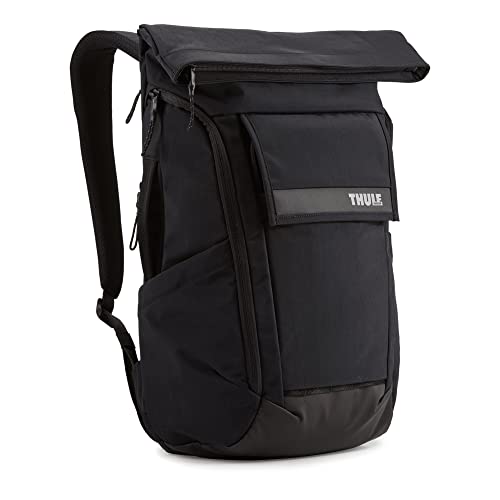
Thule Paramount Backpack 24L, Black — A structured pack like this Thule rewards zonal packing — its compartments hold their shape, so the system you build stays built instead of collapsing into a pile. Check price on Amazon.

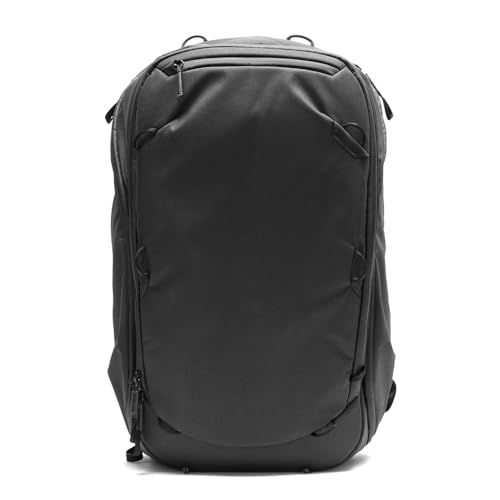
Peak Design Everyday Backpack 20L, Black, Fits 15″ Laptop — Divider-based designs like the Peak Design turn zone two into configurable shelves — the packing system becomes physical, which some brains strongly prefer. Check price on Amazon.

Samsonite Xenon 3.0 Laptop Backpack, 1680D Ballistic Poly, Fits 15.6” Laptop, TSA Compatible, Air Mesh Back Padding, Tablet Pocket, Smart Sleeve, Quick Stash Pocket, Durable & Lightweight – Large — A business organizer interior like this Samsonite gives every small item a printed address — the pouch rule, built into the bag itself. Check price on Amazon.
In this guide
What You Need
- Your backpack, emptied completely
- Your full daily load, laid out visibly
- One small pouch or organizer for cables and small items
- Five honest minutes — the first pack is the slow one
Pack on a table or bed, not into a bag hanging off a chair. Seeing the whole load laid out is what turns packing from stuffing into system design, and the first deliberate pack sets the pattern your hands will follow half-asleep for years.
How to Pack a Laptop Backpack: Step by Step
Step 1: Zone the bag before anything goes in
Every backpack has three functional zones. Zone one is the panel against your back — home of the laptop sleeve and the place heavy, flat items belong, because weight carried close to your center of gravity costs your shoulders the least. Zone two is the middle: books, lunch, a clothes layer, the bulk of your day. Zone three is the front and top: light, soft, and rarely needed items. Add two special territories — the quick-access pocket for phone, keys, and earbuds, and the bottle sleeve. Packing is simply assigning every object to its zone and refusing exceptions on busy mornings.
Step 2: Load the laptop and heavy flat items first
Slide the laptop into its sleeve — alone, in its compartment, with nothing sharing the space that could press or scratch. If your bag design shares the main compartment, the laptop still goes first, flat against the back panel. Follow with the heaviest flat items you carry — a book, a tablet, a notebook stack — layered against the same panel, heaviest lowest-center but never below the laptop protection line. This foundation is the comfort secret of the whole system: get the dense weight against your back and high, and everything else is arrangement.
Step 3: Build the middle with medium items, heaviest low and central
Charger brick, lunch container, a packed clothes cube — the middle zone takes the day substance. Keep denser items toward the bottom-center of this zone and lighter ones above and outward, which keeps the bag stable and prevents the dreaded bottom-heavy sag that drags straps off shoulders. Fill gaps with soft items — a scarf, a cap — rather than leaving voids that let the load shift and slosh as you walk. A packed bag should feel like one object, not a sack of evidence.
Step 4: Give cables and small items a pouch, permanently
Chargers cables, earbuds, adapters, pens, a mouse: loose, they become a tangled sediment layer at the bag bottom that you excavate by hand daily. Assign them a single organizer pouch that lives in one fixed pocket or zone-two spot. The pouch rule feels fussy for exactly one day and then pays out forever — you will grab it blind, in the dark, on a train, and everything small you own will be inside. Route the main charger where its weight sits low and central if it is a heavy brick; it is denser than it looks.
Step 5: Place liquids like they intend to escape
Water bottle upright in its sleeve — external if the bag has one, which also quarantines condensation. Any liquid inside the bag — lunch soup, toiletries on travel days — goes in a sealed bag within the middle zone, below nothing electronic and beside nothing paper you love. The laptop compartment is a demilitarized zone: no liquids, no food, no exceptions, ever. One leaked bottle teaches this rule permanently; this guide exists so the lesson can be theoretical.
Step 6: Set the quick-access pocket and the valuables rule
Phone, keys, transit card, earbuds case: the quick-access pocket, always the same pocket, loaded last and reached first. Valuables — wallet, passport on travel days — go in the pocket against your back if your bag has one, or deep in zone one territory; never in the front panel pocket that faces the crowd on transit. Then do the final arrangement test: close the bag, put it on, walk a corridor, and reach for three things without taking it off. Whatever you could not reach gets rezoned now, not discovered at the ticket gate.
Step 7: Maintain the system with a weekly reset
Backpacks entropy: receipts migrate, cables escape, a second umbrella appears. Once a week — Friday, home, two minutes — empty the front pocket and the main compartment floor, evict the archaeology, and restore the zones. The reset is what separates a packing system from a packing event. While you are there, check the laptop compartment for grit, which accumulates invisibly and scratches finishes; a shake-out keeps the sleeve a safe place for the machine it exists to protect.
Common Mistakes
Packing the laptop loose in the main compartment
A laptop sharing space with chargers, bottles, and book corners is a laptop being slowly damaged by its own luggage. The sleeve exists for isolation: padding around, nothing pressing, nothing rattling against the lid. If your bag lacks a real sleeve, add a padded insert — but never let the machine swim free among its accessories.
Letting heavy items drift to the front
Weight placed far from your back multiplies its effect on your shoulders and posture — the lever-arm problem. A charger brick in the front pocket can feel heavier than the laptop itself. The zones in step one are physics, not tidiness: dense against the spine, light toward the street, always.
Overpacking until the zippers strain
A bag closed by force is a bag whose zipper is dying on schedule and whose seams are working overtime. Chronic overpacking also crushes the laptop compartment padding into the machine. If your daily load needs compression heroics, the honest answer is a bigger bag or a smaller load — our choosing guide covers sizing — not stronger arms on the zipper pull.
Burying the daily items
If your keys, card, and earbuds require excavation, you will stop using the system and start using the big compartment for everything — the first step back to chaos. The quick-access pocket is sacred and small by design: if it does not fit, it does not belong there, and if you reach for it daily, it does.
Packing a wet umbrella or gym clothes against everything
Moisture migrates. Wet items get their own sealed bag or the external carry, every time, no matter how late you are. The smell of a bag that learned this lesson late is a permanent resident, and mildew near a laptop compartment is a risk with a price tag.
Pro Tips
Pack the night before when mornings are chaos. The system takes three minutes at 10 p.m. and saves ten at 7 a.m., plus the forgotten-charger tax.
Keep a permanent in-bag kit: spare cable, small charger, earbuds, a pen. Items that live in the bag cannot be left on the kitchen table.
Weigh your packed bag once. If the total surprises you, audit for the silent kilograms — the second book, the full steel bottle, the just-in-case brick — and edit like you mean it.
For travel days, the same zones scale: laptop zone unchanged, clothes cubed into zone two, documents against your back, and the quick-access pocket becomes the airport pocket — passport, phone, earbuds, nothing else.
Packing for Specific Days: Commute, Travel, and Everything Between
The zoning system in the main steps is the foundation, but different days load a bag very differently. Adapting the same zones to the day ahead — rather than emptying and reinventing the bag each morning — is what makes a packing system survive real life.
The standard office commute
For a laptop, charger, notebook, and lunch, the temptation is to let the lunch container float wherever it fits. Give it a fixed home instead: upright, in the middle zone, inside a sealed container you trust, and ideally inside a thin washable pouch so a leak becomes a laundry problem rather than a laptop problem. Keep the charger in its pouch even on days you work beside a socket, because the day you leave it behind is always the day the battery warning appears. A commuter bag packed identically every day can be checked by touch in seconds, which is the real time-saver on a dark early morning.
Carry-on and overnight travel
Travel packing rewards compression and punishes loose bulk. Roll soft clothing tightly and use it to fill the spaces around the laptop compartment’s edges, which both saves room and adds a layer of padding. Keep travel documents, medication, a change of clothes, and anything you cannot afford to lose in the main bag even if you also have a suitcase, because checked luggage and its owner occasionally part company. Place the laptop where you can remove it in one motion at security without unpacking the bag, and route cables so nothing tangles around it during that removal. Shoes, if they must travel in the backpack, go soles-out in a bag of their own at the very base.
Students and heavy book days
Textbooks are the densest load a backpack ever carries, and they belong flat against the back panel, largest first, exactly where the laptop sits on other days. If books and laptop travel together, the laptop keeps the back position and books sit immediately in front of it, never the reverse, because a heavy book pressing a laptop into the panel from the front concentrates force on the screen. Alternate which side of the bag carries a water bottle if you use a side pocket, since a permanently one-sided load wears one strap and one shoulder faster than the other.
Creators, photographers, and tool carriers
Anyone carrying fragile or oddly shaped kit benefits from padding discipline: hard items never touch each other directly, lenses and drives get their own padded wraps, and the heaviest single item sits low and central rather than high where it can shift. Keep a small essentials pouch — cables, cards, batteries — that transfers between bags as one unit, so a bag change never means rebuilding your kit from memory. Weight creeps upward with creative gear, so weigh the packed bag occasionally; if it has grown steadily over a season, audit it item by item before your back files the complaint.
Weight, Balance, and Carrying Comfort in Depth
How a bag is packed matters as much as how much it weighs. Two bags of identical weight can feel completely different after a twenty-minute walk, and the difference is almost entirely load placement and strap adjustment.
Keeping the load close and centred
Every centimetre an item sits away from your back increases the leverage it exerts on your shoulders and lower back. That is why the heaviest items belong against the back panel and why a half-empty large bag can feel worse than a full small one: loose contents swing outward with each step. If your bag has internal compression straps, use them even for light loads to pin contents to the panel. Side pockets deserve balance too — a full bottle on one side and nothing on the other creates a constant sideways pull you will feel in your neck by evening.
Adjusting straps to the load, not the habit
Most people set their shoulder straps once and never touch them again, but a travel load and a commute load should ride differently. Heavier loads ride better slightly higher on the back, with the bag’s base near the top of your hips rather than sagging below them. Tighten the straps until the bag moves with your torso instead of bouncing against it, and use a sternum strap if your bag has one on longer walks — it stops the shoulder straps migrating outward, which is a common cause of numb or aching shoulders. The hip belt on larger travel packs should carry a real share of the weight on your hips, not dangle as decoration.
Recognising an overloaded bag
Warning signs are consistent: zips that need force, a bag that tips over backwards when set down, straps that crease your shoulders through a jacket, and a laptop compartment that bows outward. A useful ceiling for daily carrying is a load that still feels manageable on the longest walk of your day, not the shortest. If the honest answer is that the bag is too heavy, the fix is subtraction or a wheeled option for that day, not tighter straps. Persistent shoulder or back pain from a routine load is worth taking seriously rather than packing around.
Cable, Charger, and Small-Item Systems That Actually Last
Small items are where packing systems go to die. Cables tangle, adapters vanish into corners, and earbuds emerge knotted around a pen. A deliberate small-item system is cheap, light, and the single biggest quality-of-life upgrade most owners ever make to their bag.
One pouch, fixed contents, no exceptions
Choose one pouch for all tech smalls — charging cable, wall charger, earbuds, a small power bank, any adapters your devices need — and make a rule that these items live there or in use, nowhere else. The rule matters more than the pouch. Coil cables loosely rather than winding them tightly around your hand, because tight coils stress the conductors at the plug ends, which is where cables actually fail. A figure-eight coil or a simple loose loop secured with a reusable tie keeps them tangle-free without strain. When a cable dies, replace it in the pouch immediately rather than borrowing the pouch’s spare permanently.
Separating clean, dirty, and wet
Three categories should never share space without a barrier: electronics, liquids, and anything damp or dirty. Gym clothes, a wet umbrella, and swim kit each get a waterproof pouch or bag of their own, sealed, every time — not just on days you expect a leak. This separation also speeds up unpacking, because each pouch goes straight to its destination: laundry, bathroom, or desk. Owners who travel often add a fourth pouch for documents and valuables that can be lifted out as one unit at security or into a hotel safe.
The five-minute weekly reset, expanded
The weekly reset in the main steps deserves its reputation as the habit that holds everything together. Empty every pocket onto a surface, discard accumulated receipts and wrappers, return strays to their zones, and check the laptop compartment for the grit that collects in its corners. Restock consumables — tissues, pain relief, a spare cable tie — at the same moment. Five honest minutes weekly prevents the slow entropy that turns a system into a lucky dip, and it doubles as an inspection: fraying straps, a struggling zip, or a charger cable splitting at the plug all announce themselves during a reset long before they fail on the road.
Packing When Space Is Tight: Small Bags and Full Days
Sometimes the day genuinely demands more than the bag comfortably holds. The answer is disciplined prioritisation, not force, because a bag packed past its design capacity punishes you through strained zips, distorted laptop protection, and a silhouette that catches on every turnstile.
Ranking items by consequence
Pack in order of consequence if left behind. The laptop, its charger, medication, documents, and keys are non-negotiable. Next come the items the day truly requires — the specific notebook, the presentation materials, the gym kit for a booked session. Last, and first to be cut, are the just-in-case items: the second book, the extra layer for weather that may not happen, the spare everything. Most overpacking is insurance against imaginary scenarios, and naming that honestly usually frees a surprising amount of space without any real risk.
Using clothing and soft items as structure
On a tight day, soft items stop being cargo and become packing material. A rolled jumper fills the void beside the laptop and stops harder items migrating; a scarf or gloves fill the corners that otherwise waste volume. Wear your bulkiest layer while travelling rather than packing it, and choose the shoes you travel in with the day in mind, since footwear is the least compressible thing most people carry. If a separate tote or carrier must come along, let it take the soft, light, bulky items and keep the dense weight in the backpack where your back can manage it properly.
Knowing when the bag is the problem
If tight packing is a daily struggle rather than an occasional puzzle, the honest diagnosis is a size mismatch, not a technique failure. A bag that needs force every morning will fail at a zip or seam within a season or two, and its laptop compartment, bowed outward by pressure, is no longer protecting the machine properly. Equally, if your bag is routinely half empty and swinging, a smaller bag will carry better. Technique optimises a roughly right bag; it cannot redeem a fundamentally wrong one, and recognising that saves both money and shoulders in the long run.
Protecting the Laptop While You Pack: Padding, Position, and Pressure
Everything else in the bag exists in relation to one fragile, expensive object. Packing well means constantly asking what touches the laptop, what presses on it, and what would happen to it if the bag fell off a chair — because eventually, every bag does.
What should and should not touch the compartment
Hard, dense objects — chargers with protruding prongs, hardback books, metal bottles, tools — should never sit directly against the laptop compartment’s outer wall without a layer of soft material between. Pressure concentrates through hard points, and a charger brick pressed into a lid by a crowded bag is a classic cause of screen marks and, in bad cases, cracked panels. Soft items make ideal neighbours: clothing, a padded pouch, a notebook. If a hard item must ride in front of the compartment, turn its flattest side toward the laptop and pad the gap.
Drops, set-downs, and the base of the bag
Bags land on their bases, so the base deserves deliberate thought. Shoes, a wash bag, or rolled clothing at the bottom create a crumple zone beneath everything else. Avoid placing the charger or a bottle at the very base corners where impact concentrates. How you set the bag down matters too: a bag placed upright keeps its packing order, while a bag dropped sideways lets dense items slide and land on fragile ones. Building the small habit of setting the bag down gently, upright, against a wall or chair leg protects both the laptop and the system you built.
Screens, lids, and the pressure you cannot see
A laptop in an overpacked bag is under constant gentle pressure, and lids flex. Keyboard marks on screens after long journeys in tight bags are a well-known symptom. Keeping the main compartment at a fill level where the zip closes without force is the simplest protection, and it is another reason the overpacking mistake in the main guide matters beyond strained zips. If your machine shows keyboard impressions on its screen after travel, treat that as data: the bag is too full, the compartment padding is too thin, or something hard is pressing from the front.
Packing Habits for Different Carriers: Bodies, Bikes, and Public Transport
The same packed bag behaves differently depending on how it travels. Adjusting small details for your main mode of transport prevents the annoyances that otherwise get blamed on the bag itself.
Walkers and standing commuters
If you stand on trains or buses, the bag often ends up between your feet or on your back in a crowd. A top grab handle in good condition, quick-access items in the upper pockets, and nothing fragile in the front pocket — which takes the knocks in a crowd — all suit this life. Keep the bag’s profile slim by packing flat items flat; a bulging front pocket is what catches on turnstiles, doors, and other passengers. Valuables belong in a pocket against your back or deep inside, never in the outermost pocket in a crowd.
Cyclists
On a bike, a packed backpack should be stable above all: contents pinned by compression, nothing loose to shift in a turn, and weight high and close to the back rather than low and swinging. Water bottles belong in a securely closed pocket or inside in a sealed pouch, because a bottle ejected over a pothole is gone. Bright or reflective elements on the bag earn their place, and a rain cover packed in a fixed pocket — always the same pocket — means weather never catches you reorganising at the roadside.
Drivers and desk-based workers
A bag that travels by car boot and office floor lives an easier life, but it still benefits from order: documents that stay flat, a charger that is always present for the day a meeting runs long, and liquids separated from electronics even on a ten-minute drive, because a bottle leaks on short journeys exactly as happily as on long ones. Drivers can carry slightly more without ergonomic penalty, which makes the weekly reset even more important — car-carried bags accumulate just-in-case items invisibly until they weigh as much as a walker’s bag with none of the discipline.
Teaching the System to Survive Real Life
Every packing system works on the day it is created. The ones still working a year later share certain traits: they are simple, they forgive bad days, and they recover quickly after disruption.
Keeping the system simple enough to keep
If your zones need a diagram, they are too complicated. Three or four rules — laptop at the back, tech in the pouch, liquids sealed and separate, daily items in the same pocket — cover most of the benefit. Every additional rule competes with the others for memory on a tired morning. When something repeatedly ends up in the wrong place, that is usually the system asking to be simplified: give that item an official home where you naturally put it, rather than fighting your own habit indefinitely.
Recovering after travel, illness, or chaos
Systems break after holidays, house moves, deadline weeks, and the bag becoming a general dumping ground. Recovery is the weekly reset performed without self-criticism: empty everything, return each item to its zone, discard the accumulated debris, and restock the pouch. Ten minutes restores order completely, because the zones never actually disappeared — they were only buried. Owners who reset after disruption keep their systems for years; owners who wait for a perfect moment tend to live with a chaotic bag and a good system they once had.
Reviewing the carry itself, twice a year
Twice a year, lay out everything you carry daily and interrogate it. Items earn their place by being used, not by being plausible. The spare cable for a device you no longer own, the third notebook, the umbrella that has not opened in a season — each one is weight, bulk, and clutter carried through hundreds of journeys. A lighter bag is easier to pack well, kinder to carry, and leaves room on the days when you genuinely need to add something. The system serves the carry, and the carry should serve the life, not the other way round.
Packing for Security: Keeping Valuables Safe in Crowds and Transit
A well-packed bag is also a safer bag. Most opportunistic theft from backpacks exploits predictable habits — valuables in the outer pocket, zips left partly open, the bag set down out of sight — and packing discipline closes most of those gaps without any special equipment.
Placement rules for valuables
Wallet, phone, passport, and keys belong either on your person or in the pocket closest to your back, deep in the bag, never in the outermost pocket that a crowd presses against and you cannot feel. Some bags include a hidden back-panel pocket designed exactly for this; if yours has one, use it for documents and cards rather than for the snacks it usually ends up holding. Split valuables sensibly when travelling: the card you use daily can ride accessibly, while backup cards and documents stay deep, so a single loss never becomes a crisis.
Zips, openings, and awareness habits
Close every zip fully, every time, and develop the habit of parking zip pulls at the side or top where a tug is noticeable rather than at the bottom where an opening goes unseen. In crowded transit, wearing the bag on your front in the densest crush, or holding it between your feet with a strap looped around a leg when seated, are old traveller habits that work precisely because they are boring. At cafes and offices, the bag goes within sight and ideally within reach; a bag under a distant table in a public place is packed perfectly and protected not at all.
What to do about laptops specifically
The laptop is usually the most valuable item and the hardest to steal unnoticed, but it is also the item most damaged by the hurried repacking that follows a security check or a rushed exit. Build your system so the laptop’s removal and return are single, calm motions, and never leave the compartment half-zipped because you were distracted — a half-zipped compartment in a crowd risks the machine sliding if the bag tips. If you regularly work in public places, a bag whose laptop compartment opens only against your back is a genuinely useful design, and worth seeking out at replacement time.
Seasonal Packing: Summer Heat, Winter Bulk, and Wet Weather
The same bag carries four different lives across a year. Anticipating the seasonal shifts keeps the system working instead of collapsing every time the weather turns.
Summer: less bulk, more water, more heat
Summer loads are lighter but wetter: water bottles sweat condensation, sunscreen leaks, and a laptop left in a hot car inside a packed bag is a machine being slowly cooked. Keep liquids in sealed pouches without exception in summer, position the bottle away from the laptop compartment, and never leave the packed bag in a parked car in direct sun. The lighter load is also the moment to notice how much better a correctly filled bag carries — and to resist refilling the freed space with just-in-case items that will still be there in October.
Winter: layers, gloves, and volume management
Winter adds compressible bulk: gloves, hat, scarf, and sometimes a whole layer that comes off indoors. Soft items compress well if they are packed deliberately into the spaces around harder contents rather than stuffed in last on top, where they force the zip and bulge the bag’s profile. Wet winter items — the umbrella, the soaked gloves — need the waterproof pouch rule enforced strictly, because winter damp against a laptop compartment for a whole working day is exactly how musty bags are made. A small microfibre cloth in a fixed pocket earns its place all winter for screens, glasses, and the laptop lid itself.
Rain days: the cover, the order, and the arrival routine
If your bag has a rain cover, it lives in one fixed pocket so it can be deployed in seconds at a doorway. Pack on rain days with arrival in mind: the items you will need first at your destination should be reachable without fully opening a wet bag over your desk. On arrival, open the bag up, remove damp items, and leave compartments ajar to dry rather than sealing the day’s moisture inside until tomorrow. Five minutes of arrival routine prevents the slow damp that no packing system, however good, can survive indefinitely.
The Packed Bag at Rest: Storage Habits That Protect Your System
What happens to the bag between journeys matters more than most owners realise. A bag stored badly arrives at Monday morning with flattened padding, a musty interior, and a system already half undone before the week begins.
Overnight and weekend habits
Empty perishables and damp items every single evening without exception; the forgotten banana and the wet gym kit are responsible for more ruined bags than any drop or theft. Leave the main compartments unzipped or ajar overnight in a ventilated spot so the interior airs, especially after wet or warm days. Keep the laptop’s living arrangement deliberate: if it charges overnight outside the bag, the bag stays cleaner and the machine stays ventilated; if it lives in the bag, at least leave the compartment open rather than sealed around a warm machine.
Longer breaks and holidays
Before a holiday, empty the bag completely, vacuum the compartments, and store it open in a dry place rather than sealed in a cupboard still holding three weeks of crumbs. A bag stored dirty for a month returns with set odours and, in humid homes, the beginnings of mildew in its padding. On your return, the weekly reset rebuilds the system in minutes. Owners who travel with a different bag entirely should still perform this emptying — the daily bag waiting at home deserves to wait in a clean state.
Padding recovery and shape
Store the bag upright and uncompressed, never under suitcases or boxes, because laptop compartment padding and structured panels take a set when crushed for weeks. If a bag has been stored compressed and its padding feels flat, a few days standing open and unloaded recovers some loft, but repeated long compression permanently thins the protection you are relying on. Treat storage as part of the packing system — the quiet part that decides whether the active part still works in a year’s time.
Related Guides
- best laptop backpacks for women
- best laptop backpacks for travel
- best laptop backpacks for business
- best laptop backpacks for work
- best laptop backpacks for under 100
- how to clean a laptop backpack
- how to measure a laptop for a laptop backpack
- laptop backpack vs messenger bag
Frequently Asked Questions
Where exactly should the laptop sit in the bag?
In its dedicated sleeve, flat against the back panel — the position closest to your own back. That placement protects it with the bag structure and your body awareness, centers the heaviest single item over your center of gravity, and keeps its weight from levering your shoulders backward. If your bag offers a false-bottom suspended sleeve, that is the premium version of the same idea, adding drop protection beneath the machine.
How do I stop my bag hurting my shoulders?
First, rezone: heavy items against your back and reasonably high solve most shoulder pain, because the load stops pulling you backward. Second, use both straps — always — and adjust them so the bag rides high with its base near your waist. Third, engage the sternum strap on longer walks. Fourth, audit the total weight honestly; no packing system redeems a load that is simply too heavy for the distance, and editing the load is a legitimate step, not a defeat.
What should go in the front pocket?
Light, flat, low-value, occasionally needed things: a notebook, tissues, a paperback, a snack bar, cables in their pouch if no better home exists. Never valuables, never heavy items, never liquids. The front pocket faces the world — on transit it is the pocket a stranger can reach — and it sits farthest from your back, which physics taxes. Treat it as the bag attic: useful, rarely visited, nothing precious stored there.
How do I pack for a work-and-gym day?
Gym clothes and shoes go in zone two in their own cube or bag — sealed, because they will be damp on the return trip — with the day clothes layer arranged so work items stay reachable without excavating the workout gear. Shoes, if bulky, ride at the zone-two bottom or in a dedicated compartment if your bag has one. The laptop zone does not change, the quick-access pocket does not change, and the sealed-bag rule for the used gym kit is absolute. Our sizing guidance suggests this dual life starts around the mid-20-liter class.
Is it bad to leave the laptop in the bag overnight?
In the sleeve, in a bag standing upright in a normal room, it is fine — that is the bag job. Two cautions: never leave the bag in a hot car, where temperatures attack the battery, and avoid leaving the machine sleeping in the bag for days while it generates heat in an insulated space; shut it down for long storage. Also remove any bottle from the sleeve before overnight storage — condensation discipline is a lifestyle.
How full is too full?
If closing the bag requires force, sitting on it, or a second person, it is too full — for the zippers, the seams, and the laptop padding alike. A well-packed bag closes with a smooth zipper run and keeps its shape without bulging like luggage on a holiday. Chronic too-full is a sizing signal: your load has outgrown the bag, and the fix is capacity, chosen by the method in our backpack choosing guide, not determination.
Should I pack a laptop switched off, asleep, or does it not matter?
For short journeys it makes little practical difference, but a sleeping laptop in a tightly packed bag can occasionally wake from a stray key press or connected device and generate heat in an enclosed space. If your bag is very full or the journey is long, shutting down or enabling hibernation is the safer habit, and it guarantees the machine has not drained its battery before you arrive.
How do I pack a backpack so nothing gets crushed at the bottom?
Place the items that can bear weight — shoes, books, a wash bag — at the base, and keep crushable items such as headphones cases, food, and glasses in the upper third or in a rigid case of their own. Never put anything fragile beneath the laptop or beneath a full water bottle, the two densest objects in most bags. If something truly fragile must travel, it belongs in a hard case, positioned centrally and surrounded by soft items.
Is it better to pack the night before or in the morning?
The night before, for most people, most of the time. Evening packing is unhurried, so zips get closed properly, liquids get sealed, and forgotten items get noticed while there is still time to find them. Morning packing under time pressure is where chargers get left and compartments get forced. A workable compromise is a fixed evening routine for the non-negotiables — laptop, charger, documents — with only perishables and the water bottle added in the morning.