Getting android phone update policy explained in plain language changes how you buy phones, because update policy is the invisible spec that decides how long your phone stays safe, compatible, and worth owning. Two phones can share a processor, a screen, and a price, yet one receives seven years of security patches and new Android versions while the other is abandoned in two. The hardware is identical on day one; by year three, they are completely different products.
This explainer defines the terms manufacturers hide behind — OS updates, security patches, quarterly versus monthly cadence — shows how the major brands policies actually differ, and teaches you to read an update promise the way you would read a warranty: for the exclusions. By the end, you will be able to check any phone real support lifespan in about two minutes, before you buy it.
Disclosure: As an Amazon Associate, kajuandouglas.com earns from qualifying purchases. Links to Amazon on this page are affiliate links; they cost you nothing extra. Listing details such as price and availability change often, so check the current Amazon listing before you buy.
Gear for This Guide
Long-policy phones are the practical takeaway of this explainer — buy the promise, not just the phone.

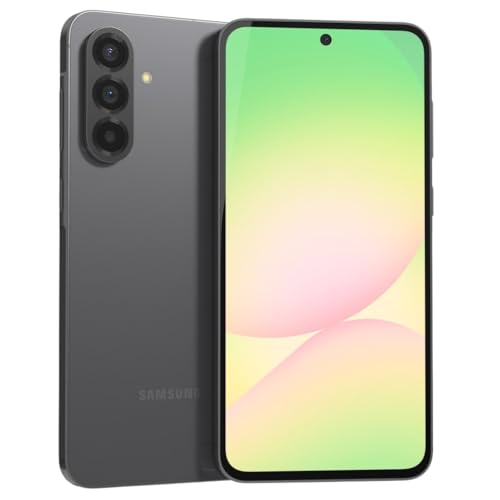
Samsung Galaxy S24 Ultra Cell Phone, 256GB AI Smartphone, Unlocked Android, 200MP, 100x Zoom Cameras, Fast Processor, Long Battery Life, Edge-to-Edge Display, S Pen, US Version, 2024, Titanium Gray — Sold with a published seven-year OS and security update commitment — the current flagship standard this article describes. Check price on Amazon.

OnePlus 12R, 8GB RAM+128GB, Dual-SIM, US Factory Unlocked Android Smartphone, 5500 mAh Battery, 50MP Camera, 80W Fast Charging, 2024, Iron Gray — A value-tier phone from a brand that publishes multi-year update commitments for its number series — proof the policy check matters at every price. Check price on Amazon.
In this guide
Android Phone Update Policy Explained
The Three Kinds of Updates, Decoded. Operating system updates are the big annual Android versions: new features, new design touches, new privacy controls. They arrive once a year and are the number manufacturers advertise loudest. Security updates are the quiet heroes: monthly or quarterly patches that close vulnerabilities discovered in Android and in your phone specific hardware. For your actual safety — banking, messages, accounts — these matter more than any feature release, and a phone can keep receiving them after its big version updates end.
The third kind is the least known: modular updates delivered through the Play Store, which refresh core components like media handling and security modules independently of your manufacturer schedule. They extend every phone useful life a little and are a genuine improvement in how Android ages. When a brand states its policy, look for two numbers — years of OS versions and years of security patches — and the cadence of the patches. Monthly for five years beats quarterly for five years, and both beat a vague promise of regular updates with no number attached.
How the Major Brands Actually Differ
Google Pixel and Samsung flagship lines currently lead the industry, with commitments up to seven years of OS and security updates on recent flagship models — a transformation from the two-to-three-year norm of the last decade. Samsung extends strong promises across much of its Galaxy A mid-range line too, typically four to six years depending on model, which is why the exact model matters more than the brand logo. Google applies its long policy across the Pixel line including the a-series, making its budget models unusually long-lived.
Other brands vary widely. Some value brands have improved to four or five years on their better models; others still ship budget phones with two years of patches and a single OS update, or no written commitment at all. Carrier-sold variants can lag unlocked ones by weeks per update. The pattern to internalize: price alone does not predict support — some inexpensive phones carry excellent policies and some expensive ones disappoint — so the published commitment for the specific model is the only trustworthy source, and it lives on the manufacturer website, not the retailer listing.
Why Updates End at All
It helps to know the legitimate reasons, because they explain the pattern. Every update must be built and tested for each model hardware combination, including its processor — and processor makers themselves support their chips with driver updates for a limited window, historically the binding constraint on phone lifespans. Newer chip designs have lengthened those windows, which is part of how seven-year promises became possible. Carrier testing adds another layer in some markets. None of this excuses two-year abandonment of a costly phone, but it explains why support is a real cost manufacturers weigh — and why a brand that commits in writing, for a specific model, is making a meaningful promise rather than reciting marketing.
There is also a business reason, and naming it keeps you clear-eyed: updates do not sell new phones. The brands leading on policy are using longevity itself as the selling point, betting that trust converts to loyalty. As a buyer, your move is simple — reward that bet. When update policy becomes a reason phones are chosen, every brand policy improves.
How to Check a Phone Real Support Lifespan
Before buying, search the manufacturer site for the model name plus update policy or security update scope; Samsung and Google both publish per-model lists showing which devices get monthly, quarterly, or no patches, and for how long. Add the phone launch date to its promised years — support runs from launch, not from your purchase — so a two-year-old model with a five-year promise has three years left when you buy it. That arithmetic is the most-skipped step in phone buying and the reason a discounted older flagship is sometimes a worse longevity buy than a fresh mid-ranger.
After buying, verify reality: your settings show the current security patch date, and a healthy phone sits within a month or two of the latest. If your patch date falls a season behind with no update offered, check the maker support page for your model — you may have reached the end of the line, or a staged rollout may simply not have reached you. Either way, you will know, and knowing is the difference between a phone that ages on schedule and one that quietly becomes a risk.
Common Misconceptions About Update Policy
Misconception one: updates slow phones down by design. Updates add features and occasionally bugs, but the systematic slowdown story confuses correlation with cause — phones slow mainly from full storage, aging batteries, and heavier modern apps. Misconception two: skipping updates keeps a phone safe and fast. Skipping security patches leaves known, published vulnerabilities open — the riskiest state a phone can be in. Misconception three: all phones from a good brand share its best policy. The flagship promise rarely covers the budget line; per-model checking is not pedantry, it is the whole game.
Misconception four: when updates end, the phone instantly becomes dangerous. Risk grows gradually — patches stop, then app minimum versions creep past you over years. An end-of-support phone is fine as a media player, a kid first device without sensitive accounts, or a backup. It should retire from banking and primary email duty on a planned schedule, not in a panic.
The Two Clocks Every Android Phone Runs On
Every Android phone lives under two separate countdowns, and update policy only makes sense once you separate them. The first clock counts major version upgrades: the annual releases that bring new features and a new number. The second counts security patches: the regular, usually monthly, fixes for vulnerabilities. The clocks run at different speeds, are promised for different lengths, and matter differently. Security patches protect your banking, your messages, and your identity, and they matter more. Version upgrades are pleasant and sometimes bring real improvements, but a phone can skip a version happily while it cannot skip patches safely. When a maker advertises years of support, always ask which clock the number describes — the generous figure usually belongs to security, with versions ending sooner.
Why the distinction is where marketing hides
A promise of many years of updates sounds identical across brands until you read the structure underneath: perhaps several version upgrades and a longer tail of security patches, perhaps patches that slow from monthly to quarterly in the later years. None of this is dishonest if it is published, but it is rarely published loudly. The maker’s support page for the specific model is the authoritative document, and it deserves a read before purchase rather than after disappointment. Two phones at the same price can differ by years of real protection, and this difference never appears on the shelf-edge label.
How Updates Actually Travel to Your Phone
An update’s journey explains its delays. Google releases the new version’s source; the chip maker must support its processors; the phone maker integrates the release with its own interface layer, which for heavily customised interfaces is substantial work; carriers in some markets test and approve; and only then does the update roll out in stages to your specific model and region. Each hand-off adds time, which is why Google’s own phones update first, why lightly customised phones update faster than heavily customised ones, and why the same model can update weeks apart in different countries. Understanding the chain replaces conspiracy theories about deliberate delay with a more useful question: how many hand-offs sit between Google and this phone?
Modular updates: the quiet revolution
Increasingly, important parts of the system update through the app store as modular components, bypassing the whole chain. Security-critical pieces, media components, and privacy infrastructure can now be refreshed on phones whose makers are slow or have stopped entirely. This does not replace full patches, but it meaningfully extends the safe life of older phones and is one reason a phone past its version-upgrade years can remain reasonably protected for a while. It also means two phones on the same version may have different real-world protection, depending on how current their modular components are — another reason the patch date in settings is a guide, not the whole story.
Policies Across the Market, in Plain Terms
At the top of the market, the leading makers now promise long support on flagships — multiple version upgrades and security patches stretching toward the better part of a decade on the newest commitments. Mid-range phones from the same makers receive shorter but respectable promises, and the pattern to learn is that the promise attaches to the model, not the brand. Budget phones, especially from smaller makers, may promise little and deliver less, with patches arriving quarterly or ending early. Carrier-locked variants can lag their unlocked twins. The only safe method is model-specific: find the exact phone’s stated commitment, in the maker’s own words, before money changes hands, and treat a vague answer as a short promise.
What happens when support ends
End of support is not a cliff; the phone keeps working, apps keep running, and nothing dramatic occurs on the day. What changes is risk accumulation: newly discovered vulnerabilities go unpatched, and over months the exposure grows, particularly for a phone used for banking, work, and two-factor codes. App developers also gradually raise their minimum supported versions, so over years some apps will decline to install or update. The sensible end-of-support plan is to demote the phone — retire it from banking and sensitive accounts first, perhaps pass it to light duties — and to replace it on your schedule rather than an emergency’s.
Your Part: Habits That Make Policy Real
A generous policy only protects a phone whose owner installs the updates. Turn on automatic updates, let the phone charge and connect to Wi-Fi overnight, and do not dismiss the update prompt into oblivion — postponement measured in weeks quietly becomes months. Check your patch date a few times a year in settings; it takes twenty seconds and tells you whether the system is working. Before major version upgrades, back up, not because upgrades are dangerous but because the one-in-many hiccup always chooses the unbacked-up phone. If updates seem stuck, a manual check in settings, a restart, and confirming storage space is available resolve most stalls; a phone with nearly full storage cannot stage an update and rarely explains itself clearly.
Buying advice distilled
- Find the exact model’s promise for both version upgrades and security years.
- Value security years above version counts when the two conflict.
- Prefer phones launching on the current version, so the runway starts full.
- Treat an unstated policy as a short policy, whatever the salesperson says.
- Factor support length into price: a phone supported twice as long often costs less per year.
Update policy is the least glamorous specification on the sheet and the one that most determines how long your phone stays safe, useful, and worth what you paid for it. Read it like it matters, because of all the numbers attached to a phone, it is the one still protecting you in year five.
Reading a Policy Like a Contract: A Worked Example
Take a typical flagship promise and translate it into a life. The phone launches in a given year on the current version. Several version upgrades means it will taste several future annual releases — count them forward and you know the last year it will feel current. Security support for a longer span means that after the version upgrades end, patches continue for some years beyond, during which the phone stays safe while feeling gently dated. Now place your purchase date on that timeline honestly: buying the same phone eighteen months after launch buys the same promises minus eighteen months, which is why launch-window and late-cycle prices should not be compared without the timeline between them. This translation — promise into calendar — is the single skill this topic teaches, and it takes ninety seconds per phone.
Quarterly patches and the fine print of later years
Some policies slow patch cadence in the later years, moving from monthly to quarterly delivery. This is a real reduction in protection speed, though far better than none, and it is usually disclosed in the model’s support documentation rather than the launch announcement. A phone in its quarterly years is a phone to begin planning around: still fine for most uses, increasingly worth demoting from the most sensitive duties if you are cautious, and a clear signal that its replacement should be researched at leisure rather than in emergency. Policies, read properly, do not just describe the phone’s past support — they schedule your future decisions, which is a kindness if you let them.
How Policies Differ by Price Tier Within One Brand
The most common misunderstanding in this area is treating a brand’s flagship promise as the brand’s promise. Within a single maker’s range, the flagship may carry a long commitment, the mid-range a moderate one, and the budget line a short and vague one, all sold under the same logo in the same shop. The budget phone is not a scam — it is a different contract at a different price — but the buyer who assumes the headline promise applies down the range will feel deceived in year two, and the feeling will be understandable. The discipline is unglamorous: the model’s own page, the model’s own numbers, every time, whatever the brand’s reputation. Reputation is a prior; the document is the fact.
Carrier variants and regional wrinkles
The same model can live under different update realities depending on where and how it was bought. Carrier-sold variants in some markets pass through carrier testing that delays delivery; phones bought in one region and used in another occasionally wait for their home region’s schedule. Grey imports complicate warranty and update expectations together. None of this is a reason for alarm, but it is a reason to buy the variant intended for your market from a channel that will support it, and to treat an unusually cheap import’s update future as part of its price. The policy, in other words, attaches not just to the model but to the model’s journey to your hand.
What Good Policy Is Worth in Money
Support length converts directly into cost per year, and the conversion is brutal to short-policy phones. A phone supported for twice as long needs to cost less than twice as much to win on annual cost, and flagships with long policies routinely do exactly that against budget phones replaced twice in the same span — before counting the budget phone’s weaker camera, screen, and resale along the way. This does not mean everyone should buy flagships; it means the budget comparison should be made in years, not in shelf prices, and that a mid-range phone with an unusually strong policy is often the mathematical sweet spot of the entire market. Retailers will never present this arithmetic, because it argues against the fastest-selling phones. Do it yourself, on the back of the receipt if necessary.
Environmental arithmetic
Every year of support is a year a phone need not be replaced, and replacement is where a phone’s environmental cost concentrates. Long policies are therefore the greenest specification a phone carries, more consequential than packaging or materials pledges. A buyer who keeps a well-supported phone for its full supported life, then passes it to a lighter second life, has made the most sustainable choice available in this market without sacrificing anything they actually wanted. Policy literacy, pursued for selfish reasons of safety and money, arrives at the public-spirited answer by the same road.
Your Policy Checklist, to Keep
- Before buying: the model’s version-upgrade count and security years, from the maker’s own documentation.
- At purchase: note the launch date, not just your purchase date, in your records.
- Quarterly: glance at the patch date in settings; investigate anything stale.
- At version-upgrade end: no action needed — note that the security clock is now the one that matters.
- At security end: demote the phone from banking and sensitive accounts, and plan replacement at leisure.
- When handing down: only pass on phones with support remaining, or pass them explicitly as light-duty devices.
That is the whole discipline. Update policy sounds like fine print because it is printed finely, but it is the biography of your phone written in advance — how long it will be safe, current, and worth keeping. Read the biography before you buy the phone, and you will never be surprised by its ending.
Update Policy and the Enterprise: What Work Phones Teach Everyone
Employers learned update policy’s importance before consumers did, because a fleet of phones is a fleet of liabilities. Organisations choose models from lists of devices with guaranteed update commitments, enrol them in management systems that can prove each phone’s patch level, and retire devices on the day support ends rather than the day they break. The consumer lessons hidden in that discipline are worth stealing. Buy from the maker’s committed list, not from the bargain shelf, when the phone will hold your money and identity. Be able to state your own phone’s patch level when asked — by your bank’s support line, by your employer’s IT, by yourself. And retire on the support schedule rather than the breakage schedule, because a phone replaced at leisure, with data migrated calmly, costs less in every currency than a phone replaced in emergency. The enterprise world is not being paranoid with your money; it is being experienced with its own.
Security patches in the news: how to read a vulnerability story
When news reports describe a serious phone vulnerability, the useful questions are always the same three. Is my phone’s model affected? Has a patch been issued for it? And has that patch reached my phone — which your patch date answers. Most such stories resolve, for owners of supported phones, into a non-event: the patch arrives, installs overnight, and the vulnerability becomes a historical footnote. For owners of unsupported phones, the same story is a genuine exposure with no remedy except replacement, which is why such stories should be read as reminders about policy rather than as panics about the specific flaw. Flaws are discovered constantly; that is normal and even healthy. What policy decides is whether discovery is followed, on your phone, by repair.
The Human Side: Why People Avoid Updates, and Gentle Counters
Update avoidance has honest roots. People have been burned by an update that rearranged a familiar screen before a busy day, consumed the last of a data allowance, or arrived with a bug that took a week to mend. Makers have responded with kinder mechanics — updates that download quietly on Wi-Fi, install overnight while charging, and can be scheduled — but the reputation lingers. The gentle counter-strategy for a hesitant owner is timing rather than refusal: let the update wait a few days after release while the earliest adopters report, back up before a major version change, install on a calm evening at home on power and Wi-Fi, and give the phone a day to settle before judging it. This rhythm captures nearly all of the safety benefit with nearly none of the drama, and it converts updating from an interruption into a household routine, like locking up at night.
Teaching the policy habit to family
If you are your family’s unofficial support desk, update policy is the highest-leverage thing you can teach, because it prevents the largest number of future phone calls. Show each relative where their patch date lives. Turn on their automatic updates while you are visiting, with their permission. Note, in the family’s shared records, the year each phone’s support ends, so replacements can be planned as birthdays rather than emergencies. And when you next help a relative choose a phone, make the policy part of the gift: the model you recommend should be one whose support outlasts their likely ownership, so the phone you set up once stays safe without your quarterly rescue. Good policy, quietly arranged, is a form of care that keeps working while you are not in the room.
Policy as the Final Specification
Every other specification on a phone describes what it is on the day you buy it. Update policy alone describes what it will remain: how many future versions of its system it will learn, how many years of discovered flaws will be repaired, how long its applications will keep accepting it, how safely it can hold your banking and your identity in year four. Two phones identical in the shop diverge across time exactly along this line, and the divergence is invisible until it is decisive. So read the policy the way you would read the warranty on a roof or the service interval on a car — as the manufacturer’s own written prediction of the product’s useful life, offered to you before purchase, free of charge. The makers who publish long policies are telling you something about their confidence. Believe them, buy accordingly, and let the calendar they promised become the calendar you plan by.
Policy in the Second-Hand Shop: Questions That Protect Buyers
The used-phone market is where update policy converts most directly into money, because it is where the information is scarcest and the consequences longest. A used phone’s remaining support is its remaining life as a safe main device, and it can be checked in two minutes: the model’s launch date, the maker’s promised years, and the patch date on the device itself, which reveals whether its previous owner and its maker between them kept the promise. Sellers price used phones by storage, condition, and camera; almost none price by remaining support, which means the informed buyer can find phones whose support runway makes them bargains and avoid phones whose expired support makes them expensive at any price. Ask the patch-date question in every used purchase, for yourself and for anyone you advise. It is the single highest-value question in the second-hand market, and it costs nothing but the knowing to ask it.
Gifting and policy: the ethics of the hand-me-down
Passing a phone down is an act of generosity with a policy dimension that deserves one honest moment. A phone with support remaining is a gift; a phone without it is a risk transferred, especially to a child or a parent who will trust it with accounts and money precisely because it came from you. The generous options for an unsupported phone are to keep it in light duties yourself — music, photographs offline, a household spare for calls — or to recycle it and gift something supported, even if humbler. Say the support position aloud when you hand any phone over. It takes ten seconds, it is part of the gift’s honesty, and it models for the recipient the habit that will protect their next phone long after this one is forgotten.
The Policy Mindset: Thinking in Years in a Market That Thinks in Launches
The phone market is organised to make you think in launches: this season’s model, this quarter’s promotion, this week’s trade-in bonus. Update policy is the one document in the entire transaction that thinks in years, and adopting its timescale is a small act of independence. Judge the phone by the calendar it will actually live — its supported years, its cost per supported year, its demotion plan when support ends — and the launch theatre loses its power to rush you. Phones bought on the years timescale are kept longer, chosen better, and replaced calmly, and their owners spend less across a decade than the launch-chasers while using better-supported devices the whole time. That is the final secret this unglamorous subject keeps: the fine print, read carefully, is not the boring part of buying a phone. It is the part where the money and the safety were hiding all along.
Policy and the Repair Economy: Supported Phones Are Fixable Phones
An underappreciated consequence of long support is what it does to repair. A phone within its support window is a phone whose parts remain in production, whose repairers stay practised on it, whose software can be reinstalled cleanly after a board-level fix, and whose owner can spend money on a screen or a battery knowing the device has years of safe life to repay the investment. A phone outside support inverts every term: parts thin out, repairers move on, and even a perfect hardware repair resurrects a device that should no longer hold banking credentials. This is why the repair-versus-replace calculation must always begin with the support calendar rather than the repair quote. A modest repair on a phone with three supported years remaining is usually money well spent; the same repair on a phone whose patches ended last spring is money spent postponing a replacement that safety has already scheduled.
Battery replacements and the support horizon
The battery decision makes the point concrete. Replacing a tired battery at the two- or three-year mark is one of the best-value interventions in all of phone ownership — it restores stamina, removes throttling, and can add years of service — provided the support horizon justifies it. Before booking the replacement, check the model’s remaining support: if patches run for several more years, proceed with confidence; if they end within the year, the same money is better held toward the replacement phone, and the old device can be demoted to light duties on its original battery. One settings screen and one support page, consulted in that order, turn an emotional decision about a beloved phone into an arithmetic one — and arithmetic, unlike sentiment, can be checked.
The Promise, Kept in View
Keep your phone’s support end date where you keep other household dates — with the boiler’s service year and the car’s inspection — because it belongs to the same category of knowledge: unglamorous, decisive, and expensive to discover late. When the date approaches, the plan this guide described unfolds without drama: the new phone is researched at leisure, the migration happens on a calm week, the old phone is demoted or passed on honestly, and at no point is a bank account sitting on an unpatched device while its owner panics in a shop queue. That calm is what update policy buys, beyond every patch and version. It buys time used well instead of time spent in emergency — the rarest currency in modern life, available here for the price of reading one document before purchase.
Policy Literacy as a Consumer Skill: Teaching It Onward
Some knowledge is worth deliberately propagating, and update policy is near the top of the list, because its absence costs the people around you real money and real safety in a pattern you can watch repeat: the relative whose bargain phone lost banking access in year two, the friend whose unsupported handset was the doorway for a scam, the colleague replacing a phone in an emergency queue at the worst price of the year. Each of those stories was preventable by one document read at one purchase. So propagate it the way this guide has practised it: not as a lecture, but as a question asked at the right moment — how many years of updates does that one promise? — in the shop, at the kitchen table, in the family chat when a purchase is announced. Questions travel further than lectures. A household, a workplace, a circle of friends in which that question is habitual is a circle in which unsupported phones quietly stop being bought, and that is how a fine-print subject becomes, in the end, a form of looking after people.
The policy card: one more household document
Make the abstraction physical with a policy card, kept with the household documents: each phone in the house, its model, its purchase date, its promised version upgrades, its security support end year, and its planned demotion when that year arrives. Update it at every purchase, glance at it every year, and let it schedule the family’s phone decisions the way a service book schedules a car’s. The card takes ten minutes to start and one minute a year to keep, and it converts the entire subject of this guide from something you once read into something your household simply knows. Knowledge that is written down survives; knowledge that is merely understood evaporates by the next launch event. Write the card.
How to Compare Two Policies in Ninety Seconds, Standing in the Shop
Here is the whole discipline compressed into a shop-floor routine. Open each maker’s support page for the exact models in your hands — not the brand page, the model page. Find two numbers on each: the count of promised version upgrades and the year security support ends. Write both on the back of your hand if you must. Convert the security year into years-from-now, and divide each phone’s true total price by that figure to get its cost per protected year. Then check one soft fact: whether the maker’s recent history shows promises kept on schedule, which any quick search of last year’s owners will tell you. Ninety seconds, two numbers, one division — and you will know more about these phones’ real value than the shelf labels, the launch presentations, and most of the reviews ever printed, because you will know the one thing none of them headline: how long each phone intends to remain itself.
Related Guides
- best android phones under 100
- best controller for android phones
- best keyboard for android phones
- best external hard drive for android phones
- best headset for android phones
- how to fix an android phone that will not turn on
- how to fix android apps crashing
- how to choose an android phone
Frequently Asked Questions
What is the difference between an OS update and a security update?
An OS update is the annual new Android version — features, design, capabilities — arriving once a year. A security update is a smaller patch, monthly or quarterly, closing vulnerabilities without changing how the phone looks. Your phone needs both, but if you had to choose, security patches protect you more. A complete policy states years for each; check both numbers, and the patch cadence, before you buy.
How long should a phone be supported?
For a phone you will keep as your main device with banking and email, five years of security patches is a healthy modern standard, and flagship promises now reach seven. Two to three years — still common on budget models — means the phone becomes a security concern while its hardware is still fine. Match the promise to your replacement habit: if you upgrade every two years anyway, a shorter policy costs you nothing; if you keep phones until they die, policy is your top spec.
Do updates really run from the launch date, not my purchase date?
Yes — a model promised five years of updates from its launch has three years remaining if you buy it two years later, which is exactly the situation with discounted older flagships. That does not make them bad buys; it makes the arithmetic essential. Sometimes the older flagship still wins on remaining support plus hardware. Just do the subtraction before the discount dazzles you.
Why is my phone patch date months behind?
Causes range from staged rollouts — updates release in waves — to carrier approval delays on carrier-sold variants, to your model moving from monthly to quarterly cadence as it ages, which manufacturers do by published schedule. Check for updates manually in settings, then check the maker per-model list to see which cadence your phone is on now. If the list says your model has ended support, that is your answer, and a replacement plan should start forming.
Can I extend support with a custom ROM?
Technically, enthusiast communities maintain software for some popular older phones beyond official support, and for a hobby device that can be rewarding. For your primary phone it trades manufacturer testing for volunteer maintenance, can break banking apps safety checks, and requires real technical confidence. Treat it as a hobbyist path, not a consumer strategy — the consumer strategy is buying a long published policy in the first place.
Do iPhones really get supported longer?
Historically yes — Apple uniform support across models, typically five to six-plus years, set the standard Android chased. The flagship Android lines have now essentially caught up, with seven-year promises matching or exceeding typical iPhone spans. The remaining gap is at the budget end, where cheap Android models still often carry short policies while every iPhone gets the long one. Per-model checking remains the rule on Android; on iPhone, the policy is the same for all.
Where do I find my phone’s exact update policy?
On the maker’s own support documentation for your specific model — not the brand’s marketing page, and not the retailer’s listing. Search the maker’s site for the model name together with the words security updates or software support, and look for the two numbers that matter: how many major version upgrades are promised, and until when security patches will be delivered. If the document is vague, treat the policy as short, because makers advertise generous policies loudly and quiet ones quietly. Write both numbers down with the purchase date; that small record is what turns this guide’s advice from reading into planning.
Do security patches matter more than new Android versions?
Yes, decisively, for the things that matter most. Version upgrades bring features, interface changes, and some genuine improvements to privacy and battery management, and they are worth having. Security patches repair the vulnerabilities that are actively discovered — and occasionally actively exploited — in the software your banking, messages, and identity live inside. A phone can skip a version and lose nothing but novelty; a phone that stops receiving patches accumulates risk month by month with no remedy. When a policy forces you to weigh the two, weigh the patch years first, and let any salesperson who reverses that order know you have read the document they are summarising.
What should I do when my phone’s update support ends?
Demote it in stages rather than discarding it in a panic. It keeps working, so begin by moving the most sensitive duties — banking, primary email recovery, two-factor codes — to a supported device if one exists in the household, and raise your discipline about links and downloads on the old phone, whose defences are now frozen. Then put its replacement on a planned calendar: researched at leisure, bought on a long written promise, migrated on a calm week with the methods elsewhere on this site. The old phone can retire to light duties, a child’s supervised use with its limits understood, or recycling. Support ending is a schedule to manage, and managed on time it costs nothing but a little foresight.