The android vs ios for beginners question sounds like it needs a winner, but for a first smartphone — or a first switch — it really needs a match. Both systems are mature, secure, and capable of everything a beginner actually does: calls, messages, photos, maps, banking, video chats with family. The real differences are about habits and ecosystems: how messages work, how much you can customize, what your family uses, and how long the phone stays supported.
This guide is written for genuine beginners and the people helping them choose. No fan loyalty, no spec wars — just the practical differences you will feel in the first month, a side-by-side table, and a recommendation by situation. If you are buying for a parent or a first-time user, the sections on messaging and support matter more than everything else combined.
Disclosure: As an Amazon Associate, kajuandouglas.com earns from qualifying purchases. Links to Amazon on this page are affiliate links; they cost you nothing extra. Listing details such as price and availability change often, so check the current Amazon listing before you buy.
Quick verdict: choose iOS if your close family and friends mostly use iPhones — messaging, photo sharing, and video calls become effortless — and you want the simplest, most consistent experience. Choose Android if you want more choice of phones and prices, easier file handling, deep customization, or specific features like a headphone jack or expandable storage at lower tiers. Both are safe, capable choices; your circle and your budget should decide.
Gear for This Guide
Two Android reference points at different tiers, plus the charger both ecosystems forgot to include.

OnePlus 12R, 8GB RAM+128GB, Dual-SIM, US Factory Unlocked Android Smartphone, 5500 mAh Battery, 50MP Camera, 80W Fast Charging, 2024, Iron Gray — A beginner-friendly Android reference point: a clean, fast unlocked phone with a big battery and very fast charging, showing how far the sensible-money Android tier has come. Check price on Amazon.

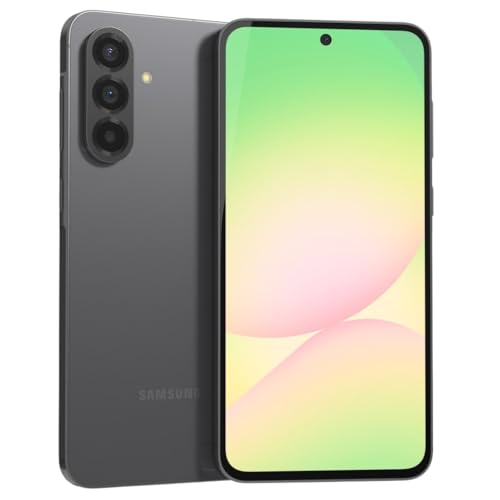
Samsung Galaxy S24 Ultra Cell Phone, 256GB AI Smartphone, Unlocked Android, 200MP, 100x Zoom Cameras, Fast Processor, Long Battery Life, Edge-to-Edge Display, S Pen, US Version, 2024, Titanium Gray — The top of the Android range: if budget is no object and you want every feature plus a stylus for notes, this is the maximal Android experience to compare against a top iPhone. Check price on Amazon.
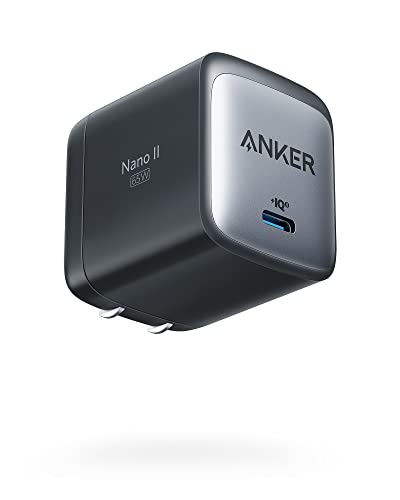
Anker Nano 65W GaN II PPS USB C Charger, Fast Compact Foldable Charger — Both platforms now often ship without a charger; one good USB-C GaN charger covers a new Android or iPhone and simplifies the beginner drawer considerably. Check price on Amazon.
In this guide
Side-by-Side for Beginners
The pattern to notice: iOS wins on sameness, Android wins on choice. Beginners feel both, in different weeks.
| Aspect | Android | iOS (iPhone) |
|---|---|---|
| Getting started | Setup wizard transfers from old Android or iPhone; interface varies slightly by brand | Very consistent setup and interface across all iPhones |
| Messaging | RCS messaging is now standard between Android phones; group chats with iPhones work but with fewer frills | iMessage is seamless between Apple devices; green-bubble chats with Android are more basic |
| Video calls | Google Meet and WhatsApp built around your contacts | FaceTime built in and effortless between Apple devices |
| App store | Google Play Store; can also install apps from other sources, with care | Apple App Store only — simpler and more tightly controlled |
| Customization | Home screens, widgets, default apps, and launchers all changeable | Tidy, consistent layout; customization has grown but stays limited |
| Phone choice | Many brands, sizes, and price tiers, from basic to flagship | Apple only; fewer models, mostly premium pricing, with one smaller budget model line |
| Updates | Varies by brand — flagships from Google and Samsung now promise up to seven years | Long, uniform support — typically five to six-plus years for every model |
| Help from family | Depends what your family uses — screens differ by brand | Any iPhone user can guide you; every iPhone looks alike |
Messaging and Your Circle: The Deciding Factor
Smartphones are communication devices first, and communication is a network effect. If your children, partner, and friends are on iPhones, an iPhone drops you into their world without friction: blue-bubble group chats that just work, photos at full quality, FaceTime one tap away, locations shared in the same app. You will also get better tech support — from them — because your screen looks exactly like theirs.
If your circle is mixed or mostly on Android and WhatsApp, that advantage evaporates. WhatsApp, which much of the world uses as its default messenger, works identically on both systems and makes the platform debate mostly moot. Modern Android-to-Android messaging via RCS has also closed most of the old gap — read receipts, typing indicators, quality photos — so an Android family is just as connected as an Apple one. Match your circle; do not fight it.
Ease of Use: Simple vs Flexible
iOS is the same on every iPhone, which is a genuine kindness to beginners: any tutorial, any grandchild, any store employee can guide you, and the phone you learn on is the phone you upgrade to. Settings live in one place, gestures are uniform, and there are fewer decisions to make — because Apple has made them for you.
Android asks a little more and offers a lot more. You choose your default browser, keyboard, and home-screen layout; you can put big widgets and shortcuts exactly where your thumb wants them; some models offer a simplified easy mode with large icons that is superb for nervous beginners. The variation between brands means a Samsung and a Pixel feel like cousins, not twins — so if a family member will be your help desk, buying the same brand as them is a smart beginner move.
Price, Choice, and Hardware
Android spans every budget: capable entry phones, strong mid-range models, and flagships that match or exceed iPhone prices. That range means a beginner can start modestly, or choose specific hardware — a bigger screen for aging eyes, a headphone jack, a microSD slot for photos, a stylus — that Apple simply does not offer. Cases, chargers, and repairs also tend to be cheaper and more widely available for popular Android models.
iPhone pricing is simpler and steeper, with quality as the compensation: every current iPhone is well built, fast, and supported for years, so there is no bad choice to accidentally make. For a beginner who finds a wall of Android options paralyzing, that curated simplicity is itself a feature. For a beginner on a budget, Android range is not a luxury — it is the whole ballgame.
Privacy, Safety, and Support Longevity
Both systems are secure when kept updated, and both app stores screen apps — Apple more strictly, Google with steadily improving Play Protect scanning. The beginner rules are identical on both: install updates promptly, use a screen lock, download apps only from the official store, and be suspicious of links in messages. Platform choice matters far less than those habits.
On longevity, iPhones receive uniform updates for many years, while Android depends on the brand and model: flagship Google and Samsung phones now promise up to seven years, while cheap Android models may promise two. A beginner keeping a phone for years should either buy an iPhone or an Android model with a long published update commitment — and avoid the bargain Android with no stated policy, which is where the old Android-gets-abandoned stories come from.
Who Each Option Suits
Choose iOS if…
Your close circle is on iPhone and you want messaging, calls, and photo sharing to be thoughtless. You value a consistent interface that never changes between upgrades, you will keep the phone five-plus years, and you are happy letting Apple make most decisions. You are also the person who will ask family for help — and they all have iPhones.
Choose Android if…
Your budget matters or you want hardware choice: screen sizes, price tiers, features like expandable storage or a stylus. Your circle lives on WhatsApp or Android, you like arranging your phone your way, or you want a simplified big-icon easy mode. You are comfortable — or have a helper who is — with a little more variety in exchange for a lot more freedom.
Final Recommendation: Android vs iOS for Beginners
Beginners do not fail with either system; they fail with a phone nobody around them can help with, bought at a price that stings, running software that stops updating. Avoid those three traps and both platforms will serve you beautifully for years. If you remain torn, walk into a store, hold the finalists, and make a call, send a message, and take a photo on each. Ten honest minutes in your own hands outweighs ten hours of comparison articles — including this one.
One last beginner tip that applies to both: whichever you buy, set up the backup and the screen lock on day one, and write your account password down somewhere safe at home. The best platform is the one whose photos and accounts you can never lose.
What the Choice Really Decides for a Beginner
For a first smartphone, or a first switch, the Android-versus-iOS decision is less about capability — both make calls, take good photos, run the essential apps, and navigate you home — and more about the environment your digital life will live in. It decides which app store bills you, which voice assistant answers, which smartwatch pairs fully, how your photos back up, and how easily the people around you can help when you are stuck. That last factor is underrated by experts and decisive in real life: a beginner surrounded by family on one platform inherits free, patient tech support in that platform’s language, and that support network is worth more than any feature comparison.
The help-around-you principle
Ask who will help you at 9 p.m. when something confuses you. If your children, partner, or closest friends all use one system, matching them means your questions get answered in familiar terms, your photo sharing is frictionless, and features like family location sharing and shared albums simply work. If your circle is mixed or you are cheerfully independent, this factor fades and personal preference takes over. Beginners consistently underestimate how much of smartphone happiness is having a person to ask, and overestimate how much is having the theoretically better camera.
Day-to-Day Feel: Guidance Versus Freedom
iOS presents one consistent way of doing things, the same on every iPhone, with settings in predictable places and a gentle learning curve that millions of beginners have successfully climbed. Android offers more freedom — you can change default apps, arrange screens extensively, and choose phones of every size and price — at the cost of more variation between brands, so instructions written for one Android may not match another exactly. For a beginner who values being taught by the device, consistency helps. For a beginner who chafes at being told how to do things, or who has a specific need such as a very large screen at a modest price, Android’s variety is the answer.
Apps, stores, and spending
Every mainstream app exists on both platforms, usually first or simultaneously on both for major services. The stores differ in feel: Apple’s is tightly curated with human review and straightforward refunds; Android’s offers more choice, including alternative sources for the adventurous, which beginners should simply ignore until they are confident. Paid apps and subscriptions bought on one platform do not transfer to the other, so a beginner starting fresh has no sunk cost, while a switcher should inventory their purchases first. Both platforms offer robust free tiers of cloud storage that fill quickly, and both will gently upsell you more; that is a wash.
Privacy, Safety, and Staying Out of Trouble
Both systems are safe for a beginner who follows basic hygiene: install apps only from the official store, keep the system updated, use a screen lock, and be suspicious of messages asking for codes or money. iOS’s tighter curation reduces the chance of a bad app slipping through; Android counters with strong on-device protections and clearer permission prompts than it once had. Scams reach beginners on both platforms overwhelmingly through messages and calls rather than through the operating system, so the safety skill that matters — pausing before acting on an urgent message — is platform-independent. Choose either, then learn that skill, and you are safer than a careless expert on the other system.
Accessibility and growing older with the phone
Both platforms offer excellent accessibility: text scaling, screen reading, hearing-aid support, voice control, and magnification are mature on each. iOS’s consistency can help a beginner with memory difficulties, because everything stays where it was learned. Android’s larger, cheaper large-screen phones can help a beginner with low vision who cannot stretch to a big iPhone. If accessibility is central to your choice, try both in a shop with your specific need in mind — font size at your setting, your hearing aids paired — because that ten-minute test outweighs any review.
Cost of Entry and Cost of Staying
Android’s clearest beginner advantage is range: capable phones exist at prices Apple does not address, and a beginner unsure how much they will even use a smartphone can start gently. Apple’s range starts higher but holds value longer, receives updates for many years, and its smaller line-up makes choosing simpler — a real benefit when choice itself is the stress. Accessories, repairs, and cases are plentiful and comparably priced for popular models of both. Over a four-year ownership, the total costs converge more than the shelf prices suggest, especially if the cheaper phone needs replacing sooner; buy the phone you can afford to keep updated and cased, on either side.
Tablets, watches, and the second-device question
If you already own a tablet, computer, or watch, matching its family smooths everything: photos, messages, and files flow between devices, and skills transfer. A beginner with an iPad should lean iPhone; a beginner delighted with a Windows computer and a Google account will find Android’s services natural. Smartwatches are the sharpest divide — Apple’s watch requires an iPhone, while Android watches pair with Android phones — so a specific watch ambition can make the phone decision for you.
A Beginner’s Decision in Five Questions
- Which system do the people who will help me use?
- Do I already own devices in one family?
- Is my budget below the level where iPhones begin?
- Do I prefer one guided way of doing things, or choices I can grow into?
- Is there a specific watch, app, or accessory that only works on one side?
Answer those honestly and the choice usually makes itself. Then commit without buyer’s remorse: both platforms are mature, secure, and capable, and the beginner who learns their phone deeply — whichever it is — ends up better served than the beginner who switches repeatedly chasing a perfect answer that does not exist.
Stories From the Switch: What Beginners Actually Report
Beginners who move from Android to iPhone most often report relief at uniformity — every tutorial matches their screen — followed by small griefs: a favourite app that costs money again, a file system that will not let them rummage, a charger drawer rendered obsolete by a different connector era. Beginners moving the other way report the mirror image: delight at choice and at a phone that bends to their habits, followed by confusion when a tutorial for a different Android brand does not match their menus. Both groups report the same timeline — awkward for a fortnight, natural within a month, forgotten within a season — which is the most reassuring fact in this entire comparison. The learning curve is real and short, on both sides, and fear of it should never make the decision.
The family-photo-sharing test
One concrete test predicts beginner happiness better than most: how will photos of the grandchildren, the dog, and the holiday actually reach you? If your family shares through one platform’s native albums and messaging, being outside that circle means receiving compressed versions, missed threads, and a faint permanent sense of being on the wrong side of a window. If your family shares through cross-platform apps — as many do — the test dissolves and the choice is free again. Ask your family which apps they actually use before you buy, because the answer is a fact about your life, not about technology, and it outweighs specification comparisons for most beginners.
Learning Resources and Growing Confidence
Both platforms are surrounded by help, but of different shapes. Apple’s help is centralised: the maker’s own lessons, in-store sessions, and a support system designed around one consistent interface, so any answer you find applies to your phone. Android’s help is distributed: the phone maker’s guides, your carrier’s staff, and a vast internet of tutorials that require you to know your brand and interface version to pick the right one. A beginner who enjoys a class and a single source of truth leans Apple. A beginner who is happy searching, or who has a patient family member as a personal help desk, will thrive on either. Confidence, not capability, is the beginner’s real project in the first months, and both systems reward the same behaviours: change one setting at a time, write down what you changed, and keep the phone updated.
Scams, and the beginner’s shield on both platforms
The threats that reach beginners arrive by message and voice, impersonating banks, delivery firms, grandchildren, and officials, and they work identically on both systems because they target the person, not the phone. The shield is behavioural: no legitimate organisation asks for codes, passwords, or urgent gift cards; a message that manufactures panic is lying by design; hanging up and calling the organisation on its published number defeats nearly every script. Both platforms offer call screening and spam filtering of varying strength, and enabling them helps, but the beginner who learns the pause-and-verify habit is safer on either phone than a hasty expert on the other. Choose your platform for living; defend yourself by habit.
The Second Year: What Beginners Grow Into
Beginners do not stay beginners, and the right choice anticipates the second year. On iOS, growth means discovering the depth inside a consistent system — shortcuts, health features, the tablet and computer at home joining the same quiet network. On Android, growth means beginning to use the freedom: changing a default app that annoyed you, automating a routine, choosing a next phone from a wide field with informed eyes. Both growth paths are satisfying; they suit different temperaments in the same way the first-year choice does. The beginner who chose for their temperament rarely regrets; the beginner who chose for a stranger’s ranking sometimes does, which is why this guide keeps returning you to your own life as the authority.
Resale, hand-me-downs, and the family economy
Phones in families flow downhill: a parent’s upgrade becomes a child’s first phone, a spare becomes a grandparent’s upgrade. iPhones hold resale and hand-me-down value strongly and receive updates for many years, making them durable family assets. Android’s wider price range means the hand-me-down may be one of many models, with support lengths varying accordingly — check the specific phone’s remaining update life before passing it to a child, because a phone without security patches is a poor gift for someone who will bank and message on it for years. Either platform, passed down with a fresh battery and an honest setup session, beats a cheap new phone of unknown support, and the family that plans this flow saves money on every cycle.
A Letter to the Beginner Who Is Still Torn
If you have read this far and remain torn, that is information: it means both platforms serve your life adequately, and the remaining difference is taste. Taste is a valid decider. Pick the phone you enjoyed holding, whose screen pleased your eyes, whose shop treated you well, and whose owners in your life can answer your questions. Then stop reading comparisons. The beginner’s real risk was never choosing the wrong platform; it is remaining paralysed between two good ones while an old phone dies unsupported, or buying in a panic without the five questions answered. You have the questions. Answer them, choose, and spend your learning energy on the phone you chose — it will repay you in either language.
The First Month, Week by Week, on Either Platform
Week one is orientation: the beginner learns where things live, makes the first calls, takes the first photographs, and discovers that the phone is less fragile, and they less clumsy, than feared. On iOS this week is eased by uniformity — every guide, video, and grandchild’s instruction matches the screen exactly. On Android it is eased by flexibility — the text can be made larger everywhere, the home screen arranged around exactly five big, familiar icons — provided someone helps with the initial arrangement. Week two is expansion: the first applications beyond the basics, the first video call, the first photograph shared and received with delight. Week three is the first problem — a forgotten password, a confusing prompt, a setting changed by accident — and this is the week the help-around-you principle proves itself, because the beginner with a person to ask recovers in minutes and learns something, while the beginner alone with a search engine may recover in an hour and learn only anxiety. Week four is the quiet miracle: the phone stops being a project and becomes a possession, reached for without thought. Both platforms deliver that week-four feeling reliably. Everything in this guide exists to get the beginner there with the fewest week-three disasters, on whichever system their life pointed to.
The accessories a beginner actually needs
Beginners are sold many accessories and need few: a case that makes the phone grippable and survivable, a screen protector fitted by someone patient, a charger and cable for the room where the phone will sleep, and perhaps a second cable for the car or the handbag. Headphones with a microphone transform video calls and should be considered early if family calls are the phone’s main purpose. Everything else — docks, mounts, styluses, elaborate stands — should wait until the beginner’s habits exist and ask for them by name. This restraint is not frugality for its own sake; every accessory is also a small system to learn, and the beginner’s learning budget in month one is better spent on the phone itself.
Money-Saving Patterns for Beginners on Both Sides
The beginner’s budget is best protected by three habits that work identically on both platforms. First, buy last year’s model or the maker’s value line rather than the flagship, because the beginner’s tasks — calls, messages, photographs, maps, video — are served completely by phones well below the top tier, and the saving funds years of the cloud storage and applications that will actually be used. Second, price the plan separately from the phone and be suspicious of bundles whose monthly figure hides the handset’s true cost across a long contract; a phone bought outright and a modest plan usually total less, and the arithmetic takes minutes. Third, delay every subscription the phone offers in its first week — extra storage, protection plans, premium tiers — until a real need has announced itself, because needs are excellent shoppers and first-week enthusiasm is a terrible one. The platforms differ in many things, but the beginner’s money is defended by the same discipline on both.
Data, Wi-Fi, and not fearing the settings
Beginners often fear the settings application as a place where the phone can be broken. Reassure them with the truth: almost nothing in the ordinary settings can harm the phone, the search box at the top of settings finds any feature by its plain name, and every change can be changed back. The two settings worth teaching in the first lesson are Wi-Fi — join the home network once and the phone remembers it forever, saving mobile data automatically — and the data toggle, so the beginner understands why the internet pauses when they are out and how to restore it. A beginner who has been shown these two doors, and told that exploring is safe, will explore; and a beginner who explores becomes, within a season, the person other beginners ask for help, which is the happiest ending this subject offers.
Health, Safety, and the Phone as a Companion
For many beginners, especially older ones, the phone’s most important features are not in the advertisements. Both platforms can store emergency medical information reachable by first responders from the lock screen. Both can share location with family continuously or on request, turning a walk home into a supervised journey. Both offer fall or crash detection on suitable models, large-text modes, hearing-aid compatibility, and voice assistants that can place a call when hands cannot. Setting these up is a first-week task that families should do together, calmly, as an act of care rather than surveillance — the distinction matters and should be spoken aloud. A beginner whose phone is configured this way owns not just a communication device but a small, patient companion in an emergency, and for many families that, more than any camera, is what the purchase was really for.
When the beginner is ready for more
Confidence announces itself in small ways: the beginner installs an application unprompted, changes a setting and changes it back, teaches the shop assistant something about their own phone’s case. At that point the platform choice recedes entirely and the interesting questions begin — photography, video calls with grandchildren abroad, the family group chat’s running jokes, the podcast discovered by accident. Both systems carry their owners to that point with equal reliability. The beginner who chose by help-around-them, by budget honesty, and by temperament will arrive with the fewest regrets, and will usually report, if asked a year later, that they cannot imagine what all the agonising was about. That report is the correct verdict on the whole comparison.
Grandparents, Children, and the Family Switchboard
In many families the beginner’s phone is not an individual purchase but a node in a family switchboard, and the platform decision echoes accordingly. Grandparents join the platform their grandchildren can support; children’s first phones join the platform whose supervision tools the parents already understand; the family photograph stream flows through whichever service the family’s archivist chose years ago. Recognising this is not a loss of individual freedom but an accurate map of how phones are actually lived with: as endpoints of relationships. The beginner who chooses against the family’s grain for a genuinely personal reason — a beloved application, an accessibility triumph, a budget that only one side respects — should do so with eyes open and a plan for the support they will now source differently. The beginner with no such reason should take the family’s platform and spend their independence on worthier battles. Belonging is a feature. On the spec sheet of a life, it outranks most of the ones printed on the box.
The shared calendar test
One small test reveals whether a family’s platform gravity will matter to you: the shared calendar. Families run on shared calendars — school terms, medical appointments, visits, birthdays — and a phone outside the family’s calendar system experiences that system as friction: invitations that arrive awkwardly, events that must be copied by hand, reminders that live in the wrong application. If your family genuinely shares a calendar, match its platform or confirm, before buying, exactly how your candidate phone joins it. If your family shares nothing and coordinates by telephone and memory, the test dissolves and your choice is free. Small tests like this, drawn from your actual arrangements, are the beginner’s best research tool — more reliable than any review, because they measure your life rather than a reviewer’s.
Confidence Is the Real Product
Look back over this comparison and notice what it has actually been about. Not processors, not cameras, not even price, in the end — but confidence: the beginner’s growing certainty that the phone is theirs, that its surprises are manageable, that help is reachable, that a mistake is reversible. Both platforms manufacture that confidence by different recipes — one by consistency, one by choice — and both succeed for millions of beginners every year. Your task was never to find the objectively superior system, because for a beginner no such thing exists in the abstract. Your task was to find the system whose recipe matches your temperament, your household, and your budget — and then to give it the month it needs to become invisible. Do that, and the great platform question shrinks to its proper size: a decision you made once, well, and rarely think about again.
The Beginner’s Second Phone: How the First Choice Echoes
Nobody warns the beginner that the first phone quietly chooses the second. By the time a replacement is due, the beginner has accumulated applications, photographs in a library, subscriptions, habits, and — most binding of all — competence in one system’s geography. Switching at that point is entirely possible and sometimes wise, but it costs the fortnight of awkwardness again, plus the repurchase of paid applications and the migration of archives. This echo is not an argument for agonising over the first choice; it is an argument for the five questions this guide posed, answered honestly, because they predict satisfaction across both phones, not just the first. It is also a comfort: a beginner who chose reasonably and learned deeply has not been trapped by the echo but served by it, since the second phone in the same family is the easiest purchase in all of technology — familiar on day one, better in every specification, and set up in an evening from the first phone’s backup.
When switching at the second phone is right
Sometimes the echo should be defied: the family has consolidated on the other platform, a needed application or accessibility feature lives only across the divide, the budget’s centre of gravity has moved, or the beginner has simply become an enthusiast whose curiosity is the point. In those cases the migration is a known quantity — an evening for the bulk, a week for the stragglers, the authenticator and banking re-enrolments done by list — and the beginner who survived the first phone’s learning curve will survive the crossing with the confidence of experience. The platforms both provide transfer tools aimed at switchers, and the process improves yearly. Choose the second phone by the same five questions as the first, not by loyalty or by restlessness, and the echo becomes what it should be: a convenience when it serves you, and a door when it does not.
A Beginner’s Blessing, of Sorts
May your first phone be the one your people can help you with. May its battery outlast your longest day and its screen forgive your brightest afternoon. May you learn one setting at a time, write down what you changed, and never be hurried by a message that manufactures panic. May your photographs back themselves up while you sleep, and your questions always find a person before they find a search engine. And may the great platform question, which loomed so large in the shop, shrink in your memory to what it truly was: the first, smallest step toward a device that disappeared into your life and left you, simply, connected. Both roads lead there. Choose yours, and walk it in peace.
The Beginner’s Kit List, Pinned Above the Desk
- People before platforms: choose the system your helpers use, unless your own needs clearly say otherwise.
- Budget honestly: last year’s model, bought outright, usually beats this year’s flagship on a long contract.
- Case it on day one, back it up on day one, and write the passwords’ whereabouts on paper.
- Learn one setting at a time, and remember that almost nothing in settings can break the phone.
- Pause at every urgent message; no real organisation asks for codes or gift cards.
- Set up the emergency information and the family sharing while everyone is calm and together.
Pin that list where the phone charges. It contains, in miniature, the whole of this comparison and the whole of beginner wisdom besides — and a beginner who follows it will be, within a season, the person the next beginner in the family is sent to for help, on whichever platform the family calls home.
Related Guides
- best tracking app for android phones
- best cases for android phones
- best portable charger for android phones
- best android phones under 400
- best antivirus for android phones
- stock android vs one ui
- what is the best android version
- android phone update policy explained
Frequently Asked Questions
Which is easier for a total beginner?
iOS, by a small margin, because it is identical on every iPhone and offers fewer choices to get wrong. Android closes the gap with easy modes on many models that enlarge icons and simplify the home screen — genuinely excellent for nervous users. The real decider is your help network: the easiest phone is the one your family can talk you through over the phone, because they see the same screen.
Can I switch from one to the other later?
Yes, and it gets easier every year. Transfer tools move photos, contacts, and messages in both directions during setup, and your Google or Apple account holds much of your life independently of the phone. What does not move: paid apps, which belong to each store, and platform exclusives like iMessage history niceties or an Apple Watch pairing. An afternoon of setup, not a life sentence, either way.
Which is safer from scams and viruses?
Both are safe when used normally: official store apps, prompt updates, a screen lock, and skepticism toward message links. Most phone scams target the person, not the platform — fake delivery texts and bank calls work on everyone. Android allows installing apps from outside its store, which is a freedom beginners should simply not use. Leave that setting alone and the practical safety difference between the systems is negligible.
Which lasts longer before needing replacement?
Hardware from both lasts years; software support is the limit. iPhones typically receive five to six or more years of updates across every model. Android flagships from Google and Samsung now match that with commitments up to seven years, while budget Android models may stop at two or three. If longevity is your priority, buy an iPhone or a long-commitment Android flagship or mid-ranger — and check the promise for the exact model.
What about tablets, watches, and earbuds?
Each platform has its ecosystem: iPhone pairs best with Apple Watch and AirPods, Android with Galaxy or Pixel watches and a wider sea of earbuds. If you already own and love accessories from one side, that tilts the phone choice. If you are starting fresh, buy the phone first and the accessories later — both ecosystems will happily sell you excellent companions, and cross-platform basics like Bluetooth earbuds work on both.
I am buying for my parent. What matters most?
Three things: the platform their friends and family use, because help and group chats flow from it; a big, bright screen and a simple home screen, which you should set up for them yourself; and long update support, because they will keep it for years. Set up backup, screen lock, and emergency contacts before handing it over, and put your number on the home screen. The best gift is a phone that arrives already calm.
Which platform is easier for a complete beginner?
iOS has the gentler reputation, earned through consistency: one way of doing things, identical on every iPhone, with tutorials that always match your screen and a support system built around that uniformity. Android counters with flexibility that can be arranged for simplicity — larger text everywhere, a home screen reduced to a handful of big icons — and with phones at prices Apple does not address. For most beginners the deciding factor is neither: it is the platform of the people who will help them, because a patient grandchild fluent in your phone’s language is worth more than any interface advantage. Choose the helpers first, and the platform usually chooses itself.
Can I switch platforms later if I choose wrong?
Yes, and millions do — but go in knowing the real costs so the first choice is made with open eyes. Your photographs, contacts, and files can migrate with the makers’ transfer tools in an evening. Paid applications and subscriptions do not transfer between the stores and must be bought or started again. Messaging histories and authenticator enrolments need their own deliberate handling. And there is a fortnight of relearning while the new system’s geography becomes familiar. None of this is prohibitive; all of it is avoidable by answering this guide’s five questions honestly the first time. Choose deliberately now, and the option to switch remains what it should be — a door, not a regret.
How much should a beginner spend on a first smartphone?
Spend for the tasks, not the tier: calls, messages, photographs, maps, and video are served completely by each platform’s value line or last year’s model, and the saving is better spent on the case, the cloud storage, and the years of service ahead. What the budget must not sacrifice is support — a phone whose security updates have years to run — because a beginner’s phone holds banking and identity like anyone else’s. Price the whole ownership, including the plan, and be suspicious of bundles that hide the handset’s cost inside a long contract’s monthly figure. A modest phone, fully supported, confidently learned, is the beginner’s best buy on either platform.