The best video converter for android phones is not an app you download and forget: it is the hardware that turns old video into digital files your phone can actually play. Converter apps on a phone can change a file from one format to another, but they cannot read a VHS tape, a Hi8 cassette, or a camcorder, and that is where most family video still lives. This guide covers six converter devices, from standalone boxes that need no computer to a USB-C capture card that plugs straight into an Android phone, each one checked against current listings with verified product details.
Every converter here turns analog video into digital files, and each one serves a different buyer: a standalone box for a shelf of tapes, a budget box for mostly VHS, a PC kit with editing software, a software suite for a large archive, a high-definition recorder for quality, and a USB-C card for direct phone capture. The six devices cover a range of prices, setups, and connection types, so you can choose by the tapes you own and the way you want the files to reach your phone.
In this guide
Quick picks: best video converter for android phones
| # | Product | Where to buy |
|---|---|---|
| 1 | ClearClick Video to Digital Converter 3.0 | Check on Amazon |
| 2 | ClearClick Video to Digital Converter 2.0 | Check on Amazon |
| 3 | Roxio Easy VHS to DVD 3 Plus | Check on Amazon |
| 4 | VIDBOX Video Conversion Suite | Check on Amazon |
| 5 | Hauppauge 1512 HD-PVR 2 | Check on Amazon |
| 6 | VHS to Digital Converter (USB-A / Type-C) | Check on Amazon |
How the picks were chosen
We started with devices that convert video, because the conversion is the whole point of this guide. A device that only plays video, or only stores it, does not belong here, even if it looks similar on the outside, and we excluded those even when they appeared in the same search results. We also excluded renewed and used listings, since a used converter is a different purchase from a new one, with a different warranty and condition.
Connection to an Android phone came next. A good converter for a phone owner should produce standard digital video files that play on a phone without any special player, and the best ones connect to the phone directly or make the transfer simple. We favored devices whose files copy easily to a phone or a cloud folder, since a converted tape that stays on a computer is no better than a tape on a shelf. The USB-C capture card earned its place because it records straight to the phone.
Finally, we balanced the list by setup, source, and price. The six converters cover standalone boxes, PC kits, software suites, and a direct phone connection, with a mix of budget and premium models, standard-definition and high-definition capture, and different source types, so a buyer can choose by the tapes they own, the computer they have, and the quality they want rather than settling for whatever is available.
Quick comparison
| Product | Standout feature | Best for |
|---|---|---|
| ClearClick Video to Digital Converter 3.0 | Standalone converter that needs no computer | Android phone owners with old tapes who want the simplest conversion |
| ClearClick Video to Digital Converter 2.0 | Budget standalone converter for VHS and camcorder tapes | budget buyers converting VHS and camcorder tapes |
| Roxio Easy VHS to DVD 3 Plus | PC converter with editing software and bonus discs | Android phone owners who want to edit converted tapes on a PC |
| VIDBOX Video Conversion Suite | Software suite for converting video to digital | owners building a digital family video library |
| Hauppauge 1512 HD-PVR 2 | High-definition recorder with digital audio | buyers who want high-definition files for phone viewing |
| VHS to Digital Converter (USB-A / Type-C) | USB-C capture card that plugs into an Android phone | Android phone owners who want a direct phone connection |

ClearClick Video to Digital Converter 3.0 (Third Generation)
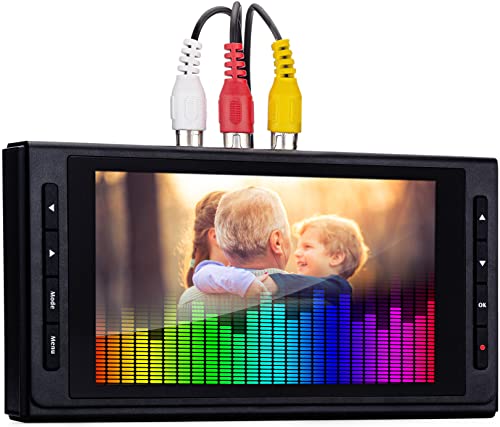
The ClearClick 3.0 is the simplest converter in this guide, because it records video and audio from a VCR, VHS tapes, camcorder, DVD player, or gaming system without needing a computer at all. It takes the analog signal through RCA, AV, or S-Video inputs and writes a digital file, so a box of old tapes becomes files that can be copied to a phone, backed up, or shared with family. The third-generation model adds turntable and cassette support alongside video, which makes it useful for a household with more than one kind of old media.
For an Android phone owner, the workflow is straightforward: convert the tape, copy the file to the phone or a cloud folder, and the video is ready to watch, trim, or share from the phone. The converter needs a working VCR or camcorder and the original tapes, since it records the signal as it plays, so a two-hour tape takes two hours to convert. That is the honest trade of a standalone converter: it asks for patience, and in return it asks for no software setup and no computer.
Key specifications: Third generation, records video and audio from VCR, VHS, AV, RCA, Hi8, camcorder, DVD, turntables, cassette tapes, requires a working VCR or camcorder and tapes
The converter story here is simplicity: no computer, no software install, just a working player and the tapes.
Strengths
- Works without a computer or software install
- Handles video, audio, and cassette sources
- Digital files play on an Android phone after transfer
Trade-offs
- Converts in real time, so long tapes take hours
- Needs a working VCR or camcorder
- No direct phone connection; files move by card or computer
A household with a shelf of old tapes and no interest in computer software will get the most from this converter.
Best for: Android phone owners with old tapes who want the simplest conversion / Not suited for: buyers who need a direct phone connection for capture
Check price on Amazon: ClearClick Video to Digital Converter 3.0
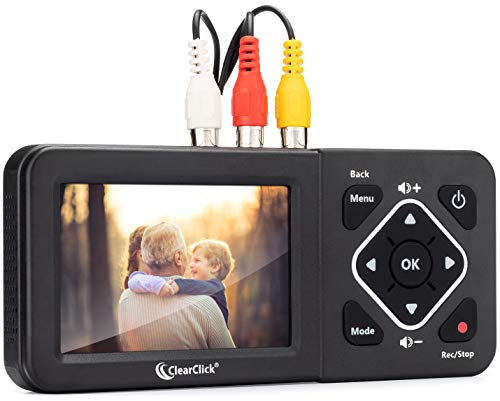
ClearClick Video to Digital Converter 2.0 (Second Generation)
The ClearClick 2.0 is the budget version of the same idea: a standalone box that records video from VHS tapes, AV, RCA, Hi8, camcorders, DVDs, and gaming systems into digital files, without a computer. It covers the same core sources as the 3.0 model at a lower cost, which makes it the right choice when the tape collection is mostly VHS and the extras of the newer model, such as turntable and cassette recording, are not needed. The files it produces play on an Android phone once they are copied over, so the old footage ends up where it can be watched and shared.
The 2.0 model records in real time, like every converter in this guide, so a long tape needs a long session, and it needs a working player and tapes in good condition. Its controls are simple, which suits a buyer who wants to start converting without reading a manual, and its output is a standard digital video file rather than a disc, so there is nothing to finalize or burn. For a first converter, it is the low-risk way to find out how many of the old tapes are still worth saving.
Key specifications: Second generation, records video from VCR, VHS tapes, AV, RCA, Hi8, camcorder, DVD, gaming systems, requires a working VCR or camcorder and tapes
The converter story here is value: the same standalone recording as the newer model, without the extras, at a lower cost.
Strengths
- No computer needed for conversion
- Lower cost than the third-generation model
- Standard digital files play on a phone
Trade-offs
- Fewer source types than the 3.0 model
- Converts in real time
- Needs a working player and tapes
A buyer converting a mostly VHS collection on a budget will find this converter does the job without extras.
Best for: budget buyers converting VHS and camcorder tapes / Not suited for: buyers who also need to convert audio cassettes and records
Check price on Amazon: ClearClick Video to Digital Converter 2.0

Roxio Easy VHS to DVD 3 Plus
The Roxio Easy VHS to DVD 3 Plus is the PC-based converter in this guide, pairing a USB capture device with software that records VHS, Hi8, and V8 video to DVD or to digital files. The software adds editing tools, so a converted tape can be trimmed, titled, and cleaned up before it is saved, which the standalone boxes do not offer. It is the pick for someone who wants to do more than copy tapes: it turns a box of old footage into edited, shareable videos that look cared for rather than simply transferred.
The kit needs a Windows computer and a working VCR or camcorder, and it records in real time, so a long tape still takes a long session. The two bonus DVDs in the listing add blank media for burning finished discs, though most Android phone owners will save the digital files instead and watch them on the phone. The editing step is where this converter earns its place: a shaky, untrimmed transfer can be cut down to the good parts before anyone sees it.
Key specifications: VHS, Hi8, V8 video to DVD or digital converter, Windows disc, Amazon exclusive 2 bonus DVDs, USB 2.0 video capturing device
The converter story here is control: PC software with editing, so converted tapes can be trimmed and titled before sharing.
Strengths
- Editing software trims and titles converted video
- Converts to DVD or digital files
- Bonus DVDs included for burning finished discs
Trade-offs
- Needs a Windows computer
- Converts in real time
- Software setup takes longer than a standalone box
Someone who wants to edit old footage, not just copy it, will get the most from this converter.
Best for: Android phone owners who want to edit converted tapes on a PC / Not suited for: buyers who want a converter that works without a computer
Check price on Amazon: Roxio Easy VHS to DVD 3 Plus

VIDBOX Video Conversion Suite
The VIDBOX Video Conversion Suite is the software-led converter in this guide, built for owners who want their converted video in a tidy digital library rather than on discs. It takes video from VHS and other analog sources and converts it to digital files that can be organized, named, and stored, ready to copy to an Android phone or a cloud folder. The suite approach suits a buyer with a large collection, because the workflow is designed for converting tape after tape in an orderly way, with the files ending up in one place.
The suite needs a computer and a capture device to bring the analog signal in, and it records in real time, so the total time depends on the size of the collection. Its strength is what happens after the recording: the files are standard digital video, so they play on a phone, a tablet, or a TV without any special player, and they can be backed up like any other files. For a family archive project, that matters more than speed, since the goal is footage that survives the next decade.
Key specifications: Video conversion suite, converts video to digital files
The converter story here is the library: software that turns a tape collection into organized digital files for a phone.
Strengths
- Converts video into standard digital files
- Files play on phones, tablets, and TVs
- Suited to converting a large collection in order
Trade-offs
- Needs a computer and a capture device
- Converts in real time
- No standalone recording without a PC
A buyer with a large tape collection who wants organized digital files will suit this suite best.
Best for: owners building a digital family video library / Not suited for: buyers who want a standalone box with no computer
Check price on Amazon: VIDBOX Video Conversion Suite
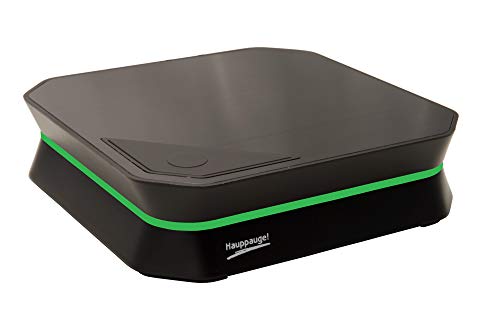
Hauppauge 1512 HD-PVR 2 High Definition Personal Video Recorder
The Hauppauge HD-PVR 2 is the high-definition recorder in this guide, capturing video in high definition with digital audio through SPDIF and an IR blaster for controlling the source device. It is built for owners who care about quality: where the other converters record standard-definition analog video, the HD-PVR 2 is designed for high-definition sources, so the files it produces look better on a modern phone screen. It is the pick for converting newer analog and component sources, or for recording live TV and set-top box output to digital files.
The recorder needs a computer and a compatible source, and its setup is more involved than a standalone box, with drivers and software to install. The IR blaster lets it change channels on a set-top box by itself, which suits scheduled recording, and the digital audio input keeps the sound clean. For an Android phone owner, the payoff is high-definition files that play well on a phone screen, rather than soft standard-definition transfers that look dated on a modern display.
Key specifications: High definition personal video recorder, digital audio (SPDIF), IR blaster technology
The converter story here is quality: high-definition capture with digital audio, for files that look good on a phone screen.
Strengths
- High-definition capture, not standard definition
- Digital audio input keeps sound clean
- IR blaster controls the source device
Trade-offs
- Needs a computer and setup
- More involved than a standalone box
- Overkill for old VHS-only collections
An owner converting high-definition sources who cares about picture quality will get the most from this recorder.
Best for: buyers who want high-definition files for phone viewing / Not suited for: buyers who only have old VHS tapes to convert
Check price on Amazon: Hauppauge 1512 HD-PVR 2

VHS to Digital Converter, 3.3ft USB Video Capture Card USB-A/Type-C 2-in-1
This USB video capture card is the only converter in this guide that connects directly to an Android phone, thanks to its USB-A and Type-C 2-in-1 connector. It takes RCA, AV, or S-Video from a VCR, DVD player, Hi8 camcorder, or similar source and turns it into a USB video signal, and with a compatible capture app on the phone it can record that signal straight to the phone storage. That direct connection is the point: there is no computer in the middle, and the converted file lands on the phone as soon as it is recorded.
The 3.3-foot cable gives room to place the phone near the player, and the card works with Windows and Mac as well, so the same device can capture to a computer when a bigger screen is useful. It records in real time, like every converter here, and it needs a working player and tapes, plus a capture app on the phone that supports USB video input. For an Android phone owner, it is the most direct route from an old tape to a file on the phone, and the most portable converter in this guide.
Key specifications: 3.3ft USB video capture card, USB-A and Type-C 2-in-1, RCA AV S-Video to USB converter, converts VHS VCR DVD Hi8 camcorder analog to digital, compatible with Windows and Mac
The converter story here is the direct connection: a USB-C capture card that plugs into an Android phone and records to it.
Strengths
- USB-C connector plugs directly into an Android phone
- No computer needed for capture
- Also works with Windows and Mac computers
Trade-offs
- Needs a capture app that supports USB video input
- Converts in real time
- Phone storage fills quickly with long recordings
An Android phone owner who wants to capture old tapes straight to the phone will find this the most direct converter here.
Best for: Android phone owners who want a direct phone connection / Not suited for: buyers who want a standalone box with no phone or computer setup
Check price on Amazon: VHS to Digital Converter (USB-A / Type-C)
Best video converter for android phones: what matters most
The source type is the first thing to confirm, because it decides whether a converter can read your tapes at all. VHS tapes need a VCR with RCA or S-Video output, Hi8 tapes need a Hi8 camcorder or player, and newer sources may need component or HDMI inputs instead. Check the inputs on the converter against the outputs on your player before buying, since a converter with the wrong inputs cannot help you, no matter how good its software is. A converter that lists your exact source type is the safe choice.
Standalone or PC-based is the next decision. A standalone converter records without a computer, which suits a buyer who wants to start converting without installing software, while a PC-based converter adds editing tools and a bigger screen for trimming and organizing. If you plan to edit the footage, a PC kit is worth the setup, while a buyer who just wants the files will finish faster with a standalone box. Decide by how much editing you will actually do, not by the feature list.
Output format decides what happens after the conversion. A converter that writes standard digital video files gives you files that play on an Android phone, a tablet, a TV, or a computer without conversion, while a converter that only burns discs leaves you with a disc that still needs ripping. Check what the converter produces before buying, and favor standard digital files, since they are the easiest to copy, back up, and share from a phone.
Real-time recording is the honest reality of every converter in this guide. A two-hour tape takes two hours to convert, because the converter records the signal as it plays, and there is no way to speed that up. Plan for it: convert in batches, start with the tapes that matter most, and check the first recording before converting the whole collection. A converter that promises faster-than-real-time conversion of analog tapes is promising something the physics does not allow.
The phone connection rounds out the decision. A USB-C capture card can record straight to an Android phone with a compatible capture app, while other converters need a computer or a memory card in between. Check whether your phone supports USB video input and whether a capture app is available for it, since the direct connection only works when both are in place. If the phone connection is not supported, the files can still move by card or computer, so it is a convenience rather than a requirement.
Buying guide: choosing video converter for Android phones
Start with the tapes, because the converter you need depends on what you own. A collection of VHS tapes needs a VCR and a converter with RCA or S-Video inputs, while a Hi8 collection needs a working Hi8 camcorder, and a mix of sources needs a converter that handles several input types. Count the tapes and check the players still work before buying a converter, since a converter cannot fix a dead player or a damaged tape.
Check the player before buying. A VCR or camcorder that has sat in a cupboard for years may need cleaning, a new belt, or a service before it plays well, and a tape that sticks or sheds will damage both the tape and the player. Play one tape end to end before converting the collection, and clean the player heads if the picture is snowy or the sound is muffled. A converter is only as good as the signal it receives.
Storage is the next check. Digital video files are large, and a long tape can produce a file of several gigabytes, so a phone with little free space will fill up quickly. Check the free storage on the phone or computer before converting, and plan to move finished files to a cloud folder or an external drive. A converter that writes to a memory card is convenient, but the card still needs emptying before the next batch.
Software support is easy to overlook and hard to fix later. A PC-based converter that needs drivers may not work with a newer operating system, so check the software requirements for the exact model, and favor converters whose software is still updated. A standalone converter avoids the issue entirely, since it has no software to go out of date, which is one reason the standalone boxes are popular.
Finally, check the seller and the listing details before paying. Confirm the exact model name, including the generation, since one number can mean a different converter: the ClearClick 2.0 and 3.0 are different models with different source lists. A listing that says renewed or used is a different purchase from a new converter, and the warranty and condition are different too. Buy from a listing that names the exact model you want, and keep the box and receipt in case the converter needs warranty service.
Using and caring for your video converter for Android phones
Set the converter up carefully on the first day. Connect the player to the converter with the right cables, check the input is selected correctly, and record a short test clip before converting a full tape. Play the test file on your Android phone to confirm the picture and sound are good, and check that the file format plays without any extra app. A short test saves hours of converting tapes that turn out to have a loose cable or a wrong input.
Keep the tapes and the player in good condition while you convert. Store tapes upright in a cool, dry place, and rewind each tape before playing it, since a tape that has sat for years can stick. Clean the player heads if the picture degrades, and stop immediately if a tape squeals or sticks, since forcing it can damage both the tape and the player. Convert the most important tapes first, in case a tape fails partway through the collection.
Look after the converted files and they will look after you. Copy finished files to a cloud folder or an external drive as soon as they are done, and keep two copies of anything irreplaceable, since a single phone or card can fail. Name the files clearly with a date and a description, so the footage can be found again in a year, and back up the original tapes too if you have space, since the digital file is a copy, not a replacement for the original.
Protect the converter and your data. Use the cables that came with it, keep the software updated if it is a PC model, and only install capture apps from the official store. Keep the converter in a dry place, and coil cables loosely rather than bending them sharply. A converter is a simple device, but a damaged cable or a lost driver disc can stop a whole project.
Common mistakes to avoid
The most common mistake is buying a converter without checking the player. A converter cannot read a tape by itself: it needs a working VCR, camcorder, or player, and a player that has not been used for years may not work at all. Check the player first, play a tape through it, and only then buy the converter that matches its outputs.
Another common mistake is ignoring the input types. A converter with only RCA inputs cannot take a signal from a player with only S-Video or HDMI, and an adapter will not fix a missing input. Check the inputs on the converter against the outputs on your player, and buy the converter that lists your exact connection, rather than hoping an adapter will sort it out.
A third mistake is converting everything before checking anything. A loose cable, a wrong input, or a dirty player head can produce hours of unusable video, and the time cannot be recovered. Record a short test clip first, check it on the phone, and only then convert the collection. The test takes five minutes and saves hours.
Finally, do not forget storage. A phone with little free space will stop recording partway through a long tape, and a full memory card will do the same. Check the free space before each session, and move finished files off the phone or card before starting the next tape. A converter is only useful when there is somewhere for the files to go.
Budget and value
A budget converter makes the most sense when the collection is mostly VHS and the buyer wants the files without editing or fuss. Pair it with a working VCR and a memory card or a cloud folder, and the result is a set of digital files that play on the phone for far less than a premium kit. The money saved can go to a replacement VCR belt or a larger memory card, which affect the project more than a faster converter.
Spending more on a PC kit or a high-definition recorder buys editing tools and better quality, which is worth it if the footage matters and the buyer wants to trim, title, and clean it up before sharing. The jump from a standalone box to a PC kit is the best value step for an archive project, since it brings the tools most owners actually use. Spending more than that buys refinements rather than big changes, so choose by the tapes you own, the computer you have, and the quality you want, not by the specification sheet alone.
Final recommendation
For most Android phone owners, the ClearClick Video to Digital Converter 3.0 is the best all-round choice among the best video converter for android phones: it records without a computer, handles video and audio sources, and produces files that play on the phone. If the budget is tight, the ClearClick 2.0 covers the same VHS and camcorder sources for less. If the phone connection matters most, the USB-C capture card records straight to the phone. Any of the six converters here will turn old tapes into digital files, so choose by the tapes you own, the setup you prefer, and the quality you want, and test one tape before converting the collection.
Frequently asked questions
What is the best video converter for Android phones?
The best converter depends on your tapes and setup. A standalone box like the ClearClick 3.0 converts without a computer, a PC kit like Roxio adds editing, and a USB-C capture card records straight to an Android phone. Choose by the tapes you own and whether you want to edit the footage.
Can I convert VHS tapes directly to my Android phone?
Yes, with the right hardware. A USB-C capture card plugs into an Android phone and records to it with a compatible capture app. Other converters record to a computer or a memory card, and the files are then copied to the phone.
How long does it take to convert a VHS tape?
Conversion happens in real time, so a two-hour tape takes two hours to convert. The converter records the signal as the tape plays, and there is no way to speed that up. Plan to convert in batches, starting with the tapes that matter most.
Do I need a VCR to convert VHS tapes?
Yes. A converter records the signal from a player, so it needs a working VCR, camcorder, or DVD player, plus the original tapes. Check that the player works before buying a converter, and clean it if the picture is poor.
What file format do video converters produce?
Most converters in this guide produce standard digital video files that play on an Android phone, a tablet, a TV, or a computer without any special player. Check the output format for the exact model, and favor standard files, since they are the easiest to copy, back up, and share.
Standalone boxes vs PC kits: choosing a converter type
A standalone converter is the simplest option, recording video without a computer or software install. It suits a buyer who wants to start converting quickly and does not plan to edit the footage, and it avoids the driver and compatibility issues that can affect PC kits. The trade-off is control: the files are what the converter records, with no trimming or titling until they are opened in an editor on the phone or computer.
A PC kit adds editing software, so converted footage can be trimmed, titled, and cleaned up before it is saved. It suits a buyer building an archive who wants the finished videos to look cared for, and it works best when the buyer already has a Windows computer and is comfortable installing software. The trade-off is setup: drivers, updates, and operating system compatibility all need checking, and a kit that worked years ago may not work on a new computer.
A USB-C capture card is the middle ground, recording straight to an Android phone with no computer and no standalone box. It suits a buyer who wants the files on the phone immediately and is comfortable using a capture app, and it is the most portable option here. The trade-off is dependence on the phone: the capture app must support USB video input, and the phone storage must have room for the files.
Matching a converter to your tape collection
A collection should decide the converter, because the tapes you own matter more than the features on the box. A shelf of VHS tapes needs a VCR and a converter with RCA or S-Video inputs, while a Hi8 collection needs a working camcorder, and a mixed collection needs a converter that handles several input types. Count the tapes and check the players before buying, since a converter cannot help with a tape whose player no longer works.
Quality is a good example. A buyer converting home movies to share with family will be happy with a standard-definition transfer from a standalone box, since the footage itself matters more than the resolution. A buyer converting footage to watch on a large TV or a modern phone screen may notice the softness of standard definition and prefer a high-definition recorder. Choose by where the finished files will be watched, not by the specification sheet.
Volume adds another layer. A buyer with a handful of tapes can convert them in a weekend with any converter here, while a buyer with hundreds of tapes needs a workflow that can run for weeks: a reliable player, a converter that can run unattended, and a storage plan for the finished files. Check the storage before starting, and convert the most important tapes first, since a large project can stall if the files have nowhere to go.
More guides from KajuanDouglas
Best Video Cameras Under 100 Best Cameras for 4K Video Under 1000 Best Laptops for Video Editing Under 1000