As an Amazon Associate, this site may earn an affiliate commission from qualifying purchases made through links in this article, at no extra cost to you.
There is a particular kind of PC owner who lands on this page, and it is probably you: your LGA1151 machine still does everything you ask of it, the DDR4 in it was paid for years ago, and the only thing standing between you and another three or four good years of service is heat. Maybe the stock Intel cooler that came in a drawer with your processor has started to whine under loads it once handled quietly. Maybe you moved from a locked Core i5 to a used i7-8700K or i9-9900K — the two chips that turned this socket into a genuinely demanding platform — and discovered that the cooler which kept a 65-watt part polite cannot keep a 95-watt eight-core processor honest. Or maybe your all-in-one liquid cooler is old enough that its pump has begun to tick, and you are shopping for a replacement before it fails on a hot afternoon.
Whatever brought you here, the buying logic for an 1151 cooler in this era is different from the logic behind a cooler for a brand-new build. You are not speccing a dream machine. You are making a targeted, value-conscious upgrade to a platform with a fixed ceiling, and the right question is never “what is the strongest cooler money can buy?” It is “what is the strongest cooler that makes sense bolted to a motherboard I already own, inside a case I already own, cooling a chip whose limits I already know?” Overspending is a real failure mode here: a flagship cooler that costs a large fraction of what your CPU and board are worth on the used market buys you degrees you may never use. Underspending is the other failure mode, because a 9900K throttled by a weak cooler is just an expensive 8700K with worse manners.
This guide is written for that balancing act. The six coolers below were chosen because each one answers a real version of the 1151 upgrade question: the big dual-tower for the person squeezing a 9900K, the quiet tower for the person whose PC lives in a bedroom or studio, the budget tower that rescues a locked i5 or i7 from stock-cooler noise, the compact option for older mid-towers with limited clearance, the 240mm liquid cooler for cases with a free radiator mount and a chip that earns it, and the value dual-tower that has embarrassed coolers twice its price. Every pick mounts to LGA1151 with hardware in the box or a well-established mounting kit, and every pick is assessed the way an upgrader should assess it — against the actual thermal character of the 8700K, the 9900K, and the locked chips beneath them.
In this guide
Quick picks: best 1151 cpu coolers
| # | Product | Where to buy |
|---|---|---|
| 1 | Noctua NH-D15 | Check on Amazon |
| 2 | Thermalright Peerless Assassin 120 SE | Check on Amazon |
| 3 | be quiet! Dark Rock Pro 4 | Check on Amazon |
| 4 | Cooler Master Hyper 212 Black Edition | Check on Amazon |
| 5 | Noctua NH-U12S redux | Check on Amazon |
What to look for in a cooler for an LGA1151 build
Start with the chip you actually have, not the socket’s reputation
LGA1151 spans an enormous thermal range, and treating it as one category is the most common shopping mistake. At one end sit the locked 65-watt parts — the i5-8400, i5-9400, i7-8700 and i7-9700 — which run cool, cannot be overclocked, and ask very little of a cooler beyond silence. In the middle sits the i7-8700K, a six-core chip that boosts aggressively, responds well to cooling headroom, and was famous in its day for running hot under all-core loads because of the thermal paste Intel used between its die and heat spreader. At the far end sits the i9-9900K and its 9900KF and 9900KS siblings: eight cores, high boost clocks, soldered heat spreader, and a genuine appetite for power when a motherboard lets it draw past its nominal limits. A cooler that is perfect for the first group is a decoration on the third. Before you compare a single fin stack, write down your exact processor and be honest about whether you run it stock, with motherboard multi-core enhancement enabled, or with a manual overclock, because those three settings can describe three different cooling problems wearing the same socket.
Air versus liquid on a platform this age
On a new build, the air-versus-liquid debate is mostly about aesthetics and case layout. On an 1151 upgrade, it is about risk and arithmetic. A good air cooler has no pump to wear out, no coolant to slowly permeate through tubing, and no failure mode worse than a fan bearing going rough after many years — and a fan is a cheap, ten-minute replacement. That matters when the machine you are cooling is already five to eight years old and you want the cooler to outlast the platform without becoming a maintenance project. Liquid cooling earns its place in exactly two 1151 scenarios: your case cannot fit a tall tower but has a 240mm radiator mount, or you run a 9900K hard enough — sustained all-core rendering, streaming while gaming, heavy compile work — that a big radiator’s thermal mass genuinely smooths out long loads. If neither describes you, air is the rational default, and the dual-tower air coolers in this guide will match or beat modest liquid coolers at lower cost and with zero pump noise at idle.
Clearance is the specification that decides everything
More 1151 cooler purchases fail on millimetres than on performance. Measure three things before you fall in love with any pick. First, CPU cooler height clearance in your case: older mid-towers from this platform’s era often allow around 160mm, which admits most big towers but not all, and a cooler that touches the side panel is a cooler you return. Second, RAM clearance: tall dual-tower coolers overhang the memory slots, and the chunky RGB memory kits popular in 1151-era builds can collide with a front fan unless the fan can slide up its rails — which then adds height you may not have. Third, for liquid, radiator placement: a 240mm radiator needs a mount with room not just for the radiator but for its fans and for the tubing to bend without kinking, and top-mounting it as exhaust is almost always the better arrangement for CPU temperatures on this platform. Ten minutes with a tape measure, or the clearance figures in your case manual, will save you a return label.
Mounting hardware and the second-hand trap
Every cooler in this guide supports LGA1151, but the details matter if you are buying used — a tempting route for a platform of this vintage. Air coolers mount with a backplate and brackets specific to Intel’s 115x hole spacing, which is shared across LGA1150, 1151, 1155 and 1156, so mounting kits are interchangeable across that whole family. When buying second-hand, confirm the Intel backplate, the correct standoffs and the mounting bars are all in the box, because a cooler missing its Intel hardware is a paperweight until you source a kit. Also check the cold plate or heat-pipe base for deep scratches and confirm the fan clips are present; bent clips are a common casualty of careless removal. New purchases avoid all of this, and for the budget picks especially, the price gap between new and used is small enough that new is usually the smarter buy.
Noise is a system, not a cooler specification
People upgrading an old 1151 machine often describe their goal as “quieter,” then buy a cooler and discover the noise moved rather than left. A cooler’s fans are only one source. Case fans starved of intake air, a graphics card working harder because CPU temperatures no longer throttle the system, and a hard drive’s seek noise suddenly audible in a quieter room all enter the picture. The practical approach: choose a cooler whose fans are known for smooth bearings and low starting speeds, then spend twenty minutes in your BIOS setting a fan curve that keeps the CPU fan near-silent below the temperatures your chip reaches in desktop work, rising decisively only under real load. LGA1151-era motherboards from ASUS, MSI, Gigabyte and ASRock all offer per-header fan curves, and that free tuning step is worth more decibels than the gap between the quietest and loudest coolers in this guide.
Thermal paste, mounting pressure and the delidding question
Because the 8700K used ordinary thermal paste under its heat spreader, the internet filled with delidding guides, and some upgraders assume exotic measures are required. They are not, for most people. A correctly mounted quality cooler with fresh paste will keep an 8700K at stock or mildly tuned settings in safe territory; delidding is an enthusiast hobby with real risks to a chip that is no longer replaceable at retail, not a prerequisite for a healthy machine. What is worth your attention is the boring part: clean the old paste from both surfaces with isopropyl alcohol until they are spotless, apply a pea-sized amount of fresh paste, tighten the mounting screws in alternating quarter-turns so pressure spreads evenly, and confirm the cooler does not rock when you press its corners. Uneven mounting pressure costs more degrees on this platform than the difference between good and great thermal paste ever will.
Fan control on 1151-era boards: PWM, DC and old headers
One detail catches upgraders out on this platform: fan control standards were in transition during the LGA1151 years, and not every header on every board behaves the same way. Most 1151 motherboards offer a mix of four-pin PWM headers and, on some models, headers that can be switched between PWM and DC voltage control in the BIOS. Every cooler in this guide uses four-pin PWM fans, which will run on any of these headers, but the control mode matters: a PWM fan plugged into a header left in DC mode, or a three-pin fan on a PWM header, can end up running at full speed or refusing to drop to its quietest range. When your new cooler sounds louder than expected at idle, the header mode is the first thing to check. The second is the low-speed limit: big, slow fans like those on the dual-towers are happiest idling at a few hundred RPM, so set your curve’s floor accordingly and disable any BIOS warning that complains the CPU fan is turning suspiciously slowly — on a well-cooled 1151 build, slow is the point.
Which tier does your processor actually need?
If you only read one section before buying, make it this one, because the 1151 family splits cleanly into three cooling tiers and buying for the wrong tier is the only real mistake available to you. The first tier is the locked 65-watt chips — Core i5-8400, i5-9400 and 9400F, i7-8700 and i7-9700. These processors cannot overclock, their boost behaviour is modest, and their cooling problem is acoustic rather than thermal. The Hyper 212 Black Edition solves it completely; the NH-U12S redux solves it more quietly and with better hardware. Anything larger is comfort, not necessity.
The second tier is the i7-8700K and 9700K, the enthusiast heart of the platform. These chips reward cooling headroom with sustained boost clocks, and their owners are the people most likely to have multi-core enhancement enabled or a mild overclock dialled in years ago and forgotten. They deserve a real cooler: the NH-U12S redux at stock settings, and any of the dual-towers — Peerless Assassin, Dark Rock Pro 4, NH-D15 — if the chip is tuned or the case airflow is poor. The third tier is the i9-9900K family, including the 9900KF and the binned 9900KS. Eight cores on this process node produce heat on a different scale, particularly with power limits removed, and this tier is where the NH-D15, the Peerless Assassin at full song, and the 240mm H100i justify themselves. Fitting a budget single-tower to a 9900K does not damage anything — the chip will simply throttle itself down to whatever the cooler allows, which means you paid for performance you have chosen not to use.
There is also a fourth, quieter consideration that cuts across all three tiers: how long the machine runs under load each day. A 9900K that games for two hours in the evening asks less of its cooler, in total wear and in sustained thermal soak, than an 8700K that renders, compiles or folds for ten hours a day in a home office. Sustained-load machines should buy one tier up from the minimum, because fin stacks, fans and — especially — liquid pumps age in proportion to the hours they spend working hard. Occasional-load machines can buy exactly to their tier with a clear conscience.
The six coolers worth your money
Noctua NH-D15: the ceiling for air cooling a 9900K
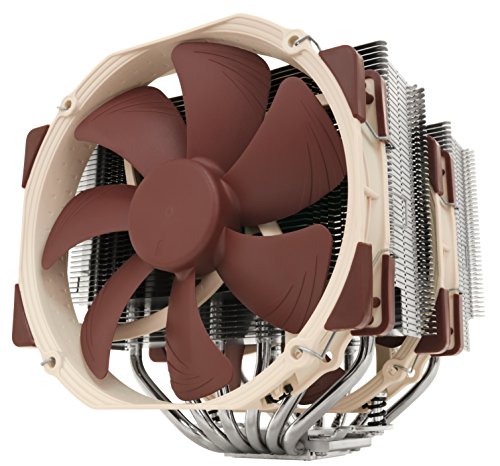
If your 1151 build carries an i9-9900K that you actually push — all-core workloads, long gaming sessions in a warm room, multi-core enhancement switched on — the NH-D15 is the air cooler that ends the conversation. It is a dual-tower, dual-fan design with six heat pipes feeding two fin stacks, and its reputation was built on exactly the class of hot, dense Intel chips this socket produced at its peak. On an 8700K it is frankly more cooler than the chip requires, which is another way of saying it will run that chip quietly at fan speeds you will struggle to hear. On a 9900K it is one of the very few air coolers that can hold sustained all-core loads without the fans ever needing to work hard, and that headroom is what you are paying for: not lower temperatures for their own sake, but the ability to get those temperatures at low noise, year after year, with nothing to service but dust.
Strengths. The cooling capacity is the headline, but the mounting system deserves equal praise on an older platform: Noctua’s SecuFirm2 hardware is all-metal, precisely machined, and makes even, repeatable mounting pressure easy to achieve, which matters on chips where a sloppy mount costs real degrees. The two NF-A15 fans are smooth, long-lived and happy at very low speeds. Support is the quiet superpower here — Noctua’s habit of providing mounting kits for new sockets means this cooler can follow you to a future platform, which changes the value calculation entirely for an upgrader: bought for an 1151 machine today, it may be the only part of the build still in service two platforms from now.
Trade-offs. It is enormous, and it will not fit every 1151-era case: check height clearance and accept that the front fan may need to sit high over tall memory, adding still more height. It is also the most expensive air cooler in this guide, and on a locked i5 or i7 it is money spent cooling a chip that never asked the question. The colour scheme remains a matter of taste, though a chromax.black version exists for those who care.
Who it suits. The 9900K or 9900KS owner who intends to keep the platform for years and wants the cooling question permanently closed, and the 8700K owner who values silence as much as temperature and likes the idea of the cooler outliving the build. For current pricing and the exact variant that suits your case, check price on Amazon.
Check price on Amazon: Noctua NH-D15

Thermalright Peerless Assassin 120 SE: flagship cooling, upgrader pricing
The Peerless Assassin 120 SE is the pick that makes the NH-D15 nervous. It follows the same formula — dual towers, six heat pipes, two 120mm fans — and delivers cooling within a whisker of the best air coolers ever made, at a price that respects the economics of upgrading an older platform. That pricing is precisely why it belongs in this guide: the whole point of keeping an LGA1151 machine alive is value, and a cooler that performs like a flagship while costing like a budget part is the most on-brief product in this roundup. On an 8700K it has headroom to spare; on a 9900K at sensible settings it holds its own against coolers with far bigger names and far bigger invoices, and it does so without liquid, pumps or any of the long-term question marks an older machine does not need.
Strengths. Raw thermal performance per unit of money is unmatched in this guide, full stop. The dual-tower layout spreads heat across a large fin area so the fans can turn slowly, and the included pair of fans are competent, reasonably quiet units rather than the afterthoughts budget coolers often ship with. At 155mm tall it is meaningfully easier to fit into 1151-era mid-towers than the tallest dual-towers, which removes the most common obstacle between an upgrader and this class of cooler. It also leaves your wallet with enough left over for the other things an old build usually needs — a fresh SSD, a RAM top-up — which is how upgrade budgets should work.
Trade-offs. The fit and finish are a step below the premium brands: fan clips are fiddly, the top covers are plain, and the documentation assumes you have mounted a cooler before. RAM clearance at the front slot can be tight with tall memory, as with any dual-tower. Long-term support and replacement-fan availability are less of a sure thing than with Noctua, so if the cooler following you across future platforms matters to you, weigh that against the saving.
Who it suits. The value-driven upgrader with an 8700K or 9900K who wants flagship-class cooling without flagship-class spending, and anyone whose case clearance rules out the very tallest towers. To see today’s listing for the SE version specifically, check price on Amazon.
Check price on Amazon: Thermalright Peerless Assassin 120 SE

be quiet! Dark Rock Pro 4: the silence specialist
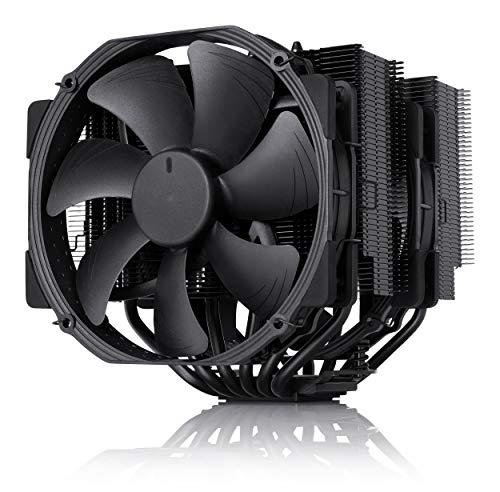
Some 1151 machines live under desks in shared offices, in living rooms driving a television, or in bedrooms where a PC that sounds like a hairdryer at 1 a.m. is a genuine problem. The Dark Rock Pro 4 was designed for those rooms. It is a dual-tower cooler with seven heat pipes and two fans — a near-silent 120mm unit tucked between the towers and a 135mm fan at the front — all finished in black with a brushed aluminium top plate that looks like it belongs on audio equipment rather than in a gaming rig. Its cooling capacity sits a small step behind the NH-D15, but its acoustic behaviour at low and medium loads is the best in this guide, and on LGA1151 chips that distinction matters more than a degree or two: an 8700K under a Dark Rock Pro 4 at desktop and gaming loads is, for practical purposes, a silent computer.
Strengths. The fans are the story — purpose-built Silent Wings units with fluid-dynamic bearings that stay smooth and unobtrusive from idle to full speed, with none of the bearing tick or tonal whine that makes some coolers audible even when they measure quietly. The all-black aesthetic is the most grown-up in this guide, and build quality is excellent throughout, from the fin stacks to the mounting hardware. Cooling performance, while not class-leading, is comfortably sufficient for an 8700K at any sane setting and for a 9900K run at stock or with power limits respected.
Trade-offs. The mounting process is the fiddliest here: the cooler is installed with a screwdriver passed through the top of the fin stack, which is manageable but less pleasant than Noctua’s system, especially in a cramped older case. It is a tall, heavy cooler, so the usual clearance homework applies, and front-fan positioning over tall RAM requires the same compromises as its rivals. You also pay a premium for the silence and finish over the Peerless Assassin, which cools about as well for considerably less.
Who it suits. The owner whose 1151 machine shares a room with other humans — a studio, a living-room PC, a bedroom workstation — and who would trade two degrees for a computer they cannot hear. For the current listing and included mounting hardware details, check price on Amazon.
Check price on Amazon: be quiet! Dark Rock Pro 4

Cooler Master Hyper 212 Black Edition: the budget rescue for locked chips
Not every 1151 upgrade is about a K-series chip. Millions of these machines run locked processors — i5-8400s and 9400s, i7-8700s and 9700s — that shipped with Intel’s small stock cooler, a unit that was adequate on a cold day and irritating on every other kind. If that is your machine, your problem is not thermal throttling; it is noise, dust-clogged fins and a fan that spins audibly during a video call. The Hyper 212 Black Edition is the classic answer: a four-heat-pipe single tower with a 120mm fan, a blacked-out finish that looks far tidier than the bare aluminium original, and a two-decade lineage of rescuing budget builds. It will not tame an overclocked 9900K and does not pretend to. What it does is transform a locked 1151 chip’s acoustic behaviour for very little money, dropping temperatures by a wide margin over the stock unit and letting its fan loaf where the stock fan sprinted.
Strengths. Value is the whole case, and it is a strong one: this is the cheapest route in the guide to a genuinely quiet 1151 machine with a locked processor. At 159mm it fits the great majority of cases from the platform’s era, it clears most memory without drama thanks to its slim single-tower profile, and the black top cover makes it presentable in a windowed case. The mounting system on this edition is a proper bracket-and-backplate arrangement, far better than the push-pin arrangements that gave older budget coolers a bad name, and it seats with reassuring, even pressure.
Trade-offs. Thermal headroom is limited by design: fine for locked chips and a stock 8700K at a stretch, but out of its depth with a 9900K under sustained all-core load or any serious overclock. The single fan is decent rather than silent-specialist, and under hard load it will be audible in a quiet room. If there is any chance your next step is a K-series upgrade, skip this tier entirely and buy one of the dual-towers — buying cooling twice is the most expensive option of all.
Who it suits. The owner of a locked-chip 1151 machine — the office PC, the family computer, the hand-me-down gaming rig — who wants the stock cooler’s noise gone for the price of a takeaway dinner. For today’s price on the Black Edition with the LGA115x bracket included, check price on Amazon.
Check price on Amazon: Cooler Master Hyper 212 Black Edition
Noctua NH-U12S redux: the compact tower that never blocks your RAM
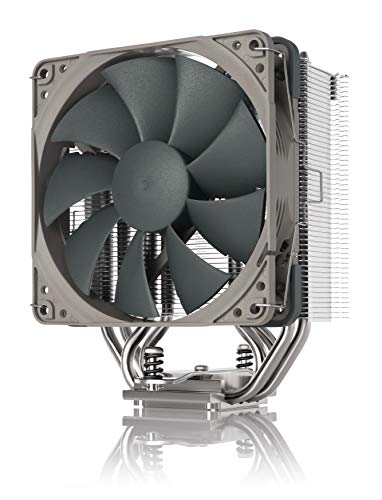
The NH-U12S redux exists for the builds the dual-towers cannot serve: the narrower case, the motherboard with memory slots close to the socket, the owner who has fought a cooler’s front fan over tall RGB RAM once and sworn never again. It is a slim single-tower design — 120mm class, but deliberately narrow — that leaves all four memory slots completely clear, which on 1151 boards is a bigger practical gift than it sounds, because topping up DDR4 is the other classic upgrade for this platform and nobody wants to remove a cooler to do it. The redux line is Noctua’s value range, so you get the company’s fin-stack engineering, its excellent mounting system and a grey, no-nonsense version of its fan, trimmed of the accessory bundle that pads out the premium boxes. Cooling sits between the Hyper 212 and the dual-towers: plenty for any locked chip, honest for an 8700K at stock, and enough for a 9900K only if you respect power limits.
Strengths. Compatibility is the headline: full RAM clearance, a height that fits most mid-towers, and no interference with the top PCIe slot on typical 1151 boards, which matters when graphics cards wear thick backplates. The SecuFirm2 mounting hardware is the same precise, all-metal system as the flagship’s, making this the easiest cooler in the guide to install well. It is also quiet in the way Noctua fans are quiet — smooth at low speeds, free of bearing noise — and the redux fan’s grey colour scheme offends nobody. Like the NH-D15, it benefits from Noctua’s long support horizon.
Trade-offs. You pay a Noctua premium for a single-tower cooler whose raw cooling is closer to the budget tier than to the dual-towers; buyers who measure only degrees per unit of currency will choose the Peerless Assassin instead. There is one fan in the box, though clips for a second are included if you want to add one later. And while it handles an 8700K happily, it is not the tool for sustained 9900K punishment — that job belongs to the big towers or liquid.
Who it suits. The upgrader whose case or memory rules out a dual-tower, who plans a DDR4 top-up and wants the slots reachable, or who simply wants an install-it-and-forget-it cooler for a locked chip or stock 8700K. To confirm the current redux bundle and fan details, check price on Amazon.
Check price on Amazon: Noctua NH-U12S redux
Corsair iCUE H100i RGB Pro XT: the 240mm liquid option
The liquid pick in this guide earns its place on two specific 1151 scenarios. The first is the case problem: compact and older chassis with limited tower height but a 240mm radiator mount in the roof, where a radiator moves the cooling hardware out of the crowded socket area entirely and leaves memory and graphics card completely unobstructed. The second is the hard-worked 9900K: a 240mm radiator’s thermal mass absorbs sustained all-core loads gracefully, holding coolant temperature steadier across a long render or a summer gaming session than an air tower’s fin stack can. The H100i RGB Pro XT is a mature, well-understood example of the form — a 240mm radiator, two 120mm magnetic-levitation fans, a quiet pump with a zero-RPM mode for silent idle, and full LGA1151 mounting hardware in the box. Mounted in the roof as exhaust, it will keep an 8700K or a sensibly run 9900K thoroughly in check while contributing nothing audible at desktop loads.
Strengths. Socket-area clearance is total — tall RAM, chunky VRM heatsinks and thick graphics-card backplates all stop mattering. Sustained-load behaviour is excellent, and the software control through iCUE lets you tie fan and pump behaviour to coolant temperature, which produces calmer, less reactive fan behaviour than CPU-temperature-based curves on air. The zero-RPM idle mode means a genuinely silent desktop. For windowed 1151-era builds, the RGB pump head also tidies up a socket area that air towers dominate.
Trade-offs. Everything an air cooler never asks of you applies here: a pump that will eventually wear, coolant that very slowly permeates, more cables to route, and a failure — however unlikely — with worse manners than a tired fan. On a platform already years old, that longevity arithmetic deserves honest thought; a quality air tower will almost certainly outlive this liquid cooler. It is also among the pricier picks, and it demands a case with a suitable radiator mount, which some 1151-era budget cases simply do not have. Installation takes longer than any air pick in this guide.
Who it suits. The 9900K owner in a case with a roof radiator mount and limited tower clearance, or the hard-load user who values sustained-load composure and a clear socket area over fit-and-forget simplicity. For the current listing and the exact fan and radiator specifications, check price on Amazon.
How the six compare at a glance
The table below is deliberately qualitative. Cooler performance shifts with case airflow, ambient temperature and mounting quality, so treat it as a map of each pick’s character rather than a league table of degrees.
| Cooler | Type | Best-matched chips | Noise character | Clearance notes | Best for |
|---|---|---|---|---|---|
| Noctua NH-D15 | Dual-tower air | 9900K, 8700K | Very quiet under load | Tallest pick; front fan may ride over RAM | Closing the cooling question for years |
| Thermalright Peerless Assassin 120 SE | Dual-tower air | 9900K, 8700K | Quiet, fans competent | Moderate height; check front RAM slot | Flagship cooling on an upgrader’s budget |
| be quiet! Dark Rock Pro 4 | Dual-tower air | 8700K, stock 9900K | Quietest in this guide | Tall and heavy; fiddly install | Bedrooms, studios, living-room PCs |
| Cooler Master Hyper 212 Black Edition | Single-tower air | Locked i5 and i7 chips | Far quieter than stock | Slim; fits most cases and memory | Silencing a locked-chip machine cheaply |
| Noctua NH-U12S redux | Slim single-tower air | Locked chips, stock 8700K | Smooth and quiet | Full RAM clearance; easy fit | Cramped builds and future RAM upgrades |
| Corsair iCUE H100i RGB Pro XT | 240mm liquid | 9900K, 8700K | Silent idle, composed under load | Needs a 240mm radiator mount | Low-clearance cases, sustained workloads |
Case airflow: the other half of cooling an old build
A new cooler fitted into a suffocated case is a disappointment waiting to happen, and 1151-era cases are the worst offenders in the business: solid front panels, a single exhausted 120mm fan, intake filtered — if at all — by mesh that has not been cleaned since the platform was new. Before you judge any cooler’s performance in your machine, give it air to work with. The minimum viable arrangement is one intake fan at the front and one exhaust at the rear, with the intake filtered and the case very slightly positive in pressure so dust enters through the filter rather than through every gap. If your case has a front panel that seals the intakes behind a decorative slab, experiment with the panel removed during a stress test; a dramatic temperature drop tells you the panel, not the cooler, is your bottleneck, and on many older cases simply standing the panel off or choosing a mesh replacement changes the machine’s whole thermal character.
Dust deserves its own paragraph because on a platform this age it is not a hypothetical. Fin stacks that have run for six years carry a felt of dust that no amount of fan speed fully compensates for, and the same applies to radiator fins, power-supply intakes and the underside of the case where many PSU filters hide, forgotten. A soft brush and a can of compressed air — used outdoors, with fans held still so they cannot overspin — restores more performance than most people expect, and it is worth doing the same week the new cooler goes in so you are measuring the cooler, not the archaeology. While you are in there, check that the cables from a modular power supply have not slumped into the intake path of the front fans; older builds accumulate cable drift, and a ribbon of cables across an intake is a silent tax on every component downstream of it.
Ambient temperature is the last unglamorous variable. A cooler does not produce an absolute temperature; it produces a temperature above the air in the room, and an 1151 machine under a desk in a sunlit room in August is working against physics no fin stack can repeal. If your machine’s temperatures are acceptable in the morning and alarming by mid-afternoon, the fix is placement and room airflow, not a bigger cooler. Moving the case out of a closed cabinet, off a carpet that chokes its bottom intake, or away from a radiator vent will do more than any product in this guide. Judge your new cooler on a normal day, in the machine’s real home, before concluding anything about it.
Getting the install right on an older board
Swapping a cooler on an 1151 motherboard you have owned for years deserves ten unhurried minutes of preparation. Work with the machine fully powered down and unplugged, and if your old cooler has not moved since installation, warm the processor briefly before shutdown — a few minutes of light use softens old thermal paste and makes the cooler far less likely to pull the chip’s heat spreader into an alarming twist as it releases. Twist the old cooler gently rather than pulling straight up. Clean both the processor’s heat spreader and the new cooler’s base with isopropyl alcohol and a lint-free cloth until no residue remains; paste left from a previous mount is the most common cause of a disappointing result from a good cooler.
When fitting the new unit, lay the case on its side if you can — gravity is a free pair of hands, especially with the heavy dual-towers — and tighten mounting screws in alternating quarter-turns, crossing from corner to corner, until each is snug. Connect the fan or fans to the CPU_FAN header (using the supplied splitter or low-noise adapter where provided, and a second header for a radiator’s pump, set to full speed or PWM as the maker directs). Before the side panel goes on, spin each fan by hand to confirm nothing fouls a cable, then boot into the BIOS and watch idle temperatures settle for a few minutes. Finally, set your fan curve while you are in there: gentle until the chip passes the temperatures it sees in ordinary desktop work, then a decisive climb. That curve, saved once, is the difference between a cooler that merely works and a machine that feels transformed.
Keeping the new cooler performing for the rest of the platform’s life
The good news about maintaining an air cooler is that there is almost nothing to maintain, which is precisely why air suits an older platform. Twice a year, with the machine off, brush the dust from the fin stacks and fan blades and clear the case’s intake filters; that is the entire schedule. Fan bearings on quality units last for many years, and when one eventually becomes audible, it unclips and replaces in minutes without disturbing the mount or the paste. Thermal paste does dry out over long periods, but on a five-to-eight-year horizon a single quality application will generally outlast your ownership of the platform; re-paste only if temperatures creep upward in a way dust removal does not explain.
Liquid coolers ask a little more of you. Once a year, confirm the pump is still running at its set speed — most software, including iCUE, reports it — and listen for new noises: gurgling that was not there before can mean coolant loss through slow permeation, and a pump that has become the loudest part of the machine is telling you its remaining life is finite. Keep the radiator’s fins dusted, since a clogged radiator quietly converts a good liquid cooler into a mediocre one, and if your case layout allows it, a radiator mounted with its ports positioned to keep air away from the pump will age more gracefully. None of this is onerous, but it is a real, recurring obligation that the air picks in this guide simply do not impose, and on a machine you intend to run untouched for years, that difference belongs in the decision.
One small habit separates owners who get a decade from a cooler from those who do not: keep the mounting hardware and the spare fan clips in a labelled bag in the case’s drive bay or taped inside the side panel. Platforms change, boxes get thrown away, and the bracket you need for a future socket — or the clip you snap during a hasty clean in year six — is always the one that was discarded. The same logic applies to the low-noise adapters and the tube of paste that came in the box. An upgrader who can lay hands on every accessory the cooler shipped with owns a cooler that can be remounted, re-pasted and carried to the next build without a single support ticket or marketplace order, and that quiet completeness is worth more over a long ownership than any single degree of cooling.
The cooler in the context of the whole upgrade
It is worth stepping back and placing this purchase where it belongs: as one line item in the small economics of keeping an 1151 machine useful. For most owners, the highest-value upgrades to this platform, in order, are an SSD if the machine somehow still boots from a hard drive, enough DDR4 to reach the amount your workload actually uses, and then cooling — because cooling is the upgrade that makes the other hardware behave. A 9900K that throttles is not delivering what its owner paid for; an 8700K whose fan screams through every meeting is a machine its owner dreads using. Seen that way, a cooler matched to its tier is not an indulgence but the purchase that unlocks value already sitting in the case. The corollary is just as important: when the cooler you are considering costs a substantial fraction of what a newer platform’s processor and board would cost together, the arithmetic has quietly changed, and the honest advice is to buy the modest cooler that serves this machine well — the Hyper 212 tier for locked chips, the Peerless Assassin tier for K chips — and bank the difference toward the eventual rebuild.
If you do shop the used market for one of the premium picks, which is a defensible strategy on this platform, buy like an inspector. Ask for photographs of the base: the nickel plating on a well-kept cooler is smooth and unmarked, while deep scratches, gouges or a base that has been lapped by an amateur are reasons to walk away. Confirm every piece of Intel mounting hardware is present — backplate, standoffs, brackets, screws, fan clips and, for Noctua coolers, the low-noise adapters if you care about them — because assembling a missing kit piecemeal can erase the saving. Spin each fan by hand and listen; a bearing that grinds or clicks at hand speed will not improve under power. For used liquid coolers, be stricter: ask its age, because a pump’s life is measured in years whether or not the price reflects it, and favour sellers who can show it running quietly. A used NH-D15 with complete hardware is one of the safest second-hand purchases in PC hardware; a used liquid cooler of unknown age is one of the least safe, and your pricing should reflect that asymmetry.
Finally, set your expectations for the result before the box arrives, so you can judge the upgrade fairly. What a good cooler delivers on this platform is not a miraculous temperature figure to post in a forum; it is a machine that holds its boost clocks through the workloads you actually run, fans you stop noticing within a week, and the quiet confidence that the oldest, hardest-working component in the build is no longer the one you worry about on a hot day. If your new cooler achieves those three things, it was the right purchase at whatever tier you chose.
Frequently asked questions
Is it worth spending money on a cooler for a platform this old?
Yes, if the rest of the machine still meets your needs — and for most owners it does, because a healthy 8700K or 9900K system with enough RAM and an SSD remains a capable computer. A cooler upgrade is one of the few purchases that improves an old PC every single day you use it: lower noise, steadier boost behaviour, and headroom that protects the hardware you already own. The discipline is proportion. Match the cooler to the chip, as this guide lays out, and resist flagship spending on a locked processor. Judged that way, a cooler is not money sunk into a dying platform; the better air coolers here can also move to a future build with a mounting kit, which makes them among the safest upgrade purchases you can make.
Will one of these coolers let me overclock my 9900K properly?
The NH-D15, the Peerless Assassin 120 SE and the H100i give you the thermal side of a sensible 9900K overclock, but cooling is only one of three gates. The others are your motherboard’s power delivery — many 1151 boards, especially early or budget models, have VRM designs that wilt under a heavily overclocked eight-core chip — and your power supply’s capacity and condition. If your board was built for locked chips, run the 9900K at stock with a good cooler and enjoy it; that combination is fast and dependable. If your board is a quality Z370 or Z390 model with strong power delivery, the big dual-towers and the 240mm liquid cooler will hold a moderate all-core overclock in check. Either way, monitor VRM temperatures as well as CPU temperatures during stress testing, because on this platform the board often gives up before the cooler does.
My 8700K runs hot no matter what cooler I fit. Is something wrong?
Probably not — the 8700K is simply a warm chip by design. Intel used standard thermal paste between the die and the heat spreader on this processor, so heat leaves the cores less efficiently than on the soldered 9900K, and temperatures in the high seventies or low eighties under heavy all-core load with a good cooler are normal behaviour rather than a fault. Before blaming your new cooler, check the boring causes: mounting pressure even, paste fresh and correctly applied, case intake unobstructed, and your motherboard’s multi-core enhancement setting, which on many boards quietly raises voltage and power limits beyond Intel’s specification. Turning that off, or setting a modest negative voltage offset, often recovers more temperature than any cooler swap. Delidding exists as an enthusiast option, but it risks a chip you cannot easily replace; treat it as a hobby, never a necessity.
Can I reuse my existing cooler on a future build when I finally leave 1151?
Often, yes, and it is a genuine argument for buying a quality air cooler now. The mounting question is whether the manufacturer offers a bracket for the newer socket. Noctua is the standout here, with a long record of supplying mounting kits for new platforms to existing owners, which is why the two Noctua picks in this guide carry value beyond this socket. Thermalright and be quiet! have also supported socket transitions with kits for many models. Liquid coolers are a weaker bet for cross-platform reuse simply because their pumps age on their own schedule regardless of brackets. When you eventually shop for a new platform, check the cooler maker’s support page for your model before assuming anything — but buy the cooler for the machine in front of you, and treat future reuse as a welcome bonus.
How do I know if a cooler will fit my case before ordering?
Three measurements settle it. Your case manual or maker’s page lists a maximum CPU cooler height; compare it against the cooler’s stated height, remembering that a dual-tower’s front fan may sit higher than the fin stack if it has to clear tall memory, so add a margin rather than trusting a one-millimetre pass. For memory, assume any dual-tower will overhang at least the first slot and check whether your memory’s height is compatible or whether the fan can slide up to clear it. For liquid, confirm the case has a 240mm radiator mount and that the mount has room for radiator plus fans without colliding with the motherboard’s top edge or its heatsinks. If your case documentation is lost, a tape measure from the processor’s heat spreader to the inside of the side panel answers the height question directly. Five minutes of measuring beats a return every time.
Keeping an LGA1151 machine alive is not nostalgia; it is arithmetic, and the right cooler is the one that respects both your chip’s appetite and your platform’s remaining years — choose for the processor you own, mount it carefully, and your old build will repay you in quiet, steady service long after newer sockets have stopped asking for your money.