Disclosure: As an Amazon Associate, kajuandouglas.com earns from qualifying purchases. Links to Amazon on this page are affiliate links; they cost you nothing extra. Listing details such as price and availability change often, so check the current Amazon listing before you buy.
Where to buy
Here is the shortlist for the best tracking device for android phones. Every tracker below is sold on Amazon and works with Android phones, so you can check the current price, availability and delivery estimate on the listing before you order. Orders are placed through Amazon, and this site may earn a commission on qualifying purchases at no extra cost to you. These picks are for finding your own belongings and your own vehicle; choose the network that matches your phone first, then read the full review.
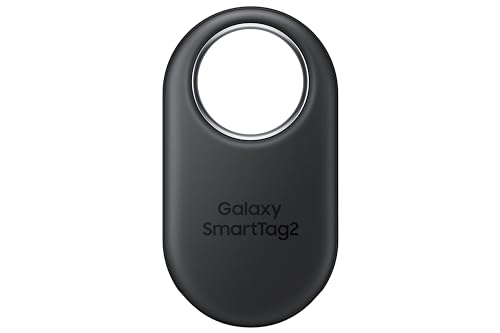
- Samsung Galaxy SmartTag2 — the native Galaxy finder with the deepest integration Samsung owners can get.
- Life360 Tile Mate (1-Pack) — the brand-agnostic finder that also rings your phone when the phone is the thing you lost.
- Chipolo POP — the tag that joins Google’s own Find Hub network and reminds you before you leave things behind.
- Samsung Galaxy SmartTag3 — Samsung’s newer tag with location history and a maker-claimed battery measured in years.
- VOCOlinc Air Tracker Smart Tags (4-Pack) — four Find Hub tags with removable batteries, for outfitting the whole household at once.
- Bouncie GPS Tracker for Vehicles — true live GPS for your own car, with route history, geofences and accident alerts in the app.
Read the full guide ↓
The best tracking device for android phones is, for most people, a small Bluetooth tag that lives on a keyring, in a wallet or inside a bag, and reports its location to your phone when you need it. This guide covers that job honestly, and one related job — a GPS tracker for your own vehicle — while drawing a firm line this category needs: these are tools for recovering your own property, used with the knowledge of anyone carrying them, not devices for secretly following another person. Every pick below is a mainstream consumer product from an established maker, sold openly for finding things you own.
Five of the six picks are Bluetooth item finders, and the crucial difference between them is the finding network behind the tag. A tag is only findable when a compatible phone passes within Bluetooth range, so the network your tag belongs to — Samsung’s SmartThings Find for Galaxy owners, Google’s Find Hub for the wider Android world, or Tile’s own Life360 network — decides how quickly a lost bag gets located in an airport, a city or a small town. The sixth pick, a plug-in GPS tracker for your own car, works completely differently, using satellite positioning and a cellular connection for live vehicle location.
Choosing well means matching three things: your phone brand, because Galaxy owners get a stronger native option; the places your things get lost, because network density matters most away from home; and your tolerance for upkeep, because tags differ in battery life and replaceability. The reviews below state each pick’s network and requirements in its spec box, so you can filter fast, then read the buying guide for the trade-offs that listings rarely explain.
Expectations deserve one calibration before the picks. A Bluetooth finder does not watch your belongings continuously; it remembers where they were last heard and calls for help from passing phones when they are lost. That design is deliberate: it is why tags can be tiny, inexpensive and run for a year or more on a small battery, and it is also why their location updates arrive in steps rather than as a live stream. Judged as recovery tools, the picks below are excellent. Judged as live surveillance of objects, only the vehicle GPS pick qualifies — and that difference in kind is exactly what the buying guide unpacks after the reviews.
Key Takeaways
- Network first, hardware second: a Bluetooth tag is findable only when a phone on its network passes nearby, so pick the network that matches your phone and your travel patterns.
- Galaxy owners should start with the Samsung SmartTag2; owners of other Android phones should start with Tile or a Google Find Hub tag like the Chipolo POP.
- Bluetooth finders locate belongings; they do not provide live GPS tracking. The Bouncie pick is the only true GPS device here, and it is for your own vehicle.
- Battery strategy differs: the SmartTag3 claims up to 790 days per its maker, the VOCOlinc tags use removable batteries, and Tile models trade replaceability for a sealed design.
- Use trackers only on your own property and with the knowledge of anyone carrying them; secretly tracking a person is illegal in many places and is not a use this guide supports.
In this guide
Quick Picks
Six trackers in deliberate order: the Galaxy default first, then the cross-brand options, then the vehicle specialist. Badges match the full reviews, and each spec box names the network the tag depends on.
| Badge | Pick | Why it stands out | Link |
|---|---|---|---|
| Best Overall for Galaxy Owners | Samsung Galaxy SmartTag2 | Samsung’s own tag for Galaxy phones, using the SmartThings Find network of Galaxy devices to locate keys, bags and more. | Check price on Amazon |
| Best for Any Android Brand | Life360 Tile Mate (1-Pack) | The cross-brand default: Tile’s mature finder network, an Android app for any phone brand, and a phone-finder button on the tag itself. | Check price on Amazon |
| Best for Google Find Hub | Chipolo POP | A Find Hub tag with out-of-range alerts, so it warns you at the door instead of only helping after the loss. | Check price on Amazon |
| Best Battery Life for Galaxy | Samsung Galaxy SmartTag3 | Location history plus a maker figure of up to 790 days of battery make it the fit-and-forget Galaxy tag. | Check price on Amazon |
| Best Multi-Pack Value | VOCOlinc Air Tracker Smart Tags (4-Pack) | Four dual-network tags with user-replaceable batteries — the economical way to tag keys, bags and cases in one purchase. | Check price on Amazon |
| Best for Your Own Vehicle | Bouncie GPS Tracker for Vehicles | The only genuine GPS pick here: live location, route history and driving alerts for a vehicle you own, viewed in the Android app. | Check price on Amazon |
How These Picks Were Chosen
Picks were verified through the site’s own product data before writing, and each had to meet three tests. It had to be a mainstream consumer finder or vehicle tracker from an established maker, sold openly on Amazon for locating the owner’s own belongings. It had to state its phone requirements clearly enough that an Android buyer could confirm compatibility from the listing. And it had to represent a distinct network or job, so the six picks teach the category instead of repeating one tag six times.
Deliberately excluded: no-name tags that mimic another brand’s network claims, hidden or disguised trackers marketed for following people or vehicles without the owner’s knowledge, and detector-style gadgets that are not trackers at all. Where a maker states a battery figure, it is reported as the maker’s figure. Prices change too often to print, so every pick links to its listing for a current check.
- A clearly stated finding network or GPS method, matched honestly to the buyer’s phone.
- Compatibility requirements an Android owner can verify from the listing before buying.
- Battery life and battery strategy suited to the tag’s job, stated as maker figures where quoted.
- A form factor that fits its target: keys, wallet, luggage, backpack or vehicle.
- Mainstream, openly sold products intended for the owner’s own property.
- A distinct role in the lineup, from Galaxy default to cross-brand value to vehicle GPS.
The Best Tracking Device for Android Phones
Reviews follow the buying box order. Read the network line in each spec box before the prose: if the network does not match your phone, the review that follows cannot rescue the pick for you.

Samsung Galaxy SmartTag2
Badge: Best Overall for Galaxy Owners
| Type | Bluetooth tracker and item finder |
| Network | Samsung SmartThings Find (Galaxy ecosystem) |
| Requires | Phones and tablets on Android 11 or later (per listing) |
| For | Keys, wallet, luggage, pets |
| Pack | 1 pack, Black, 2023 model |
If your Android phone is a Samsung Galaxy, the SmartTag2 is the natural first pick, because it plugs into the finding network Samsung builds into its own phones. Galaxy devices around your lost item can relay its Bluetooth signal, and the tag appears inside the SmartThings world Galaxy owners already use. The listing covers the classic jobs — keys, wallet, luggage, even a pet’s collar — and requires Android 11 or later on Samsung phones and tablets.
The boundary is equally clear: this is a Galaxy-ecosystem product. Owners of Pixel, Motorola or other Android phones should not buy it expecting the same experience, and the cross-brand picks below exist for them. Within its ecosystem, though, the combination of a huge relay network, a compact tag and first-party integration makes it the most complete finder in this guide, and the one most Galaxy owners should buy first.
Daily life with the SmartTag2 is mostly invisible, which is the compliment this category aims for. The tag sits on the keyring through months of pockets, bags and weather, and only becomes interesting on the bad day — the keys left in a jacket across town, the bag mislaid in a café — when the map and the ring turn a crisis into a detour. Galaxy owners also benefit from the tag living inside the same SmartThings world as their other Samsung devices, so checking a tag feels like checking the phone itself rather than opening a stranger’s app. Outfit the two or three items whose loss would genuinely hurt, and the SmartTag2 stops being a gadget and becomes part of how the household runs.
Strengths
- First-party Samsung integration for Galaxy phones
- Large SmartThings Find relay network in Galaxy-dense areas
- One tag covers keys, bags, luggage and pet collars
Trade-offs
- Built for the Galaxy ecosystem, not for other Android brands
- Finding depends on Galaxy devices passing near the lost item
- Single-tag pack; outfitting many items means buying several
Choose it if you own a Galaxy phone and want the finder that integrates with it natively. Skip it if your Android phone is a Pixel, Motorola or any non-Samsung brand.
Best for: Samsung Galaxy owners tagging keys, bags and luggage / Not suited for: Owners of non-Samsung Android phones

Life360 Tile Mate (1-Pack)
Badge: Best for Any Android Brand
| Type | Bluetooth tracker, keys finder and item locator |
| Network | Tile network via the Life360 Tile app |
| Compatibility | Both iOS and Android compatible (per listing) |
| Extra | Phone Finder function |
| Pack | 1 pack, Black |
Tile built the item-finder category, and the current Life360 Tile Mate is its core tag: a Bluetooth tracker for keys, bags and everyday carry that works with both Android and iPhone through the Tile app. For Android owners outside the Samsung ecosystem, that brand independence is the point — the same tag works if you switch from a Pixel to a Motorola next year. Its network relies on Tile app users and Life360 members passing nearby, which is densest in busy areas.
The signature extra is the Phone Finder: press the tag and your phone rings, even on silent, which solves the most common loss in most houses. Like every Bluetooth tag, it reports where it was last seen and updates when the network hears it, rather than streaming live location. As the safe, simple, any-brand answer in this guide, it earns its place near the top.
Tile’s maturity shows in the moments around the technology. The app’s last-seen map is honest about what it is, the ring is loud enough to settle the which-room question that accounts for most home losses, and the phone-finder button acknowledges the truth that the phone is lost as often as the keys are. Households that already use Life360 for family location will find the tag folds into an app they already open, which lowers the friction that kills finder systems — the uninstalled app, the forgotten account. For a Pixel or Motorola owner who wants the category’s most traveled road, with the fewest surprises at either end, the Mate remains the straightforward recommendation it has been for years.
Strengths
- Works with any Android brand through the Tile app
- Phone Finder feature rings a misplaced phone from the tag
- Mature finder network and app experience
Trade-offs
- Location updates depend on Tile-network phones passing nearby
- Some advanced features in this category live behind optional plans; check the listing and app
- Bluetooth finding is not live GPS tracking
Choose it if you want one finder system that survives changing phone brands. Skip it if you are a Galaxy owner who would benefit more from Samsung’s native network.
Best for: Pixel, Motorola and mixed-brand households / Not suited for: Rural users far from other finder-network phones

Chipolo POP
Badge: Best for Google Find Hub
| Type | Bluetooth key finder and luggage tracker |
| Network | Google Find Hub or Apple Find My (per listing) |
| Features | Call Your Phone function |
| Alerts | Out of Range Alerts (per listing) |
| Color | Black |
The Chipolo POP plugs into Google’s Find Hub, the finding network built into the Android ecosystem itself, which makes it the most future-facing pick here for non-Samsung owners. A tag on Google’s network can be heard by the enormous population of Android phones with Find Hub enabled, and the POP also works with Apple Find My if your household mixes platforms — you choose one network when you set it up.
Chipolo adds two thoughtful touches. Call Your Phone mirrors Tile’s trick of ringing your handset from the tag, and Out of Range Alerts warn you when you walk away from a tagged item, which prevents losses instead of only recovering from them. For Android owners who want their finder riding on Google’s own infrastructure rather than a single maker’s app, the POP is the pick that fits that philosophy best.
The POP’s out-of-range alerts change the emotional shape of owning a tracker. Instead of the sinking moment of discovery — the wallet realized missing an hour later — the phone buzzes as you walk away from the tagged item, when recovery is a ten-step walk back rather than a retracing of the whole day. That prevention-first design suits commuters who leave things on trains and café tables, and it pairs naturally with Google’s network doing the recovery work on the rare day prevention fails. Setup asks you to pick your network once, and Android owners should pick Find Hub without hesitation. After that, the POP mostly works by making losses rarer, which is the best outcome a finder can offer.
Strengths
- Runs on Google Find Hub, Android’s native finding network
- Out of Range Alerts prevent losses, not just recover them
- Also supports Apple Find My for mixed households
Trade-offs
- You must choose one network at setup; it cannot ride both at once
- Find Hub density is still growing compared with older networks
- Prevention alerts can be chatty until tuned in the app
Choose it if you want your tag on Google’s own Android finding network. Skip it if you are deep in the Samsung ecosystem and prefer SmartThings Find.
Best for: Pixel and other non-Samsung Android owners / Not suited for: Samsung owners wanting native SmartThings integration
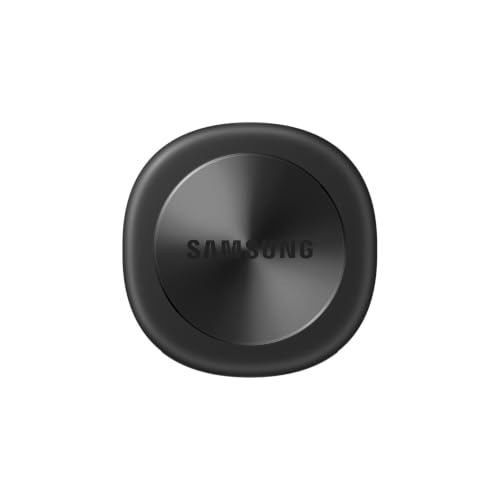
Samsung Galaxy SmartTag3
Badge: Best Battery Life for Galaxy
| Type | Lightweight Bluetooth tracker with location history |
| Battery | Up to 790-day battery life (maker figure) |
| Build | IP67 (per listing) |
| Compatibility | Galaxy and iOS compatibility (per listing) |
| Color | Black |
The Galaxy SmartTag3 is Samsung’s newer-generation tag, and its listing leads with the two things frequent losers and frequent travelers care about: location history, so you can retrace where an item has been rather than only where it is, and a maker-stated battery life of up to 790 days, which turns battery checks into a rare event. The IP67 code in the listing means the tag shrugs off rain, splashes and dusty bags.
Its listing also notes Galaxy and iOS compatibility, which broadens it beyond the SmartTag2’s Galaxy-only pitch, though Galaxy owners will still get the deepest integration. Treat the battery figure as a best-case maker figure; real life varies with how often the tag is pinged and rung. If you tag luggage that lives in a closet between trips, that long battery and the location history make this the most set-and-forget pick here.
Location history sounds like a minor feature until the first genuinely confusing loss: the bag that could be at the office, the gym or the second car. A tag that only reports its current position answers where it is; a tag with history answers where it has been, which often identifies which of your guesses is right and whether the item is moving or settled. For travelers, that trail across an airport or a city is the difference between a targeted recovery and a hopeless one. Add the long maker battery figure and the weather sealing, and the SmartTag3 becomes the tag you attach to the suitcase in January and trust in December — the closest this category gets to fitting a tracker and forgetting the subject entirely.
Strengths
- Location history shows where an item has been, not just where it is
- Maker-stated battery life of up to 790 days
- IP67 sealing suits luggage, bags and outdoor carry
Trade-offs
- Battery figure is a maker best case, not a guarantee
- Newest-generation positioning costs more than the SmartTag2
- Deepest features still favor Galaxy phones
Choose it if you tag luggage and bags and want the longest battery and a location trail. Skip it if you want the lowest-cost way into the Galaxy finder network.
Best for: Travelers and Galaxy owners tagging luggage / Not suited for: Budget buyers outfitting many items at once

VOCOlinc Air Tracker Smart Tags (4-Pack)
Badge: Best Multi-Pack Value
| Type | Bluetooth tracker smart tags |
| Pack | 4 pack |
| Battery | Removable battery |
| Network | Google Find Hub or Apple Find My (per listing) |
| For | Keys, backpack, suitcases (per listing) |
Most people do not lose one thing; they rotate through keys, a work bag, a gym bag and a suitcase. The VOCOlinc four-pack answers that reality directly: four smart tags that work with Google Find Hub on Android or Apple Find My, in one box, so the whole set of everyday items gets covered at once instead of one precious tag being moved between bags.
The removable battery is the quiet headline. Sealed tags eventually become e-waste when their cells die; a tag you can open and re-cell keeps working for years, which matters when you own four of them. As with the Chipolo, each tag joins one network at setup. For households standardizing on Google’s network, this pack is the value pick that makes whole-household coverage practical.
The four-pack changes household behavior in a way a single premium tag cannot. When every important item is tagged, the family stops negotiating over the one finder and starts trusting the system: the spare keys, the school bag, the camera case and the suitcase all report to the same Find Hub view on the same Android phones. The removable batteries reinforce that system thinking, because a tag that can be revived in a minute at a kitchen drawer stays in service for years instead of rotating into a drawer of dead sealed tags. Individually, each VOCOlinc tag is a straightforward Find Hub citizen. Collectively, at this pack size, they are the most complete belongings coverage in this guide for the money position they occupy.
Strengths
- Four tags cover keys, bags and cases in one purchase
- Removable battery avoids sealed-tag replacement cycles
- Works with Google Find Hub for Android households
Trade-offs
- Each tag must be set up on one network, not both
- Less established brand than Samsung, Tile or Chipolo
- Per-tag polish and app experience trail the first-party picks
Choose it if you want to tag several belongings now and keep the tags alive with fresh batteries. Skip it if you want one premium tag with first-party phone integration.
Best for: Families and anyone tagging four or more items / Not suited for: Galaxy owners wanting SmartThings-native features
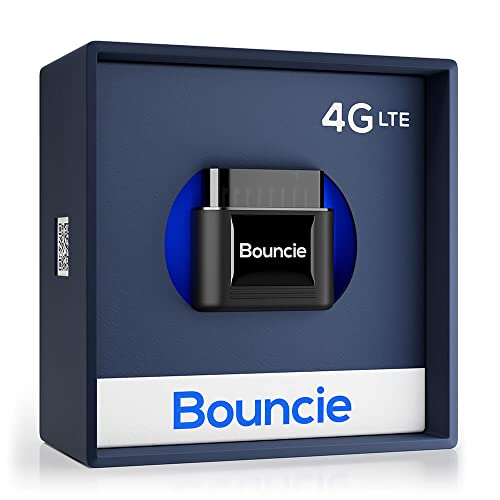
Bouncie GPS Tracker for Vehicles
Badge: Best for Your Own Vehicle
| Type | GPS tracker for vehicles |
| Location | Real-time location with route history |
| Features | Speed monitoring, driving insights, geo-fence and accident notifications (per listing) |
| Terms | No contracts; cancel anytime (per listing) |
| Use | Your own vehicle, with a companion app |
The Bouncie answers a different question from the tags above: not where are my keys, but where is my car, right now. It is a GPS tracker for vehicles that reports real-time location through its service, keeps route history, and adds speed monitoring, driving insights, geofence alerts when the vehicle enters or leaves a set area, and accident notifications, all viewed in its companion app on your Android phone. The listing states there are no contracts and the service can be cancelled anytime, though a service plan is part of how GPS trackers work and should be confirmed on the listing.
Use it on your own vehicle, or a family or business vehicle whose drivers know it is fitted — for a teen driver’s safety updates, an elderly parent’s car, or your own car’s theft recovery and trip records. It is not a belongings tag, it needs vehicle power and cellular coverage, and it is not a tool for following anyone unawares. For the vehicle job specifically, nothing else in this guide does what it does.
The Bouncie’s value accumulates quietly over months of ordinary driving. The geofence that confirms a teen driver arrived at school, the route history that settles which errand the car is on, the accident notification that reaches a parent before a phone call can — each is a small service that justifies the device on a different day. Parents and small-business owners are its natural audience, using it openly on vehicles they own, with drivers who know it is fitted and often check the same app themselves. It asks for a service arrangement where the tags ask for a battery, and that ongoing relationship is the honest price of live GPS. For the vehicle job, it is the only pick here even attempting the work, and it does the work completely.
Strengths
- True real-time GPS location rather than Bluetooth relay
- Route history, geofences and accident notifications in one service
- No-contract terms per the listing lower the commitment
Trade-offs
- Requires an ongoing service arrangement, unlike the tags
- Works for vehicles, not for keys, wallets or bags
- Depends on cellular coverage where the vehicle travels
Choose it if you want live location and trip history for a vehicle you own. Skip it if you only need to find keys, bags and other belongings.
Best for: Car owners, parents of teen drivers, small fleets / Not suited for: Anyone wanting a no-subscription belongings tag
Comparison Table
The network column decides real-world performance more than any other. Confirm your phone brand against it before comparing anything else in the table.
| Pick | Type | Network or method | Battery or terms |
|---|---|---|---|
| Samsung Galaxy SmartTag2 | Bluetooth item finder | SmartThings Find network | Galaxy phones, Android 11+ |
| Life360 Tile Mate (1-Pack) | Bluetooth item finder | Tile / Life360 network | Any Android or iOS phone |
| Chipolo POP | Bluetooth item finder | Google Find Hub network | Most Android phones |
| Samsung Galaxy SmartTag3 | Bluetooth tracker | SmartThings Find with location history | Up to 790 days (maker figure) |
| VOCOlinc Air Tracker Smart Tags (4-Pack) | Bluetooth tracker tags | Google Find Hub network | Removable battery, 4-pack |
| Bouncie GPS Tracker for Vehicles | Vehicle GPS tracker | Live GPS with route history | Service plan, no contract (per listing) |
Buying Guide: How to Choose a Tracking Device for an Android Phone
Separate the two technologies before you spend anything. Bluetooth finders are tiny, inexpensive tags that whisper to passing phones; their location updates are opportunistic and their running cost is a battery every year or two. GPS trackers carry their own positioning and cellular radio; they report live location almost anywhere, at the cost of size, charging or vehicle power, and usually a service plan. Keys, wallets and bags want the first. A vehicle wants the second. Confusing them is the category’s most expensive mistake.
Within Bluetooth finders, the network is the product. Samsung’s SmartThings Find rides on Galaxy phones, Google’s Find Hub rides on the wider Android base, and Tile’s network rides on its app’s users. In a dense city, all three will likely hear a lost tag quickly. In a small town or on a rural trail, the network with the most phones near your item wins, and that is usually the one built into the phones around you. Galaxy owners therefore start with Samsung’s tags; everyone else starts with Find Hub or Tile.
Then decide your battery philosophy. Sealed tags are slimmer and simpler but are replaced whole when the cell dies. Tags with removable or rechargeable cells cost a little convenience per change and keep working for years. Maker battery figures assume light use; ringing a tag daily and living in a busy radio environment shortens them. Buy the battery model that matches how you actually maintain small gadgets, because a dead tag finds nothing.
Coverage honesty is the last buying skill this category demands. Finder networks publish impressive phone counts, but your tag’s real network is the phones that pass your item in the places you lose it: your office district, your gym, your airport, your street. Urban owners can buy almost any network in this guide with confidence. Owners in small towns and rural areas should weight the built-in networks — Samsung’s Galaxy base or Google’s Android base — because a tag heard by the phones already around it beats a theoretically larger network that is thin on the ground where you live.
- Decide Bluetooth finder versus GPS tracker by the job, not the marketing.
- Galaxy phone: SmartThings Find. Other Android: Find Hub or Tile.
- Match network density to where your items actually get lost.
- Choose sealed, removable or rechargeable battery by your maintenance habits.
- Plan one tag per important item instead of moving a single tag around.
Privacy, Consent and the Legal Line for Trackers
Trackers are dual-use technology, and this guide recommends them for one side of the line only: finding your own property. Tag your keys, your bag, your luggage and your car. If another person will carry the tagged item regularly — a partner’s keys, an employee’s vehicle, a child’s school bag — they should know the tag is there, and in the case of employees and other adults, agree to it. That is not just courtesy; secretly tracking a person or their vehicle is illegal in many jurisdictions and can carry serious penalties.
The mainstream makers in this guide design against misuse: tags are registered to your account, several are built to alert people traveling with an unknown tag, and the networks are run by Samsung, Google, Tile’s owner and similarly accountable companies. Buy from those ecosystems, register tags in your own name, and use the safety features rather than defeating them. If a listing markets a tracker as undetectable or hidden for following people, walk away; that product is not what this guide is about, and owning the problem it creates is not worth any price.
Checking the Listing Before You Order a Tracker
Read the compatibility line before anything else. Galaxy tags state their Samsung and Android-version requirements, Find Hub tags state their network, and vehicle trackers state their service terms. Confirm your exact phone and, for GPS picks, whether a service plan is required, what it includes and how cancellation works, using the listing’s own wording rather than a review’s summary.
Also confirm the pack contents and the battery type. Single tags and multi-packs sit on the same listings as variants, and the difference between a sealed tag and a removable-battery tag decides your costs in two years. Check whether a keyring hole, adhesive mount or holder is included if your item has nowhere to clip a tag, and register the tag to your account as soon as it arrives so a lost item can actually reach you.
Tagging Strategy: What to Tag First and How to Name It
Tag in order of pain. The first tag belongs on the item whose loss would disrupt your week most severely — for most people the main keyring, because it strands you outside your own home and car. The second covers the daily bag, the third the luggage that travels, and after that the long tail of bikes, camera cases, instrument cases and the spare keys that currently live in hope. This order matters because a half-finished tagging system fails exactly where it hurts; a pain-ordered system protects the worst losses from the first tag onward.
Naming is the unglamorous half of the strategy. A tag called by its item and owner — Sam Keys, Sam Work Bag — can be rung, found and returned without confusion, while three tags called Tag 1, Tag 2 and Tag 3 guarantee a comedy of ringing the wrong item. Photograph each tag on its item after setup, keep the finder app on the home screen of the phone that will do the finding, and tell the household which account the tags live under. Systems beat gadgets: the network finds the tag, but your naming is what finds the thing.
How Do You Set Up a Bluetooth Tracker with an Android Phone?
Setup follows the same rhythm for every Bluetooth pick in this guide, with the app differing by network. Allow about five unhurried minutes per tag, and set tags up at home, one at a time, naming each for the item it will live on.
- Charge or activate the tag. Some tags ship with a pull-tab to remove; vehicle GPS units instead need fitting and activation through their own instructions.
- Install or open the right app for the network: SmartThings for Samsung tags, Google Find Hub for Find Hub tags, or the Tile app for Tile tags.
- Sign in with the account you want the tag registered to; this account is how a finder contacts you and how the tag stays yours.
- Choose Add device (wording varies), hold the tag near the phone, and follow the prompts until the tag appears with its battery and signal status.
- Name the tag for its item — Car Keys, Work Backpack, Blue Suitcase — and attach it before you forget which tag went where.
- Test both directions: ring the tag from the phone, then use the tag’s phone-finder feature, if it has one, to ring the phone.
- Walk the tag to the end of your home or garden and confirm the app updates its seen location as expected for a Bluetooth finder.
Problem: The app cannot find the tag during setup → wake the tag by pressing its button or removing and replacing its battery tab, move it within a few inches of the phone, and confirm Bluetooth and location permissions are granted to the app.
Problem: A lost tag shows an old location → that is how Bluetooth finding works: the map shows where a network phone last heard it. Head to that area; as you or other network phones come within range, the location will refresh.
Problem: The tag rings but the map never updates outdoors → check that your phone’s location services are on and that the finder app is allowed to run in the background rather than being battery-optimized to sleep.
Problem: A family member keeps getting an unknown-tracker alert → the tag is doing its safety job; register the tag to a shared household account where the network supports it, or make sure the regular carrier is the account owner.
Common Buying Mistakes
Expecting live GPS from a Bluetooth tag. Bluetooth finders update when a network phone passes nearby. They are excellent at recovery and useless as live surveillance of a moving bag, by design. Buy GPS when live location is truly the requirement.
Buying a Galaxy tag for a non-Galaxy phone. SmartTag models are built for Samsung’s ecosystem and state their requirements on the listing. Other Android owners should buy Find Hub or Tile tags instead.
Tracking people instead of property. Secretly following a partner, employee or anyone else with a tag is illegal in many places and a misuse these products are designed to resist. Tag your things, with the knowledge of anyone carrying them.
Moving one tag between items. The item that gets lost is always the one the tag is not on. Outfit each important item, which is exactly what multi-packs are for.
Ignoring the battery model. A sealed tag with a dead cell is a paperweight. Know whether your tag’s battery is removable or rechargeable, and note the maker figure so you can plan replacements.
Skipping registration and testing. An unregistered tag cannot reach its owner, and an untested one may not be paired at all. Set up, name and ring every tag the day it arrives.
Final Recommendation
Galaxy owners should buy the Samsung Galaxy SmartTag2 first: native integration, a large relay network and coverage for keys, bags and luggage make it the complete default. The SmartTag3 is the runner-up for Galaxy owners who travel, trading a higher position for location history and the longest maker-stated battery here. Everyone else on Android should start with the Tile Mate for its any-brand maturity, or the Chipolo POP if riding on Google’s own Find Hub matters more.
Outfit the whole household with the VOCOlinc four-pack when one tag is not enough, and reserve the Bouncie for the genuinely different job of live vehicle location on a car you own. Whichever you choose, register it the day it arrives, test both ringing directions, and keep the consent rule in view: these devices are at their best, and their safest, finding your own things.
Finally, review your tags twice a year when you check smoke alarms and passport dates. Open the app, confirm every tag still reports, ring each one, and replace any battery that the app flags or that has served beyond its maker figure. A finder system is a small piece of household infrastructure, and like all infrastructure it works best when its maintenance is a calendar habit rather than a hope.
Related Guides
- best gps apps for android phones
- best accessories for android phones
- best android phones for privacy
- best fitbit for android phones
- best fitness tracker for android phones
- best watches for android phones
Frequently Asked Questions
Do Bluetooth trackers work without internet on my phone?
The tag itself needs no internet; it broadcasts Bluetooth. Your phone’s app uses its connection to show maps and receive updates from the network, and other people’s phones relay a lost tag’s signal through their own connections. With no connection at all, you can still ring a tag that is within Bluetooth range of your phone.
How far away can a Bluetooth tag be found?
Directly, within Bluetooth range of your phone, which is a room-to-room distance indoors and further in open space. Beyond that, finding depends on the network: any compatible phone passing the tag can relay its location. That is why network size and the population around your lost item matter more than the tag’s own radio.
Will a Samsung SmartTag work with a Pixel or Motorola phone?
SmartTags are built for Samsung’s ecosystem and their listings state Galaxy and Android-version requirements. Owners of Pixel, Motorola and other Android phones should choose a Google Find Hub tag like the Chipolo POP or VOCOlinc tags, or a Tile, all of which are designed to work across Android brands.
Is it legal to put a tracker in my car or my child’s bag?
Tracking your own vehicle and your own belongings is the intended, lawful use, and parents tagging a young child’s bag is a mainstream example of it. Secretly tracking another adult, a partner or an employee’s movements is illegal in many jurisdictions. When in doubt, the rule is simple: your property, and informed carriers.
How long do tracker batteries last?
It varies by model and use. Samsung states up to 790 days for the SmartTag3 as a maker figure, while typical tags in this category are planned around roughly yearly attention. Ringing tags often and busy radio environments shorten life. Removable-battery models like the VOCOlinc tags make renewal cheap and quick.
Can a tracker find something on a plane or in another country?
A Bluetooth tag can be heard by network phones wherever they are, so a bag in a foreign airport can update when a compatible phone passes it, which is common in busy terminals. It cannot report from a sealed cargo hold with no phones nearby until it emerges. GPS vehicle trackers report wherever they have cellular coverage under their service terms.