Disclosure: As an Amazon Associate, kajuandouglas.com earns from qualifying purchases. Links to Amazon on this page are affiliate links; they cost you nothing extra. Listing details such as price and availability change often, so check the current Amazon listing before you buy.
Where to buy
Here is the shortlist for the best stylus pen for android phones. Every stylus below is sold on Amazon and works with Android phone touchscreens, so you can check the current price, availability and delivery estimate on the listing before you order. Orders are placed through Amazon, and this site may earn a commission on qualifying purchases at no extra cost to you. Match the pen type to your phone first — that decision matters more than any other in this guide — then read the full review.
- MEKO Stylus Pen for Touchscreen (3-in-1) — three tip sizes in one pen, so it signs, taps and sketches on almost any Android phone.
- STAEDTLER Noris Digital Jumbo — real pressure sensitivity and an eraser end, for Galaxy phones and tablets with an S Pen digitizer.
- Luntak Stylus Pen for Android — a powered fine-point pen aimed squarely at Android writing and drawing.
- DOGAIN Stylus Pen with Power Display — a powered pen that tells you its battery level, with a smooth POM tip.
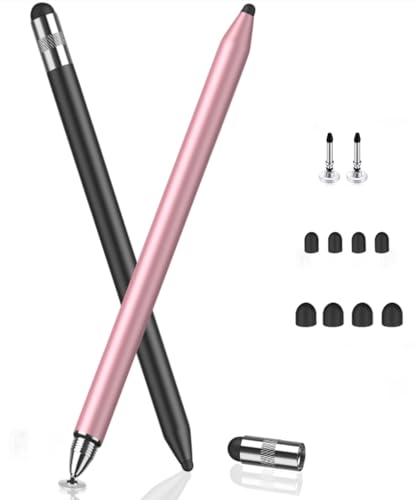
- Bopomofo Stylus Pens (5-Pack) — five pens with disc and rubber tips, so one lives in every bag and drawer.
- baolaili Stylus Pens (2-Pack) — two simple universal pens that work on everything and cost very little.
Read the full guide ↓
Finding the best stylus pen for android phones means untangling one honest complication first: not every Android phone can use every kind of pen. Most Android phones have capacitive touchscreens that respond to any soft conductive tip, which is why simple stylus pens work on nearly everything. A smaller group of phones, notably Samsung models built for the S Pen, add a special digitizer layer that enables pressure-sensitive pens with palm rejection. The right purchase depends on which screen your phone actually has, and this guide is organized around that fact rather than pretending it away.
The six picks cover the realistic options. There is a versatile three-in-one capacitive pen that suits most phones and most tasks, a pressure-sensitive EMR pen for Samsung’s S Pen devices, an active powered pen aimed at Android writing and drawing, a powered pen with a battery display for people who hate surprises, and two inexpensive multi-packs that put a working stylus in every bag, car and drawer. None of them needs Bluetooth pairing to write, and all of them are sold as physical products you can order today.
What you plan to do with the pen decides which type deserves your money. Signing documents, tapping accurately, scrolling without fingerprints and taking quick notes are capacitive jobs that the simplest pens here do well. Sketching with varied line weight, writing longhand with your palm resting on the screen, and precise photo retouching are digitizer jobs that only the EMR pick truly serves. Read the reviews with your actual tasks in mind, and the right pen usually identifies itself.
It also helps to set a budget expectation for the category as a whole. Stylus pens for phones are among the least expensive accessories in this entire program of guides: the multi-packs cost less than a single phone case, the versatile capacitive pens sit in the same modest territory, and only the digitizer specialist carries a genuinely premium position, justified by the writing experience it unlocks on the phones that support it. That pricing shape encourages the system approach the final recommendation makes — one considered main pen, plus inexpensive spares — rather than agonizing over a single perfect purchase that has to serve every room and every bag.
Key Takeaways
- Check your phone first: capacitive pens work on almost every Android phone, while pressure-sensitive EMR pens need a phone with an S Pen digitizer layer.
- The MEKO 3-in-1 is the safest all-round pick for most Android phones; the STAEDTLER Noris Digital Jumbo is the specialist for Samsung S Pen devices.
- No capacitive pen can offer true palm rejection or pressure sensitivity on a phone without a digitizer — listings that imply otherwise are describing the pen, not your screen.
- Multi-packs are the smart buy for signing, tapping and note-taking, because the best stylus is the one that is actually within reach.
- Tip style decides the feel: disc tips glide and show the contact point, fiber and rubber tips feel familiar, and fine active tips suit handwriting.
In this guide
Quick Picks
Six pens, ordered from the most universally useful to the most specialized and the most economical. Every badge here matches the badge in the full review below.
| Badge | Pick | Why it stands out | Link |
|---|---|---|---|
| Best Overall | MEKO Stylus Pen for Touchscreen (3-in-1) | Three interchangeable fine tips make it the most versatile capacitive pen here, working on virtually any Android phone. | Check price on Amazon |
| Best for Samsung S Pen Phones | STAEDTLER Noris Digital Jumbo | The only pick here with genuine pressure sensitivity and palm rejection — on the Samsung devices whose digitizer supports EMR pens. | Check price on Amazon |
| Best Active Pen | Luntak Stylus Pen for Android | An active fine-point pen built for Android devices, with fast charging for writers who outgrow basic capacitive tips. | Check price on Amazon |
| Best for Battery Awareness | DOGAIN Stylus Pen with Power Display | A powered pen with a battery display and a smooth POM tip, so a flat pen never ambushes your note-taking. | Check price on Amazon |
| Best Value Multi-Pack | Bopomofo Stylus Pens (5-Pack) | A five-pack with both disc and rubber tips — the practical answer for signatures, forms and shared household use. | Check price on Amazon |
| Best Budget Spares | baolaili Stylus Pens (2-Pack) | The simplest possible answer: two universal capacitive pens that work on every touchscreen you own. | Check price on Amazon |
How These Picks Were Chosen
Picks were chosen from verified Amazon listings and sorted by pen technology first, because technology decides what your phone can actually do with the pen. Capacitive pens were judged on tip quality, versatility and value in packs. The active pens were judged on their stated Android compatibility and charging practicality. The EMR pen was included deliberately and labeled clearly: it is outstanding on the Samsung phones that support it and inert on phones that do not, and the review says so plainly.
Specifications come from the verified listing details for each pen. No pen in this guide invents capabilities the screen cannot support, so pressure levels are quoted only for the EMR pick, where the phone’s digitizer makes them real. Prices move too often to print responsibly, so each pick uses a check-price link, and the prose-only risk in this category is not availability — it is compatibility, which the buying guide below explains in full.
- Honest compatibility: the pen’s technology must match what Android phone screens can actually use.
- Tip quality and choice, because the tip is the entire writing experience on a capacitive pen.
- A clear job in the lineup: all-rounder, digitizer specialist, active writer, or economical spare.
- No pairing or setup burden for the capacitive and EMR picks; straightforward charging for the active picks.
- Build and grip suited to real sessions, from quick signatures to longer note-taking.
- Value that makes sense, including multi-packs where a pen’s job is simply to be there.
The Best Stylus Pen for Android Phones
The order below starts with the pen most Android owners should buy, moves to the specialists, and ends with the economical spares. Compatibility notes in each review are part of the recommendation, not fine print.
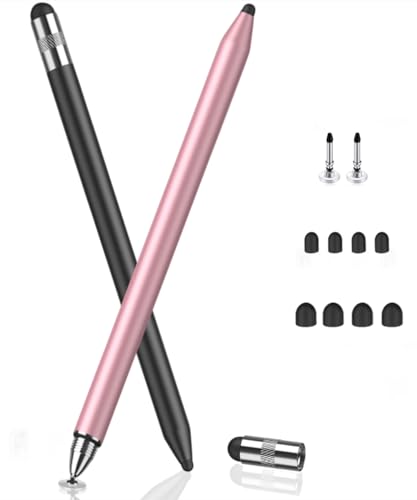
MEKO Stylus Pen for Touchscreen (3-in-1)
Badge: Best Overall
| Type | 3-in-1 capacitive stylus |
| Tips | Fine tips in 3 sizes |
| Sensitivity | High sensitivity design (per listing) |
| Compatibility | iPad, iPhone, Samsung and all touchscreen devices (per listing) |
| Pairing | None required |
The MEKO 3-in-1 earns the top spot by being the pen that fits the most phones and the most tasks. It is a capacitive stylus, so it works on Samsung Galaxy, Google Pixel, Motorola and essentially every other Android phone with a touchscreen, no pairing and no charging. The three-in-one design gives you fine tips in three sizes, which lets you pick a precise point for signing and note-taking or a broader tip for tapping and scrolling, instead of accepting whatever single tip a cheaper pen ships with.
Its limits are the limits of capacitive technology itself: it cannot sense pressure and your palm will still register if it rests on the screen, because the phone cannot tell the pen from a finger. Within those honest boundaries it is excellent — accurate, comfortable and ready the second you pick it up. For the majority of Android owners who want a better finger rather than a drawing instrument, this is the pen to buy.
A month of living with the MEKO clarifies why tip choice matters more than any other capacitive feature. The finest tip becomes the signature and form-filling tool, precise enough that small checkboxes stop being a fingertip lottery. The broader tips take over for reading, scrolling and tapping through settings, where a bare finger would smear the screen and miss small targets. Swapping between them becomes as automatic as choosing a pen or a pencil from a desk pot. The pen also travels well between devices — the same stylus that signs on your phone annotates on a household tablet — which is the quiet advantage of the capacitive standard: nothing about it is married to one screen, one brand or one year of phone releases.
Strengths
- Works on virtually every Android phone with no setup at all
- Three tip sizes cover signing, writing and general tapping
- High-sensitivity tips track accurately for a capacitive pen
Trade-offs
- No pressure sensitivity; line weight comes from the app, not the pen
- No palm rejection on phones without a digitizer layer
- Fine tips are consumables that eventually need replacing
Choose it if you want one pen that works on your phone today and your next phone too. Skip it if you draw seriously and need pressure sensitivity and palm rejection.
Best for: Most Android owners: notes, signatures, tapping and everyday precision / Not suited for: Digital artists who need a digitizer pen
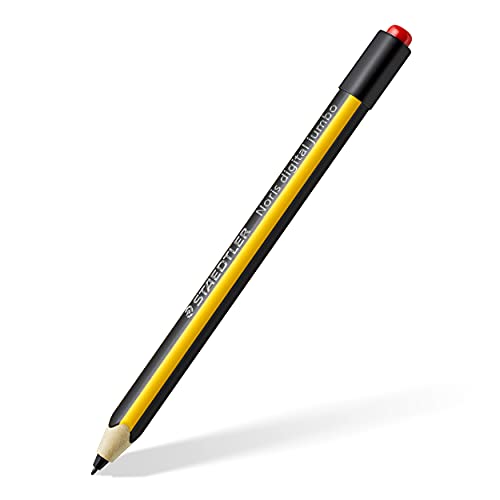
STAEDTLER Noris Digital Jumbo
Badge: Best for Samsung S Pen Phones
| Type | EMR stylus with built-in eraser |
| Pressure | 4,096 pressure levels (per listing) |
| Tip | 0.7 mm tip |
| Features | Palm rejection on supported devices |
| Power | No charging or pairing |
The STAEDTLER Noris Digital Jumbo is the specialist pick, and its condition is absolute: it works only on devices with an EMR digitizer, which in the phone world means Samsung Galaxy models built for the S Pen, along with supported Samsung tablets and similar devices named in the listing. On those devices it is transformative compared with a capacitive pen — 4,096 levels of pressure make lines thicken as you press, palm rejection lets you rest your hand naturally, and the eraser end flips to rub out like the pencil it is styled after.
It never needs charging or pairing, because the digitizer powers it, and the pencil-like body is comfortable for long writing sessions. On any other Android phone — a Pixel, a Motorola, a Galaxy model without the S Pen digitizer — it will do nothing at all, and that is not a defect but the technology working as designed. Check your exact phone model against the listing’s compatibility notes before ordering, and if your phone qualifies, this is the most capable pen in the guide by a wide margin.
Writers who switch to the Noris Digital Jumbo usually describe the same small revelation: handwriting on the phone stops feeling like a compromise. Because the digitizer tracks pressure and ignores the resting palm, a sentence can flow at natural speed with natural hand position, and the eraser end makes corrections a gesture rather than a menu dive. Sketchers get the shading control that capacitive pens structurally cannot offer, and annotators get underlines and margin notes that look like ink. None of this is the pen being clever in isolation — it is the pen completing a system your phone already contains. If your Galaxy has the digitizer, leaving that system unused while buying capacitive pens is the real waste this pick exists to correct.
Strengths
- True pressure sensitivity for drawing and natural handwriting
- Palm rejection on supported devices changes what a phone pen can do
- Built-in eraser and a comfortable pencil-style body
Trade-offs
- Completely incompatible with phones lacking an EMR digitizer
- Costs more than every capacitive pick here
- The fine 0.7 mm tip is a drawing tool, not a rugged tapper
Choose it if your Samsung phone supports the S Pen and you write or draw for real. Skip it if your phone is any model without an S Pen digitizer — it cannot work.
Best for: Galaxy S Pen phone owners who sketch, annotate and write longhand / Not suited for: Every Android phone without an EMR digitizer

Luntak Stylus Pen for Android
Badge: Best Active Pen
| Type | Active stylus pen for Android tablets and phones |
| Charging | Fast charge (per listing) |
| Use | Writing and drawing |
| Compatibility | Samsung and other Android devices (per listing) |
| Color | Black |
The Luntak active pen is for Android owners who want a finer, more deliberate writing point than a passive capacitive tip provides. As an active stylus it carries its own power, charges quickly according to the listing, and is aimed at writing and drawing on Android phones and tablets including Samsung models. The fine point makes handwriting and annotation feel closer to pen on paper, which is exactly what students and note-takers ask a stylus to do.
Be clear-eyed about what active means on a phone without a digitizer: the pen improves the tip and the tracking experience, but it cannot add pressure sensitivity or palm rejection that the screen does not support. You also take on a battery to manage, unlike the passive picks. For writers who take notes on their phone daily and want the finer point, that trade is fair, and the fast charging keeps the commitment small.
The Luntak makes most sense as a student’s pen. Lectures and study sessions reward a fine point that keeps cramped notes legible, and a phone is often the device actually present when an idea needs capturing. The fast charging in its listing fits student logistics too: a short charge between classes restores the pen rather than ending its day. Pair it with a note app that organizes by subject, keep the phone propped at a slight angle, and the combination is a credible paper-notebook replacement for many subjects. It will not satisfy an artist, and it asks for a charging habit the passive pens do not, but for the specific job of writing a lot on an Android phone, its priorities are correctly ordered.
Strengths
- Fine active point suits handwriting and annotation
- Designed and listed specifically for Android devices
- Fast charging keeps downtime short between sessions
Trade-offs
- Battery to charge, unlike the passive picks
- Cannot add pressure or palm rejection to a non-digitizer screen
- Best experienced on larger phone screens for writing
Choose it if you handwrite notes on your Android phone and want a finer, powered point. Skip it if you want a pen that is always ready with zero charging, ever.
Best for: Students and note-takers with Android phones / Not suited for: Owners of S Pen digitizer phones, who should buy the EMR pick

DOGAIN Stylus Pen with Power Display
Badge: Best for Battery Awareness
| Type | Digital touch pen with POM tip |
| Display | Power display shows battery state |
| Design | Magnetic body |
| Compatibility | iPhone, iPad, Switch, Lenovo and other iOS and Android smartphones and tablets (per listing) |
| Use | Writing and drawing on touchscreens |
The DOGAIN pen solves the one annoying problem of powered styluses: not knowing the battery is about to die. Its power display shows the charge state, so you can top it up before a lecture, a meeting or a flight instead of discovering the problem mid-sentence. The POM tip is a smooth, durable material that glides across phone glass, and the magnetic body clings to suitable surfaces and cases so the pen stays findable.
Like the Luntak, it is an active capacitive-class pen: excellent tip control on any Android phone, no invented pressure claims, and a battery that is now at least visible and manageable. The wide compatibility in its listing covers the usual Android brands. If you like the active-pen experience but have been burned by a silent flat battery before, this is the version of that idea designed for you.
The power display sounds like a gimmick until the first time it saves a session. Glancing at the pen before leaving for a meeting and seeing a low battery turns a mid-sentence failure into a two-minute charge at the desk, and that predictability is what separates a tool from a gadget. The POM tip supports the same point: it is chosen for glide and durability, so the pen feels consistent month after month rather than developing the scratchy drag of a worn soft tip. Owners who use a stylus as daily equipment — inspectors, delivery coordinators, teachers marking up documents — are exactly the people who feel these unglamorous virtues most. The DOGAIN is the active pen for people who think in routines.
Strengths
- Power display removes the flat-battery surprise
- POM tip glides smoothly and resists wear
- Magnetic body helps the pen stay attached and findable
Trade-offs
- Still a battery to manage, display or not
- No digitizer features on phones that lack a digitizer
- Magnetic attachment depends on your case and surfaces
Choose it if you like active pens but want to see the battery before it matters. Skip it if you prefer a passive pen that can never run flat.
Best for: Regular note-takers who rely on their pen daily / Not suited for: Digitizer-phone owners seeking pressure sensitivity

Bopomofo Stylus Pens (5-Pack)
Badge: Best Value Multi-Pack
| Type | 2-in-1 capacitive stylus |
| Tips | Precise disc tip and rubber tip |
| Pack | 5 pieces |
| Compatibility | iPad, iPhone, Samsung Galaxy, Android tablets and Kindle (per listing) |
| Pairing | None required |
The Bopomofo five-pack is built on a true observation: most stylus use is not art, it is signatures on delivery forms, precise taps on small buttons, form-filling, and keeping fingerprints off a screen you just cleaned. Each pen pairs a precise disc tip, which lets you see exactly where the contact lands, with a familiar rubber tip at the other end, and with five in the box the pen can live where the tasks happen — desk, car, kitchen, bag and bedside.
Disc tips glide beautifully on clean glass and the transparency helps accuracy, though they prefer a screen without gritty debris and feel different from a pen point. Nobody should buy this pack to draw a portrait. Everybody who has ever hunted for the one stylus in the house while a courier waits at the door should buy it to end that hunt permanently.
There is a behavioral trick hidden in the five-pack: when a stylus is always within arm’s reach, people actually use it, and the small jobs it is best at — the signature, the precise tap, the fingerprint-free scroll — stop defaulting back to a fingertip. Put one where the deliveries arrive, one in the car for passenger-side form filling and map work, one by the kitchen tablet and one in the bag, and the pack pays for itself in minor conveniences rather than major features. The disc tip also turns out to be the household favorite for older relatives, who can see exactly where the pen will land before it touches. Not every accessory needs to be a precision instrument; some need to be present, and presence is this pack’s entire, well-executed idea.
Strengths
- Five pens end the where-is-the-stylus problem
- Disc tip shows the exact contact point for forms and signatures
- Rubber tip at the other end covers everyday tapping
Trade-offs
- Disc tips need reasonably clean glass to glide well
- No fine-point handwriting experience like the active picks
- Basic build, as expected at a multi-pack position
Choose it if your stylus jobs are signatures, forms and accurate tapping all over the house. Skip it if you want one premium pen for handwriting or drawing sessions.
Best for: Households, delivery signatures, forms and shared devices / Not suited for: Artists and longhand writers

baolaili Stylus Pens (2-Pack)
Badge: Best Budget Spares
| Type | Universal capacitive stylus pens |
| Pack | 2 pieces |
| Compatibility | All capacitive touchscreen devices (per listing) |
| Examples | iPad, Samsung Galaxy and more (per listing) |
| Pairing | None required |
The baolaili two-pack is the floor of this category, in a good way. Two universal capacitive pens, compatible with all capacitive touchscreen devices per the listing, that work on your Android phone, your tablet, and the touchscreen at the gym check-in if it came to that. There is nothing to charge, pair, configure or update, and losing one is a minor event rather than a small tragedy.
You give up the interchangeable tips of the MEKO, the fine powered points of the active pens and any hope of digitizer features. What you get is a pen that is always ready for the signature, the sketch of a room layout, or the grandparent who finds fingertips imprecise. As spares bought alongside a main pen, or as the only pens for light-duty users, they are exactly right.
The baolaili pair plays a role the other picks should be grateful for: it is the pen you lend. Every household and office has the moment — a guest signing a document on your phone, a colleague marking up a photo, a child who wants to draw on the big screen — where handing over your good pen feels wrong. A universal spare solves it, and because these pens work on every capacitive screen, they also become the travel backup that lives permanently in a wash bag or glovebox. Judged as instruments they are basic, and the reviews above say so. Judged as insurance against the dozen small moments a stylus is wanted and absent, they are among the most rational purchases in this guide.
Strengths
- Universal capacitive compatibility with every touchscreen
- Two pens at a budget position; losing one barely matters
- Zero maintenance: no charging, pairing or setup
Trade-offs
- Basic tips without the MEKO’s size options
- No fine-point precision for handwriting
- No digitizer or active features of any kind
Choose it if you want cheap, ready spares for light stylus jobs. Skip it if handwriting, drawing or precision work is your main use.
Best for: Light-duty users and as backup pens beside a main pick / Not suited for: Writers, artists and heavy note-takers
Comparison Table
The decisive column is pen type: it determines what your phone screen can do with the pen. Confirm your phone’s digitizer support before valuing any feature that depends on it.
| Pick | Pen type | Tip | Works on |
|---|---|---|---|
| MEKO Stylus Pen for Touchscreen (3-in-1) | Capacitive stylus | 3 tip sizes included | No charging or pairing |
| STAEDTLER Noris Digital Jumbo | EMR digitizer pen | 4,096 pressure levels | Samsung S Pen devices only |
| Luntak Stylus Pen for Android | Active stylus pen | Fast charge | Android phones and tablets |
| DOGAIN Stylus Pen with Power Display | Active touch pen | Battery display | POM tip, magnetic body |
| Bopomofo Stylus Pens (5-Pack) | Capacitive 2-in-1 stylus | Disc plus rubber tips | 5 pens per pack |
| baolaili Stylus Pens (2-Pack) | Capacitive stylus | Universal touchscreen fit | 2 pens per pack |
Buying Guide: How to Choose a Stylus Pen for an Android Phone
Everything in this category flows from one question: does your phone have a pen digitizer? Samsung builds an EMR digitizer into its S Pen phones, which is what makes pressure sensitivity, palm rejection and hover features possible. Every other Android phone, and Samsung models without S Pen support, uses a capacitive touchscreen that senses contact but cannot measure pressure or distinguish a pen from a palm. No pen purchase can change which screen you own, so establish this first, from your phone’s specifications, before reading a single pen feature list.
With that settled, match the pen to the job. Capacitive pens are better fingers: they sign, tap, scroll and take quick notes on any phone, and the best ones add interchangeable tips and comfortable grips. Active pens refine the writing point and suit people who handwrite on their phone daily, while staying inside capacitive limits. EMR pens are drawing and writing instruments for digitizer phones. Buying across those categories — an EMR pen for a Pixel, a basic rubber tip for serious sketching — is how money gets wasted in this market.
Finally, think in systems rather than single pens. Note-takers lose pens; households share them; bags swallow them. A main pen chosen for your primary job plus a cheap multi-pack for everywhere else outperforms one expensive pen that is never where you need it. The listings make that combination easy to assemble, and the total commitment stays modest.
Hand size and writing style deserve a final word, because they quietly decide comfort. Writers with a tripod grip who print small letters tend to love fine tips and slimmer barrels; palm-heavy writers who script large and fast tend to prefer thicker, pencil-like bodies that resist rolling and cramping. Children and older users often do best with the forgiving rubber tips and chunkier multi-pack pens, where precision demands are low and grip is easy. If you can, mimic your writing grip on a pen you already own while reading the reviews; the pick whose shape matches the pen you reached for is usually the right one.
- Identify your screen type first: digitizer (S Pen) or capacitive.
- Capacitive for signing, tapping and notes; active for daily handwriting; EMR for digitizer drawing.
- Ignore pressure claims for any pen used on a non-digitizer phone.
- Pair one main pen with a cheap multi-pack for spares.
- Check the listing’s compatibility notes for your exact phone model.
Tips, Grip and the Feel of Writing on Glass
On a capacitive pen, the tip is the product. Disc tips float a small transparent plate on the glass, which sounds odd and works beautifully: you see the exact contact point, so signatures and form fields land where intended. Rubber and fiber tips feel familiar and forgiving, at the cost of a broader, less visible contact area. Fine active points come closest to a pen nib and reward people who write small and fast. None of these is best in the abstract; each is best for a hand and a task.
Grip and weight matter more than buyers expect. A phone stylus is used in short bursts, but handwriting sessions stretch, and a slim, slippery pen cramps a hand the way a cheap ballpoint does. Pens styled after pencils, like the STAEDTLER pick, borrow a century of grip design. If you write for more than a few minutes at a time, favor diameter and texture over the slimmest possible profile, and keep a spare tip on hand, because every tip in this guide is a wear part.
Checking Compatibility on the Listing Before You Order
Compatibility is where stylus listings earn careful reading. For capacitive and active pens, look for your phone’s brand in the compatibility notes and confirm the pen is described for Android phones, not only for a specific tablet line. For the EMR pick, the standard is stricter: your exact phone model must be an S Pen device, and near-misses — a Galaxy model from a line without pen support — do not work at all.
Also check what the box contains and what wears out. Interchangeable-tip pens should list spare tips or make replacements findable; multi-packs should state the count plainly; active pens should state their charging method. Two minutes on the listing prevents the classic disappointments of this category: a beautiful pen that your screen cannot use, and a favorite pen sidelined by a worn tip with no replacement in the drawer.
Note Apps, Signatures and Getting More from the Pen You Buy
A stylus is only as good as the app it writes in, and Android’s note and markup tools reward a few minutes of setup. Choose one primary notes app and set it as the home for everything, because scattered notes across four apps are lost notes. Enable the app’s shape and handwriting tools if it offers them, learn its lasso and eraser gestures, and on Samsung pen phones, explore the built-in markup that appears the moment the pen approaches a screenshot — for many owners that single feature justifies the pen.
For signatures and documents, practice once before it matters. Sign your name at natural speed — slow, careful signatures look forged and track worse — and check the result at full size. Save a clean signature workflow in your usual PDF or forms app so a document can be signed and returned from the phone in under a minute. That rehearsed minute, repeated across tenancies, deliveries, school forms and contracts, is where an inexpensive pen quietly returns its cost many times over.
How Do You Set Up and Use a Stylus Pen with an Android Phone?
Most pens in this guide need no setup at all, which is their charm. The steps below cover the passive and active pens, with notes where digitizer phones differ, so your first writing session goes smoothly.
- Identify your pen type. Capacitive and EMR pens work the moment they touch the screen; active pens need a charge and a power button press first.
- For an active pen, charge it fully before first use and note how its indicator or display reports battery state.
- Open a notes or drawing app on your phone and make a few strokes. On Samsung S Pen phones, the phone will recognize the EMR pen automatically and may offer its pen menu.
- On digitizer phones, open the pen settings to enable palm rejection behavior and choose what the pen’s hover and button actions do, if your model offers them.
- Test the tasks you actually bought it for: sign your name, fill a form field, and write one full sentence at your normal speed.
- Adjust your grip and angle if strokes skip; capacitive tips track best with the tip fully in contact, and disc tips like a clean screen.
- Store the pen where the task happens, and keep spare tips or the second pen from a multi-pack in the same place.
Problem: Strokes skip or break up while writing → clean the screen, press with the tip fully in contact rather than at a shallow angle, and replace a worn tip; on active pens, charge the battery before blaming the pen.
Problem: My palm keeps making marks while I write → your phone lacks a digitizer, so palm rejection is not available; rest your hand on a folded cloth at the screen edge, or use an app setting that restricts input where offered.
Problem: The pen worked on my old phone but not the new one → check whether the pen is an EMR model and the new phone lacks the digitizer, which is the most common cause; capacitive pens, by contrast, carry across phones freely.
Problem: An active pen dies mid-session → build a charging habit around its indicator or display, and keep a passive spare from a multi-pack in the same bag for exactly this moment.
Common Buying Mistakes
Buying an EMR pen for a phone without a digitizer. It will not write a single letter, because the screen technology it needs is not there. Confirm S Pen support for your exact model first; this is the costliest mistake in the category.
Believing pressure claims for capacitive pens. On a capacitive screen, pressure sensitivity is impossible regardless of the pen. Apps can fake line variation from speed, but that is software, not the pen sensing your hand.
Judging a pen by drawing alone. Most owners mostly sign, tap and jot. A pen that excels at those jobs, like the multi-packs here, may serve you better than a drawing specialist you rarely exploit.
Owning exactly one pen. Pens migrate and vanish. A main pen plus cheap spares in the places you use them beats a single pen that is always in the wrong room.
Ignoring tip wear. Tips are consumables. A scratchy, flattened tip ruins the feel of a good pen and can drag debris across glass; replace tips when strokes start to skip.
Skipping the compatibility notes. Listings state supported devices plainly, including the strict limits of digitizer pens. Two minutes of reading is cheaper than a return.
Final Recommendation
Most Android owners should buy the MEKO 3-in-1: it works on the phone you have, handles signing, notes and precise tapping with a choice of tips, and asks for no charging or pairing in return. The runner-up depends entirely on your phone — Galaxy owners with an S Pen digitizer should step up to the STAEDTLER Noris Digital Jumbo, which is not a better MEKO but a different and far more capable instrument on the screens that support it.
Add the Bopomofo five-pack if your household shares pens or loses them, choose the Luntak or the DOGAIN if daily handwriting justifies a powered fine point, and keep the baolaili pair as universal spares. Whatever you order, confirm your phone model against the listing’s compatibility notes first; in this category, that single check decides whether the pen delights you or does nothing at all.
A closing thought on value: the most expensive mistake in this category is not buying the premium pen — it is buying any pen your screen cannot use, or buying a precision instrument for fingertip jobs. The cheapest correct pen outperforms the finest wrong one every day of the week. Confirm the screen, name the job, and the rest of this guide is just refinement.
Related Guides
- best accessories for android phones
- best memory cards for android phones
- best android phones for photography
- best gimbal for android phones
- best scanner for android phones
- best bluetooth headphones for android phones
Frequently Asked Questions
Will any stylus work on my Android phone?
Any capacitive stylus will, because capacitive screens respond to the same kind of contact as a fingertip. That covers five of the six picks here. The exception is the EMR pen, which needs a phone with a built-in digitizer, such as Samsung’s S Pen models, and does nothing on other phones.
Can a stylus give my phone palm rejection?
Only if the phone has a pen digitizer. Palm rejection works because the digitizer tracks the pen separately from your hand, which is why it functions with the STAEDTLER pick on S Pen phones. On capacitive phones, no pen can add it, though some note apps offer partial workarounds.
Do stylus pens need Bluetooth or pairing?
None of the pens in this guide needs pairing to write. Capacitive pens are passive, the EMR pen is powered by the phone’s digitizer, and the active pens work as powered touch points. Bluetooth appears in some flagship phone pens for remote buttons, which is a separate feature from writing.
Which tip is best for handwriting?
A fine point, from an active pen or a fine capacitive tip, tracks handwriting most naturally because it lands where a pen point would. Disc tips suit signatures and forms where seeing the contact point matters. Rubber tips are the most forgiving for general tapping but the least precise for small writing.
How long do stylus tips last?
It depends on pressure, screen cleanliness and tip material, but treat every tip as a wear part measured in months of regular use rather than years. When strokes begin to skip or the tip looks flattened or rough, replace it; multi-packs and spare-tip designs exist precisely because this is normal.
Is a phone stylus worth it if I do not draw?
Often, yes. Signing documents, filling forms accurately, tapping small controls, keeping a clean screen free of fingerprints and jotting quick notes are everyday jobs a stylus does better than a fingertip. The inexpensive multi-packs in this guide exist for exactly those non-art uses.