Where to buy
These are the three webcam black friday deals we would check first. Start with the three picks below, then read the full six before you decide, because the right choice depends on how you actually use this kind of product rather than on the biggest headline discount. Check the latest price, availability and delivery on Amazon. Orders are placed on Amazon, and prices during Black Friday Week can change by the hour, so the figure on the live listing is the one that counts. We may earn a commission from qualifying purchases.
- Best Overall: Logitech MX Brio Ultra HD 4K Webcam (Graphite)
- Best for Presenters and Teachers: Insta360 Link 2 PTZ 4K Webcam
- Best Value 4K: Logitech Brio 4K Webcam
Disclosure: As an Amazon Associate, kajuandouglas.com earns from qualifying purchases. Links to Amazon on this page are affiliate links; they cost you nothing extra. Listing details such as price and availability change often — during this event they can change several times a day — so check the current Amazon listing before you buy.
Webcam Black Friday Deals: What Is Actually Worth Buying
Amazon Black Friday Week runs from November 19 to November 30, 2026. Black Friday itself is November 27, and Cyber Monday closes the event on November 30. The best webcam black friday deals cluster around a simple truth: a webcam is the highest-impact upgrade in a home office, because the camera other people see you through shapes how professional, present and trustworthy you look in every meeting, class and interview — and laptop manufacturers keep fitting cameras that flatter nobody. This guide spans the full honest range: a flagship 4K Logitech, a motorised tracking camera for presenters, a proven 4K value pick, the mid-range all-rounder that defined the category, a budget 4K disruptor, and a twenty-five-dollar rescue for dreadful laptop cameras.
Every price in this guide was checked against Amazon’s own catalogue data on November 20, 2026, and every price is written as a dated sighting: ‘seen at $54.99 on November 20, 2026’ means exactly that, no more. Webcam prices move during Black Friday Week as stock rotates between sellers and editions, and the same model name can hide a new listing and a Renewed listing a few dollars apart — this guide links new listings and flags the one place where that distinction matters most. Where the catalogue also returned a list price, we show the percentage that pair of numbers represents; where no list price came back, we print no percentage at all.
The decision that matters is matching the camera to the call. Seated one-to-one meetings need resolution, light handling and a decent microphone. Teaching and presenting need tracking or a wide, forgiving frame. Streaming and recording need headroom your editing software can crop. And occasional family calls need none of that — they need a camera that works the moment it is plugged in. Each review below states which job its camera is actually for, and the comparison and choosing sections translate the spec language — sensor size, field of view, autofocus type, frame rate — into what you will actually see on screen. Best Black Friday Camera Deals 2026 Bestblackfridaycameradeals2026 Bestblackfridaycameradeals2026
One more piece of honest framing before the picks: no webcam fixes bad light or bad audio on its own. A window in front of you beats a flagship sensor with a window behind you, and a room’s echo limits any built-in microphone. The cameras here were chosen because their light correction, microphones and focus systems handle real rooms gracefully — but the how-to section later in this guide covers the free setup changes that multiply whatever camera you buy.
In this guide
Quick Picks
Short on time? These are the six deals, the buyer each one suits, and the price we verified on November 20, 2026. Every price is a dated sighting — check the live price before you buy.
| Best for | Deal | Spotted price | Link |
|---|---|---|---|
| Best Overall | Logitech MX Brio Ultra HD 4K Webcam (Graphite) | seen at $169.99 on November 20, 2026 (list $199.99) | Check on Amazon |
| Best for Presenters and Teachers | Insta360 Link 2 PTZ 4K Webcam | seen at $149.99 on November 20, 2026 (list $199.99) | Check on Amazon |
| Best Value 4K | Logitech Brio 4K Webcam | seen at $144.48 on November 20, 2026 (list $169.99) | Check on Amazon |
| Best Mid-Range All-Rounder | Logitech C920s HD Pro Webcam | seen at $54.99 on November 20, 2026 (list $59.99) | Check on Amazon |
| Best Budget 4K | EMEET C960 4K Webcam | seen at $41.14 on November 20, 2026 (list $59.99) | Check on Amazon |
| Best Budget | Logitech Brio 101 Full HD 1080p Webcam | seen at $24.99 on November 20, 2026 (list $39.99) | Check on Amazon |
How These Deals Were Chosen
We verified every pick the slow way: by searching Amazon’s own catalogue data for the exact brand and model, matching the returned listing title against the webcam we intended to recommend, and recording the price and list price the catalogue returned on November 20, 2026. That process eliminates the two failure modes that fill most Black Friday roundups — links that land on a different model or edition than the headline promises, and prices copied from roundup to roundup until nobody knows which year they belong to. Where a search returned a Renewed listing alongside the new one, we linked the new listing and noted the distinction in the review.
A deal then had to clear three further bars. First, the product had to be a current, genuine webcam from its maker, sold as new. Second, its headline claims had to be specific and checkable in the verified listing — a stated resolution, a named autofocus type, a defined field of view — rather than vague promises of HD quality. Third, the price had to be worth printing: a token dollar off a camera that sits at that figure all year is not a deal, so we favoured listings where the verified price sat meaningfully below the list price returned alongside it, and where it did not, we said so in the review rather than dressing the pick up.
We also weighted the unglamorous details that decide whether a webcam stays on the monitor or ends up in a drawer: a privacy shutter or cover, plug-and-play setup without a software suite, a mount that fits real monitors and laptops, and microphone quality sufficient for the calls the camera is aimed at. Readers building a fuller desk setup will find the companion camera coverage on this site useful for recorded content, while this guide stays focused on live calls and streaming.
The Six Deals, In Detail

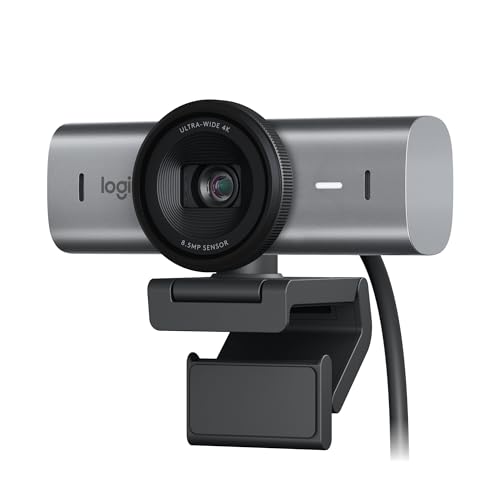
1. Logitech MX Brio Ultra HD 4K Webcam (Graphite) — Best Overall
Badge: Best Overall. Logitech’s flagship desk webcam, built for people whose camera is on for hours every day: Ultra HD 4K capture, a 1080p mode at 60 frames per second for smoother motion, and Show Mode, which tilts the view down to share a desk, a sketch or a product without standing up and re-aiming anything. It is the complete professional package in this guide.
Spec snapshot: Ultra HD 4K webcam per the verified listing; 1080p at 60 FPS; Show Mode; works with Microsoft Teams, Zoom and Google Meet per the listing title; Graphite finish; confirm cable and mount contents on the live listing.
Who it suits: Remote professionals, executives, teachers and creators who present as much as they talk. Show Mode is the differentiator in real meetings: sharing a notebook page, a whiteboard sketch or a physical product normally means holding it up to the lens and hoping, while this camera was designed around exactly that gesture.
The 60fps mode deserves a practical explanation. Most meeting platforms compress video heavily, but a smoother source still reads as more polished, especially when you move, gesture or share a screen-adjacent demo. Pair that with 4K headroom for cropping in software and you have the webcam in this guide that stays useful longest as platforms improve around it.
Deal details: Seen at $169.99 on November 20, 2026, against a $199.99 list price returned by the same catalogue check — 15% below list on those two figures. Check the live price before you buy, and confirm the exact contents and configuration on the listing, because sale-week listings can rotate bundles and editions.
Strengths
- Flagship 4K image with a smooth 1080p 60 FPS mode for motion.
- Show Mode shares desk items without awkward re-aiming.
- Works across Teams, Zoom and Google Meet per the verified listing.
Trade-offs
- Highest mainstream price in this guide; casual callers will not use its headroom.
- 4K benefits depend on platform, bandwidth and lighting in your room.
- Desk lighting still matters more than any sensor at this level.
Verdict — Best for: professionals and presenters who live on video calls and share physical work on camera. Not suited for: occasional callers, who get everything they need from the C920s or Brio 101 below for far less. Check on Amazon · See the listing · View the live price and full details

2. Insta360 Link 2 PTZ 4K Webcam — Best for Presenters and Teachers
Badge: Best for Presenters and Teachers. A webcam on a motorised gimbal: the Link 2 physically pans and tilts to follow you around a room, with AI tracking, HDR, a 1/2-inch sensor and gesture control per the verified listing. For anyone who teaches, coaches, demonstrates or presents standing up, that movement is not a gimmick — it is the difference between performing for a fixed frame and simply working while the camera keeps up.
Spec snapshot: PTZ 4K webcam with 1/2″ sensor per the verified listing; AI tracking and HDR; AI noise-canceling microphone; gesture control; works with Zoom, Teams and Twitch per the listing title.
Who it suits: Teachers, fitness and music instructors, workshop presenters, streamers and anyone who moves while they talk. If your work happens at a whiteboard, a workbench or a demonstration table rather than a chair, a tracking camera is the only webcam type that frames you correctly without a second person operating it.
Gesture control matters more than it sounds: starting and stopping tracking or zooming without walking back to the keyboard keeps a lesson or a stream flowing. The honest caveat is placement — a PTZ camera needs a stable mount and a clear arc to move in, so plan its tripod or monitor position before the first class rather than balancing it on a stack of books.
Deal details: Seen at $149.99 on November 20, 2026, against a $199.99 list price returned by the same catalogue check — 25% below list on those two figures. Check the live price before you buy, and confirm the exact contents and configuration on the listing, because sale-week listings can rotate bundles and editions.
Strengths
- Motorised tracking follows presenters around a room.
- Large 1/2-inch sensor class and HDR help in mixed lighting.
- Gesture control keeps lessons and streams hands-free.
Trade-offs
- Moving parts need stable mounting and clear space to pan.
- More camera than a seated caller will ever use.
- Premium pricing against fixed webcams of similar resolution.
Verdict — Best for: teachers, coaches and presenters who stand, move and demonstrate on camera. Not suited for: seated desk callers, for whom a fixed camera like the MX Brio is simpler and cheaper to live with. Check on Amazon · See the listing · View the live price and full details

3. Logitech Brio 4K Webcam — Best Value 4K
Badge: Best Value 4K. The long-running 4K benchmark from Logitech, in its current new listing: Ultra 4K HD capture with autofocus, 5x digital zoom, dual noise-cancelling microphones, HD light correction and a wide field of view per the verified listing. Note the sourcing care here — a Renewed version of this camera also appears in catalogue results, and this guide deliberately links the new listing and says so.
Spec snapshot: Ultra 4K HD webcam per the verified listing; autofocus with 5x digital zoom; dual noise-cancelling microphone; HD light correction; wide field of view; Windows, Mac and ChromeOS per the listing title. This is the new listing, not the Renewed listing that also appears in search results.
Who it suits: Professionals who want genuine 4K headroom and Logitech’s mature software support without paying the MX Brio’s flagship premium. The wide field of view suits small-group huddle framing and roomier desk setups, and the digital zoom lets you tighten the frame in software for one-to-one calls.
Light correction is the feature you will feel daily. Home offices have terrible light — a window to one side, a warm lamp behind — and a camera that balances exposure automatically saves the daily fiddling that makes people abandon external webcams. Set it up once, check your framing in each app you use, and this camera simply disappears into the routine, which is what good desk gear should do.
Deal details: Seen at $144.48 on November 20, 2026, against a $169.99 list price returned by the same catalogue check — 15% below list on those two figures. Check the live price before you buy, and confirm the exact contents and configuration on the listing, because sale-week listings can rotate bundles and editions.
Strengths
- Real 4K capture with autofocus and useful digital zoom.
- Dual noise-cancelling mics and HD light correction for real rooms.
- Wide field of view covers huddles and roomy desks.
Trade-offs
- Design is older than the MX Brio flagship above.
- Digital zoom crops the sensor; it is framing help, not optical reach.
- A separate Renewed listing exists — double-check you are buying the new one linked here.
Verdict — Best for: professionals wanting proven 4K quality and light correction below flagship money. Not suited for: buyers who want the newest flagship features, or presenters who need physical tracking. Check on Amazon · See the listing · View the live price and full details

4. Logitech C920s HD Pro Webcam — Best Mid-Range All-Rounder
Badge: Best Mid-Range All-Rounder. The webcam that defined the category, in its privacy-shutter version: Full HD 1080p video at 30fps, clear stereo audio, light correction and a physical privacy shutter per the verified listing. It is not the newest or sharpest camera here, and its review says so plainly — it is the proven, compatible, works-everywhere answer at a mid-range price.
Spec snapshot: Full HD 1080p/30fps video per the verified listing; stereo audio; light correction; privacy shutter included; works with Skype, Zoom, FaceTime and Hangouts per the listing title; PC, Mac, laptop, tablet and Xbox compatibility per the listing.
Who it suits: Hybrid workers, students and families who need one dependable webcam for everything: work calls, classes, family video chats and the occasional stream. The C920 family’s enormous installed base means every app, tutorial and troubleshooting answer on the internet assumes it, which is a genuine practical advantage when something needs configuring at 8:55 before a 9:00 call.
The privacy shutter deserves its own sentence because it changes behaviour: a physical cover you can see and touch ends the low-grade uncertainty about whether the camera is watching, and for a shared family computer that certainty is worth more than a resolution bump. Slide it shut when the call ends; the habit takes a day to form and then it is automatic.
Deal details: Seen at $54.99 on November 20, 2026, against a $59.99 list price returned by the same catalogue check — 8% below list on those two figures. Check the live price before you buy, and confirm the exact contents and configuration on the listing, because sale-week listings can rotate bundles and editions.
Strengths
- Proven 1080p quality that every platform handles perfectly.
- Physical privacy shutter for shared and family computers.
- Stereo audio and light correction cover real home offices.
Trade-offs
- 1080p ceiling: no 4K headroom for cropping or future platforms.
- The verified discount is the shallowest in this guide — value rests on the absolute price.
- Fixed frame: no tracking or Show Mode tricks.
Verdict — Best for: hybrid workers and families wanting one proven webcam for every app. Not suited for: creators who need 4K, or presenters who move around the room. Check on Amazon · See the listing · View the live price and full details

5. EMEET C960 4K Webcam — Best Budget 4K
Badge: Best Budget 4K. The surprise of the guide: a 4K webcam at a budget price, with PDAF autofocus, dual omni microphones, a 73-degree field of view, auto light correction and a privacy cover per the verified listing. EMEET built its name on conference-room gear, and the C960 4K brings that meeting-first tuning to a price the big brands charge for 1080p.
Spec snapshot: 4K webcam with PDAF autofocus per the verified listing; dual omni microphones; 73° field of view; auto light correction; USB-A plug-and-play connection; privacy cover included; works with Zoom, Teams and Google Meet per the listing title.
Who it suits: Budget-conscious remote workers and students who want resolution headroom without a flagship bill, and anyone equipping a second desk or a home classroom. PDAF autofocus is the spec that matters most here: phase-detection focusing is faster and calmer than the contrast-based hunting found in most cheap webcams, so the picture stays locked when you lean in or hold something up.
Set expectations with the honesty a budget pick deserves. The 4K label gives you a sharper source and cropping room, but meeting apps will still compress your outgoing video, and EMEET’s software ecosystem is smaller than Logitech’s. What you are buying is strong hardware fundamentals — sensor, focus, microphones, cover — at a disruptive price, verified on November 20, and for most home offices that trade is exactly right.
Deal details: Seen at $41.14 on November 20, 2026, against a $59.99 list price returned by the same catalogue check — 31% below list on those two figures. Check the live price before you buy, and confirm the exact contents and configuration on the listing, because sale-week listings can rotate bundles and editions.
Strengths
- 4K resolution and PDAF autofocus at a budget price.
- Dual microphones and auto light correction included.
- Privacy cover and plug-and-play USB-A setup.
Trade-offs
- Smaller software and support ecosystem than Logitech.
- App compression limits how much of the 4K advantage callers see.
- 73-degree frame is tighter than wide-angle rivals for group shots.
Verdict — Best for: remote workers and students wanting 4K hardware on a strict budget. Not suited for: buyers who want flagship software features or the widest group framing. Check on Amazon · See the listing · View the live price and full details

6. Logitech Brio 101 Full HD 1080p Webcam — Best Budget
Badge: Best Budget. The cheapest honest webcam in this guide, from the brand that knows the category best: Full HD 1080p resolution, auto-light balance, a built-in microphone and a privacy shutter, with USB plug-and-play setup for Zoom, Teams and Google Meet per the verified listing. For a laptop with a dreadful built-in camera — which is most laptops — this is the single largest call-quality upgrade available at this price.
Spec snapshot: Full HD 1080p resolution per the verified listing; auto-light balance; built-in microphone; privacy shutter; USB plug-and-play; works with Zoom, Teams and Google Meet per the listing title; black finish.
Who it suits: Students, occasional callers, grandparents, second-desk setups and anyone rescuing a laptop whose built-in camera makes them look like a witness-protection interview. The setup story is the point: plug it in, clip it on, select it in the app. No drivers, no software suite, no configuration rabbit hole.
Be clear about what the money does not buy: there is no autofocus system to praise, no 4K headroom and the built-in microphone is a calls microphone, not a recording microphone. None of that matters for its job. Its job is to make a weekly call look and sound clean and human instead of grainy and distant, and at the verified sighting it does that job for less than a team lunch.
Deal details: Seen at $24.99 on November 20, 2026, against a $39.99 list price returned by the same catalogue check — 38% below list on those two figures. Check the live price before you buy, and confirm the exact contents and configuration on the listing, because sale-week listings can rotate bundles and editions.
Strengths
- Full HD 1080p at the lowest verified price in this guide.
- Privacy shutter and auto-light balance at a budget price.
- True plug-and-play: the five-minute upgrade for any laptop.
Trade-offs
- Basic fixed-focus class optics and a calls-grade microphone.
- No 4K, no tracking, no creator features.
- Single-user framing; not a group or presentation camera.
Verdict — Best for: students, families and occasional callers upgrading a poor laptop camera. Not suited for: creators, presenters or anyone recording content for an audience. Check on Amazon · See the listing · View the live price and full details
Comparison Table
| Pick | Type | Key detail | Seen Nov 20, 2026 | Watch out for |
|---|---|---|---|---|
| Logitech MX Brio Ultra HD 4K Webcam (Graphite) | 4K webcam | Ultra HD 4K; 1080p 60 FPS; Show Mode per listing | $169.99 (list $199.99) | Premium price; check USB-C cable and mount in box |
| Insta360 Link 2 PTZ 4K Webcam | PTZ 4K webcam | 1/2-inch sensor; AI tracking; HDR; gesture control per listing | $149.99 (list $199.99) | Moving gimbal head wants a stable mount; confirm edition |
| Logitech Brio 4K Webcam | 4K webcam | Ultra 4K HD; autofocus; 5x digital zoom; dual noise-cancelling mic per listing | $144.48 (list $169.99) | Older flagship design; verify this is the new listing, not the Renewed one |
| Logitech C920s HD Pro Webcam | 1080p webcam | Full HD 1080p/30fps; stereo audio; privacy shutter per listing | $54.99 (list $59.99) | 1080p ceiling; discount percentage is shallow — judge on absolute price |
| EMEET C960 4K Webcam | Budget 4K webcam | 4K; PDAF autofocus; dual omni mics; 73-degree FOV per listing | $41.14 (list $59.99) | Budget brand support; confirm 4K mode settings in your app |
| Logitech Brio 101 Full HD 1080p Webcam | Budget 1080p webcam | Full HD 1080p; auto-light balance; privacy shutter per listing | $24.99 (list $39.99) | Basic mic and fixed focus class; fine for calls, not content |
Understanding Resolution, Frame Rate and Field of View Before You Buy
Resolution is the vocabulary that sells webcams, so it deserves one plain-English pass. A 1080p camera produces a clean, professional image for meetings, because meeting platforms themselves typically transmit at 1080p or below — extra resolution is cropped away or compressed by the app before anyone sees it. A 4K camera’s advantage is headroom: the ability to crop digitally without going soft, smoother downscaling, and a sharper source when you record locally for content. Neither is ‘better’ in the abstract; 4K earns its price for creators, presenters who crop, and buyers keeping a camera for many years of platform improvements.
Frame rate is the quieter spec that changes how you feel on camera. Thirty frames per second is the meeting standard and looks perfectly natural for a seated speaker. Sixty frames per second — offered by the MX Brio’s 1080p mode in this guide — smooths gestures, demonstrations and anything that moves, which is why streamers and teachers notice it immediately. If your work is mostly still and seated, spend on light and audio first; if you move, frame rate deserves a place in the decision.
Field of view decides who and what fits in the frame. A tighter view around 73 degrees, like the EMEET pick, flatters a single speaker and hides a messy room. A wide view suits huddle rooms, family calls with three people on a sofa, and desks where you show physical work. Most cameras let software crop a wide sensor tighter, but a natively tight camera cannot go wider — so when in doubt, buy the wider frame and crop, unless your room background is the thing you most want to exclude.
Autofocus type is the last spec worth translating. Fixed-focus budget cameras are sharp within a designed distance range and never hunt, which is fine for a seated caller at a consistent distance. Contrast-based autofocus can pulse visibly while it searches. PDAF — phase-detection autofocus, on the EMEET pick — is the fast, calm system borrowed from mirrorless cameras, and it shows when you lean in, stand up or hold a product to the lens. Match the system to how much you move, not to the spec sheet’s length.
Webcams by Job: Streaming, Teaching and the Hybrid Desk
A streamer’s webcam lives a different life from a meeting camera, and the difference should steer the purchase. Streaming rewards frame rate, low-light cleanliness and software control, because the image sits in a corner of a broadcast for hours and viewers notice softness, hunting focus and noisy shadows. That is why the MX Brio’s smooth 1080p mode and the Brio 4K’s mature light correction sit at the top of this guide for creators, and why a streamer should also budget attention — if not money — for lighting, which shapes a broadcast image more than any sensor in this price range. Record a test at your usual streaming hour, in your usual room light, before judging any camera: noon light flatters everything and midnight light tells the truth.
Teaching splits into two opposite cases. A tutor seated at a desk, sharing a screen, is served by exactly the same cameras as a hybrid worker — the C920s or the EMEET — because the screen is the content and the camera is a presence window. A teacher who stands, writes, demonstrates an instrument, a recipe, a repair or a movement is served by only one design in this guide: a tracking camera that keeps them framed while both hands are busy. Buying a fixed flagship for a standing job is the most expensive mistake in this category, because no resolution compensates for a presenter who has walked out of the frame.
The hybrid desk is the most common case and the easiest to serve well. Its pattern is back-to-back calls, mixed internal and external audiences, and a premium on reliability over spectacle: the camera must wake instantly, be selected correctly by three different apps, and make its owner look rested on a grey Tuesday. That is the C920s’ home ground and the reason it remains in this guide despite the shallowest discount — dependability across a thousand ordinary calls is a feature, and for many buyers it outranks every headline specification the flagships compete on.
Finally, consider the second-camera trick before spending flagship money. Many creators and teachers get more from two modest angles — a face camera plus a desk camera for hands, notes or products — than from one expensive camera locked to a single view. The EMEET and Brio 101 price points make that pairing realistic during this sale, and switching angles in a lesson or a stream holds attention in a way no single frame can. If your content involves showing things as much as saying things, price a pair before you price a flagship.
How to Choose the Right Webcam Deal for Your Calls
Start with the call, not the discount. Write down your three most common video situations: the weekly team meeting, the client presentation, the class you teach, the family call. Seated and solo points to the C920s, the Brio 4K or the MX Brio depending on budget. Standing and moving points to the Link 2 and nothing else in this guide. A second desk or a student’s laptop points to the Brio 101 or the EMEET. Every webcam here is the best answer to one of those lists and an expensive ornament for the others.
Decide whether you record or only call. If the camera’s output is only ever live meeting video, 1080p is the rational ceiling and the savings belong in a better microphone or a desk lamp. If you record lessons, videos or streams — even occasionally — 4K headroom pays for itself the first time you crop a recording in editing. This single question splits this guide in half, and answering it honestly saves more money than any percentage in the Quick Picks table.
Price the whole desk, not the camera. A webcam may need a small tripod for the right height, and every camera benefits from light in front of your face. Compared on that honest total, rankings shuffle: a mid-range camera plus a simple light often outperforms a flagship in a dark room. Black Friday is the cheapest week to buy those extras too, and readers upgrading a whole setup should sort the desk itself first — the camera is the priority purchase.
Three example shopping lists. For a hybrid worker: the C920s, positioned at eye level, and nothing else until you know your apps. For a teacher or presenter: the Link 2 on a small tripod, with gesture control learned before the first live session. For a creator: the MX Brio or Brio 4K, recording locally at full resolution, with the EMEET as a second angle for a desk or overhead shot.
How to Set Up a New Webcam — and Check a Deal Is Real
Compare the sale price with the webcam’s own history. Free price-history trackers keep long Amazon histories for most listings; thirty seconds there tells you whether a discount is a genuine event low or a list price nobody has paid since spring. Every pick in this guide was verified against live catalogue data on November 20, 2026 — do the same check on anything else you add to the cart, and pay particular attention to whether the listing in your cart is the new version or a Renewed version at a different price.
Position beats pixels. Put the camera at eye level — a small tripod, a monitor mount or a stack of books all work — and put your main light source in front of you, never behind. Look at the lens, not at your own preview, when it matters. Set the camera as the default in each app separately, because Teams, Zoom and Meet each remember their own choice, and test with a colleague before the meeting that counts. These five minutes improve your image more than the gap between most cameras in this guide.
Check the price at checkout, not just on the page. Prices move during Black Friday Week, and the price in the cart is the price you pay. If a figure jumps between the deal page and checkout, back out and re-check the listing — either the deal ended, or a different seller’s offer, possibly a Renewed one, has replaced the offer you chose. Confirm the model name, the colour or edition and the contents are still what you selected.
Protect the purchase when it arrives. Test the camera in every app you use during the first days, while the extended holiday return window is open: focus, microphone, low-light behaviour and the privacy shutter. Save the order confirmation. A deal is only a deal once the camera on your monitor is the camera you meant to buy, doing the job you bought it for.
Common Mistakes
Buying 4K for meetings that transmit in 1080p. If you never record and never crop, the platform compresses your flagship’s advantage away before anyone sees it. Buy the resolution your actual use can display, and spend the difference on light and audio.
Ignoring the Renewed listing trap. Several popular webcams sell in new and Renewed versions a few dollars apart, and sale-week carts can swap between them. Renewed can be a fair buy when chosen deliberately — it is a bad surprise when it arrives unchosen. This guide links new listings; verify yours at checkout.
Mounting the camera where the monitor happens to be. A camera below eye level or off to the side makes every call look like a security-footage still. Eye level, centred, light in front: the free setup beats the expensive sensor.
Forgetting the microphone. Callers forgive soft video far faster than echoing, distant audio. If your room is bare and echoey, budget for soft furnishings or a basic headset alongside the camera rather than blaming the webcam for the room.
Waiting for Black Friday itself. The event runs November 19–30, and the early days carry full stock at full discount. Waiting for November 27 out of tradition mostly buys sold-out listings and marketplace markups. If the price is at its low today, today is the day.
Final Recommendation
If you buy one webcam this Black Friday Week, make it the one that matches your calls: the Logitech MX Brio, seen at $169.99 on November 20, 2026, for professionals who present daily; the Insta360 Link 2 at a seen $149.99 if you teach or demonstrate standing up; or the Logitech C920s at a seen $54.99 for the proven all-round answer. Budget buyers should look first at the EMEET C960 4K at a seen $41.14 or the Brio 101 at a seen $24.99. Check the live price before you buy — during this event, the listing is the only price that is real, and the difference between a verified deal and a hopeful guess is exactly the thirty seconds that check takes.
Frequently Asked Questions
When do webcam Black Friday deals run on Amazon in 2026?
Amazon Black Friday Week runs November 19–30, 2026, with Black Friday on November 27 and Cyber Monday on November 30. Webcam deals appear throughout the window rather than all at once, and popular models can sell through early — the prices in this guide were verified on November 20, 2026.
Are the prices in this guide guaranteed?
No. Every price here is a dated sighting verified against Amazon catalogue data on November 20, 2026, and prices move during the event. Treat a sighting as evidence of what the deal has cost, then check the live price, the seller and the exact edition on the listing before you buy.
Do I need a 4K webcam for Zoom or Teams meetings?
For live meetings alone, usually not: the platforms typically transmit at 1080p or below, so a good 1080p camera like the C920s looks clean and professional. Choose 4K if you record content, crop your frame digitally, present products close to the lens, or want headroom for future platforms.
What is the difference between a fixed webcam and the Insta360 Link 2?
A fixed webcam frames whatever is in front of it. The Link 2 sits on a motorised gimbal and physically follows you around the room with AI tracking and gesture control, which suits teachers, coaches and presenters who stand and move. Seated callers gain nothing from the mechanism and should buy a fixed camera.
Should I buy a Renewed webcam to save money?
Only deliberately. Renewed listings can be good value, but they are a different offer from a new camera, with different condition and return considerations. This guide links new listings throughout; if you choose a Renewed version, do it knowingly at checkout rather than discovering it on delivery.
Why does my new webcam still look poor in my room?
Almost always light and position, not the camera. Put the camera at eye level, face your main light source instead of sitting with a window behind you, and set the camera as the default in each meeting app separately. Those free changes outperform most hardware upgrades.
Should I wait for Cyber Monday instead?
Cyber Monday (November 30, 2026) usually repeats some Black Friday pricing and adds a few fresh offers, but stock is the risk: models that sell out during Black Friday Week do not reliably come back for Monday. If a price matches the level you were waiting for now, buying now is the safer play. Our dedicated Cyber Monday camera coverage uses this week’s verified prices as benchmarks.
Related Guides
- Best Black Friday Camera Deals 2026 Bestblackfridaycameradeals2026 Bestblackfridaycameradeals2026
- Mirrorless Camera Black Friday Deals Mirrorlesscamerablackfridaydeals Mirrorlesscamerablackfridaydeals
- Oled Tv Black Friday Deals Oledtvblackfridaydeals Oledtvblackfridaydeals
- Black Friday Tv Deals Under $500 Blackfridaytvdealsunder500 Blackfridaytvdealsunder500
- Smartwatch Black Friday Deals 2026 Smartwatchblackfridaydeals2026 Smartwatchblackfridaydeals2026