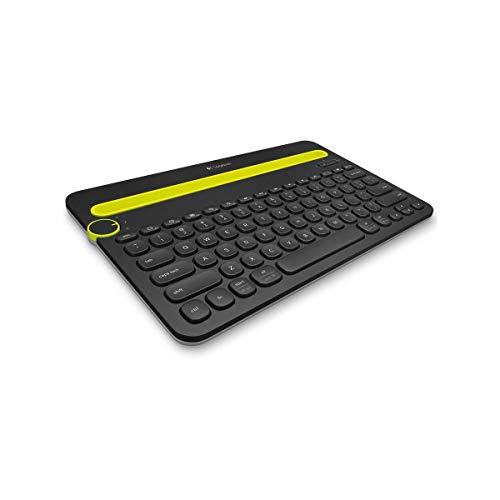
Asking what is a good tablet keyboard sounds like a request for a product name, but the honest answer is a set of qualities: full-enough keys your fingers can find without looking, a layout that matches your language, a connection that never makes you think about it, and a design that fits where you type. A keyboard with those qualities at a modest price beats a feature-stacked board that fails any one of them.
This explainer defines each quality in plain terms — key size and travel, layout, connection types, battery, build — explains how to judge listings and specifications without being misled, and works through examples for different typists: the student, the travelling professional, the home writer. It also clears up the common misconceptions that lead people to buy the wrong board.
Disclosure: As an Amazon Associate, kajuandouglas.com earns from qualifying purchases. Links to Amazon on this page are affiliate links; they cost you nothing extra. Listing details such as price and availability change often, so check the current Amazon listing before you buy.
What Is a Good Tablet Keyboard? The Direct Answer
A good tablet keyboard has standard-spaced, clearly tactile keys in your language layout; connects reliably by Bluetooth or your tablet’s smart connector; holds its charge for weeks (or never needs charging); and suits its setting — a protective case design for travel, a separate full board for a desk. Everything else, from backlighting to trackpads to media keys, is a bonus layered on top of those fundamentals. Judge any keyboard by those four tests first.
In this guide
Keys: The Quality You Feel Every Minute
Key pitch — the distance from one key centre to the next — is the specification that decides comfort. Laptop-standard pitch lets touch-typists keep their speed and accuracy; compact boards shrink it and everyone’s error rate climbs. Travel, the distance a key moves when pressed, matters less than tactility: a good tablet keyboard gives a clear, quiet ‘bump’ confirming the press, rather than a mushy sponge or a harsh bottoming-out. Keycap shape helps too — slightly dished caps centre your fingertips, while flat chiclet caps demand more visual attention.
Noise belongs in this judgement. A keyboard used in lectures, meetings, trains or a shared bedroom should be quiet by design; most membrane and scissor tablet keyboards are, while novelty mechanical mini-boards can be antisocially loud. If you type near other people regularly, treat quietness as a core quality, not a preference.
Gear for This Guide
Two verified keyboards that illustrate the fundamentals-plus-extras pattern:
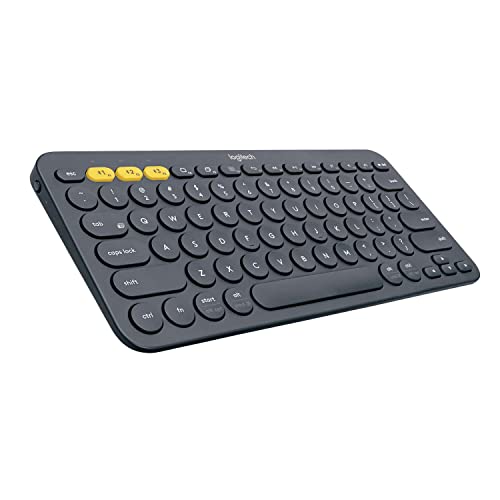
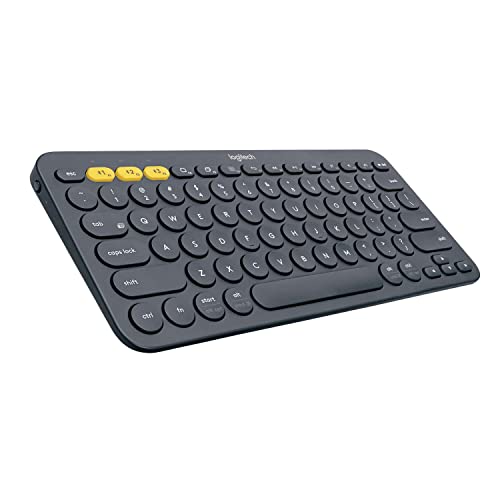
Logitech K380 Multi-Device Bluetooth Keyboard – Windows, Mac, Chrome OS, Android, iPad, iPhone, Apple TV Compatible – with Flow Cross-Computer Control and Easy-Switch up to 3 Devices – Dark Grey — the K380 demonstrates the fundamentals: standard-feeling keys, multi-device Bluetooth and a layout that works across platforms — the baseline a good tablet keyboard should meet. Check price on Amazon.

Logitech Pebble Keys 2 K380s Wireless Bluetooth Keyboard – Tonal Graphite — the Pebble Keys 2 adds customisable shortcut keys in a slim travel body, showing how extras should layer onto sound basics rather than replace them. Check price on Amazon.
Layout, Language and Shortcuts
A keyboard is only good in the layout you type in. Regional layouts differ in the Enter key shape, the placement of symbols and the availability of accented characters, and listings do not always shout which layout ships. Confirm it before ordering, especially from international sellers. Beyond letters, look at the function row: tablet keyboards replace it with platform shortcuts — home, search, brightness, media, app switching — which genuinely speed tablet use once learned. Multi-device keyboards add channel keys for switching between tablet, phone and computer, a quality-of-life feature multi-device households feel daily.
Connection and Battery: The Invisible Qualities
Good connection behaviour is invisible: the keyboard wakes when you open it or press a key, reconnects to the right device in a second or two, and never drops mid-sentence. Smart-connector keyboards achieve this perfectly because they are wired whenever attached and need no battery at all. Bluetooth keyboards approach it when well made; the cheap end reveals itself in sleep lag and dropped first characters. Battery quality is similar — weeks per charge is the norm for decent boards, USB-C charging is the convenient standard, and an honest power switch beats vague auto-sleep claims.
Worked Examples: Good for Whom?
For a student, good means a keyboard case with adequate protection, keys close to full size, and a price that survives a lost-bag scenario — backlighting is a luxury, durability is not. For a travelling professional, good means slim, quiet, multi-device switching for the phone-and-tablet combination, and USB-C charging shared with everything else in the bag. For a home writer, good means a separate board indistinguishable from a laptop keyboard in spacing and feel, with the tablet on a stand at eye level. Notice that ‘good’ changed completely three times while the fundamentals — keys, layout, connection, fit for setting — stayed constant.
Common Misconceptions About Tablet Keyboards
First, that more features mean a better keyboard: a trackpad and backlight cannot rescue cramped keys. Second, that mechanical-style mini keyboards type better — their switches may feel characterful, but their tiny layouts slow real work. Third, that expensive fitted cases are automatically good; some are excellent, others are slim fashion items with poor keys, and the brand badge does not say which. Fourth, that Bluetooth keyboards lag noticeably — good modern ones do not, in any way a typist can perceive.
How to Read a Keyboard Listing Like a Reviewer
Listings lead with what is easy to claim — battery months, device counts, slimness in millimetres — and bury what matters. Hunt for the key pitch or the overall width, which betrays it: a board much narrower than a laptop keyboard has shrunk something. Look at the photograph of the layout rather than the render, checking the Enter key shape, the symbol positions and whether the legend language matches yours. Renders lie by idealisation; photographs of the actual product in reviewers’ hands are harder to fake.
Read the compatibility paragraph word by word. ‘For iPad’ spans a decade of models with different sizes and connectors; the model list in the small print is the truth. For separate boards, check the platform modes and whether shortcut keys are printed for your system or another. Then read the critical reviews sorted by recency — connection drops, dead keys and layout surprises surface there in patterns that star averages conceal.
Finally, price the whole working setup the listing implies: the keyboard, plus the stand your tablet will now need, plus the case you may still need, plus a cable if charging differs from your other devices. Listings sell components; you live with systems, and good keyboards are the ones whose systems stay out of your way.
The Qualities Nobody Lists
Stability is unlisted and essential: a keyboard should not rock on its corners, flex in the middle or slide on a smooth desk while you type. Weight helps here — the lightest board is rarely the steadiest — and rubber feet and a rigid deck are worth more than another millimetre shaved. Sound belongs in the same hidden category: pitch and volume of the keystroke decide whether the keyboard is welcome in quiet rooms, and only reviews and returns windows reveal it.
Wake behaviour is another: a good keyboard is ready when your fingers arrive, reconnecting from sleep in a breath, while a poor one eats your first sentence’s opening characters every time it dozes. This single behaviour separates keyboards people love from keyboards people tolerate, and it appears in no specification table ever printed. If reviews repeatedly mention lag after sleep, believe them and choose otherwise.
Consider also the off switch, the charging port’s position, and whether the keyboard can be used while charging — small logistics that decide whether the keyboard is charged on the day you need it. Good, in the end, is the absence of these frictions: the best tablet keyboard is the one you stop noticing entirely, which is why the fundamentals outrank the features every time.
Matching the Keyboard to the Typist
Touch-typists should be uncompromising: standard pitch, clear tactility, correct layout, and no patience for miniaturised punctuation. Two-finger typists can trade pitch for portability happily and may prefer the guidance of a fitted case that is always present. Writers of code and data should audit the symbol rows and function layers with special care, because their characters live exactly where compact boards hide things. Multilingual typists should verify dead keys and accent access in their layout, not merely its presence in the listing’s language list.
Children need durability, spill tolerance and keys that survive enthusiastic force; the good keyboard for a school bag is a rugged, inexpensive one whose loss is an annoyance, not a disaster. Professionals presenting in meeting rooms need quiet keys and instant wake. There is no contradiction in owning different keyboards for different roles — the definition of good travels with the typist, which is the entire point of this explainer.
Good Keyboards for Specific Hands
Hands differ, and good follows them. Large hands need full pitch and suffer most on compact boards, where the error rate compounds into wrist tension from constantly corrected posture. Smaller hands may find compact boards genuinely comfortable and full boards a stretch — the standard is a starting point, not a law. Users with arthritis or reduced strength should weight key activation force: light, shallow keys with clear tactility beat deep, firm ones, and voice dictation alongside the keyboard is a legitimate part of a good setup rather than an admission of defeat.
Children’s hands and habits argue for durability over refinement, as this explainer has noted, while professionals with repetitive-strain histories should treat the keyboard-plus-stand arrangement as health equipment and buy accordingly — separate board, raised screen, neutral wrist posture. In every case the definition of good bends toward the body using it, which is why universal superlatives fail in this category and personal testing wins.
A Short History of Getting It Right
Tablet keyboards began as apologetic accessories — cramped, laggy, sold as afterthoughts — and the category’s maturation is the story of makers realising the keyboard is the product for anyone who writes. Connector power removed charging, trackpads arrived, backlighting spread downward, and separate boards quietly became as good as laptop keyboards because, increasingly, they are the same engineering. The buyer’s task has simplified accordingly: the fundamentals this explainer lists are now achievable at honest prices, and the remaining differences are fit, feel and finish. Judge those, in person where possible, and the good keyboard identifies itself by disappearing under your fingers.
Looking More Closely at the Details That Decide It
Most discussions of recognising a good tablet keyboard by the qualities you feel every day stay at the level of headlines, yet the outcome is usually decided by smaller details that only appear once you live with the decision. Three of those details deserve attention before anything else: key size, spacing and travel working together rather than in isolation, legends and layout that match your language and your habits, and trackpad precision judged by small movements, not just by size. None of them looks dramatic on a specification sheet. Together, those three checks decide whether a keyboard keeps feeling precise after the newness fades or starts to annoy you daily.
Start with key size, spacing and travel working together rather than in isolation. A single key can feel fine in isolation yet cramp your hands across a paragraph, because pitch, cap size and travel depth combine into one typing sensation. Compare two boards by typing the same familiar paragraph on each in one sitting, so spacing and travel differences show up without memory blurring them. Write down which board produced fewer errors in that paragraph.
Points to keep in mind
- Judge key size, spacing and travel working together rather than in isolation in your own setting before trusting a general verdict.
- Treat legends and layout that match your language and your habits as a first-order factor, not a footnote.
- Name the compromise in one line, such as compact size gained against key spacing given up.
Then consider legends and layout that match your language and your habits. Legends are that kind of late discovery, familiar in photos yet hiding punctuation your fingers never expect. Test the legends by typing punctuation-heavy sentences without looking at the keys, because that is where a mismatched layout announces itself fastest. A layout that only works when you type slowly and watch your fingers will disappoint anyone who writes at full speed in meetings, lectures or late-night drafts.
Finally, weigh trackpad precision judged by small movements, not just by size alongside the first two rather than in isolation. A bigger trackpad steals palm room or key space, while firmer keys can tire fingers over long sessions. A mature decision about keyboard quality judgement names that trade-off out loud. Once you say out loud whether your hands need full spacing or your bag needs a smaller board, most listings disqualify themselves without further debate.
How This Plays Out in Real Situations
Abstract advice becomes useful when it meets a real household, so consider a casual user who types in short bursts and values instant readiness. For that casual user, the question is whether the keyboard wakes, connects and accepts the first word instantly. Start by judging wake speed, first-key response and error count over a short burst, and only consider backlighting or styling once those basics pass. Casual users here routinely find a modest board with instant manners beats a premium one needing coaxing.
Contrast that with a large-handed user repeatedly catching neighbouring keys on compact boards. For large hands the priorities invert, with full key spacing suddenly worth more than compact dimensions. A millimetre of missing spacing that seemed trivial in a photo can become the whole story for large hands, while an extra shortcut row goes unused. This is why copying a friend’s conclusion about keyboard quality judgement so often disappoints: the friend optimised for a life that is not quite yours, with rooms, routines and patience that differ from your own.
Points to keep in mind
- A good tablet keyboard earns its place by disappearing: keys, stand, and battery simply behave predictably.
- Use reviewers’ checklists to spot candidates, then judge goodness by your own tired-evening typing.
- Judge the keyboard by your ordinary paragraph, not by the one perfect demonstration.
A third pattern appears with a bilingual user switching layouts and needing clear, correct legends. Switching languages mid-sentence leaves no patience for hunting symbols, so legends must match the active layout. For that bilingual user, checking the printed legends against both language layouts before buying prevents a year of mis-typed accents and misplaced punctuation. If that sounds familiar, put correct legends and a predictable layout ahead of backlighting or styling.
There is also the quieter case of a professional whose keyboard must look and sound appropriate in meetings. Nothing has failed outright for that professional, yet a loud, hollow space bar can undermine a quiet meeting more than any specification suggests. A space bar that rattles, a legend that fades, and a key that needs a firmer press than its neighbours can quietly sour an otherwise capable board. Calling it a sound problem points to the stabilisers, while a feel problem points to travel and spacing.
A Practical Method You Can Repeat
When opinions conflict, a repeatable method settles the question of recognising a good tablet keyboard by the qualities you feel every day better than another hour of reading. The method has four moves. First, write the typing job plainly: long documents, short messages, bilingual writing, or quiet shared rooms. Second, gather evidence in that exact setting. Third, change or compare one variable at a time. Fourth, judge the board against that written job rather than against its feature list, because the paragraph you actually type is the real exam.
In practice that means actions such as these: check the layout diagram for your language rather than a generic product photo; judge the typing qualities before the decorative extras in any listing; and match the board to the typist you are today, not the one you hope to become. Each is deliberately unglamorous. None of those checks needs laboratory gear, only a familiar paragraph, the layout diagram and ten honest minutes. Worked through in that order, the checks shrink a long feature list into the handful of qualities your fingers will actually grade. Change boards, apps and layouts together during testing, and you will never know which variable changed your error count.
Points to keep in mind
- type the same passage on any candidate and count the errors honestly
- translate vague marketing words into a concrete feature you can test
- weigh reliability reports from long-term owners more than first impressions
Equally important is what to record. Useful notes for keyboard quality judgement include the date and time, the place, what else was happening at the time, and a simple verdict in your own words. Across a week of notes, the pattern that emerges is usually about feel: which hour your fingers tire, which key starts to shine, which shortcut you keep reaching for. Those dated observations are also exactly what a reviewer cannot give you, because only your hands, your language and your rooms can produce them.
Allow the paragraph test a few sessions rather than judging from the first excited hour. That patience pays by replacing feature-list excitement with a verdict your fingers reached on their own evidence. Most people do not need more information about keyboard quality judgement; they need their own information, gathered calmly in their own setting, and this method is simply a way of collecting it without drama.
Living With the Decision Over Time
The first week with any choice about recognising a good tablet keyboard by the qualities you feel every day is a poor predictor of the first year. In week one the keys feel crisp and the deck solid, and no stabiliser has developed its rattle yet. Picture month six instead: the space bar found its true sound, the caps shined or stayed matte, and your error rate settled honestly.
Long-term satisfaction usually rests on unexciting qualities connected to shortcut keys mapped sensibly for the tablet system you use and battery behaviour that fits a routine instead of demanding attention. Those unglamorous qualities decide whether the board stays on your desk as the default or gets demoted to a drawer when a better keyboard appears. When you grade a board, weight shortcut sanity and battery manners above the launch review, because you will press those keys thousands of times after the reviewer has moved on. Ask a colleague who has typed on the same board through a year of deadlines which key, sound or shortcut still earns their respect.
Points to keep in mind
- Judge a good keyboard again after a month, when novelty fades and habits form.
- Writers keeping one keyboard for years praise boring reliability far above clever extra features.
- Raise your standards if you start writing professionally, because good enough stops being enough.
Maintenance deserves a plan rather than good intentions. Fold a quick key wipe, a battery glance and a shortcut refresher into one weekly moment. Five monthly minutes of wiping and listening prevent the shine and rattle that make a good board feel cheap. In the context of keyboard quality judgement, that plan mainly means keeping an eye on repairability and support that matter once the first fault appears before it turns into a bigger problem.
Finally, expect your next device, language or project to reshuffle what a good keyboard must prove. Moving home, changing work, a new household member or a new device can all reorder the priorities around keyboard quality judgement. A compact board that was perfect for short messages is not a failure when a book project demands full spacing and quieter keys. With your paragraph scores in hand, that reshuffle becomes a quick re-test of spacing, legends and sound rather than a fresh feature hunt.
Mistakes to Avoid and Signs You Chose Well
Three judging errors show up in disappointed reviews so often that they deserve plain names before you test. One is this: rating a trackpad-equipped board higher even though you never use one. Another, just as common, is the opposite excess — confusing a long feature list with quality in the few things that matter hourly. And a third, quieter error is assuming a famous brand guarantees the right size for your hands. None of the three needs golden fingers, only a slower minute before the feature list charms you. Each error begins the same way, with one vivid moment, a glowing demonstration, a famous badge, a friend’s certainty, standing in for weeks of ordinary paragraphs.
Avoiding them does not require expertise, only a pause. Before buying, ask the hostile version: what will my fingers complain about in month two, and have I actually typed at full speed on it? Have I judged it anywhere except a quiet showroom, including a meeting room and a late-night desk? What am I assuming about a stand or case arrangement that holds the screen at a healthy angle that I have not verified? Ten minutes of hostile questioning, aimed at your own favourite option, is the cheapest insurance available in the whole process of recognising a good tablet keyboard by the qualities you feel every day.
Points to keep in mind
- Put your leading board through that full-speed paragraph before the purchase becomes final.
- Judge success by quiet, ordinary evidence over several weeks.
- Try small corrections before concluding that replacement is necessary.
How will you know the decision was right? Watch for ordinary evidence: whether the connection survives a week without a single intervention; how rarely you think about the keyboard while concentrating on writing; and error rate on familiar text compared with your main computer keyboard. None of these announces itself with fanfare. Success looks quiet: a week passes without a connection intervention, your writing thoughts stay on the words, and familiar text produces its usual low error count. That absence of daily negotiation is what good actually means here, and it outranks any feature count printed on the side of the box.
If the error counts point the other way, begin with the tiniest adjustment that answers the actual annoyance. Many disappointments with keyboard quality judgement yield to a small correction — a setting, a position, a habit, an accessory — rather than a complete replacement. Work through those small corrections first, adjusting layout settings, wrist position or shortcut habits before blaming the board. Save replacement for structural mismatches: spacing your hands cannot learn, a layout your language cannot use, or a deck flexing under normal typing. That calm order, small corrections before structural verdicts, saves more hasty returns than any single judging tip here.
One More Round of Checks Before You Settle
There is one last check that seasoned typists run even when a board already feels right, and it is worth borrowing before the return window closes. It concerns connection reliability you stop noticing because it never interrupts and repairability and support that matter once the first fault appears, two aspects that reveal themselves slowly. Deliberately type your fastest, messiest draft in your noisiest room, and watch where accuracy, sound or connection strains first. You are not hunting for reasons to return it; you are mapping exactly how much rattle, shine or spacing compromise you can happily live with for years.
Tell whoever shares the board what you learned about its shortcuts, its sound and its battery habits. A setup for keyboard quality judgement is a household system, not a personal gadget, and other people’s routines will find edges yours never touches. Their fingers will find the stiff key you adapted to and the shortcut you never press, far cheaper than quiet complaints. Agree the house rules together, which shortcuts matter, how quiet the board must stay in meetings and who tops up the battery, and leave them on a note inside the case lid.
Points to keep in mind
- Probe the fastest typing, quietest room and smallest trackpad movement once on purpose, rather than mid-draft by accident.
- Define good for your household in writing: key feel, weight, battery, and stand stability ranked.
- Stop comparing boards once your weekday paragraphs land at their usual accuracy.
Then stop optimising. Past a certain point, another evening spent comparing key travel figures is an evening not spent writing, and recognising that point is part of judging well. If your paragraph scores, sound checks and battery notes all say the board works, let it type without further supervision. Save the saved attention for genuinely weak things, like a wobbling stand or truly misbehaving trackpad. When a new project, a new language or a new device arrives, your paragraph notes will turn that fresh board decision into a short, calm re-test. With keyboard quality judgement, that stopping point usually arrives once whether you would buy the same board again knowing your own routine stops changing from week to week.
Worked Examples That Make the Trade-Offs Concrete
Work through the short-burst user slowly, because wake speed, not travel, changes the answer completely. Imagine a casual user who types in short bursts and values instant readiness. The instinct is to buy the board with the longest feature list, as if extras could compensate for keys that tire your fingers. Yet the binding constraint in that picture is usually materials that resist shine, wobble and rattles as months pass, and no amount of spending elsewhere relaxes it. That casual story only resolves once the materials question is answered honestly, because instant readiness means little on a deck that rattles itself loose.
What to watch for
- Name what limits the casual user first, wake delay or key feel, before comparing boards.
- Restate the casual user’s limits with your own sessions, hands and rooms before trusting the moral.
- If the same error complaint keeps returning, the spacing itself is the problem, not your technique.
Now change one variable: imagine a large-handed user repeatedly catching neighbouring keys on compact boards. The same two boards remain, yet the large-handed user ranks them oppositely, because hand size changed the exam. This is the single most transferable lesson in the whole subject of recognising a good tablet keyboard by the qualities you feel every day: context is not a detail around the decision, it is the decision. When a review praises a board, translate its verdict into your hands, your language and your session length before letting it influence the shortlist.
A third example works as a warning. Picture a household that skipped the early checks, committed quickly, and spent the following month applying fixes for assuming a famous brand guarantees the right size for your hands and then for rating a trackpad-equipped board higher even though you never use one. Each quick fix, a wrist rest, a remapped key, a forgiven rattle, helped for a day before the size mismatch returned. The cost was not only money; it was confidence. By the time the wrong spacing was finally admitted, the family had stopped trusting their own showroom tests altogether. The three examples in this guide are there to break that cycle: test spacing, legends and sound with your own hands before money changes hands.
Use these examples as templates rather than stories. Swap in your own hands, your own languages and your own sessions, and run the casual reasoning again with those facts. If swapping in your hand size flips the winning board, your fingers, not the feature list, are the real decision-makers. If the same board wins for the student, the bilingual writer and the meeting professional in your notes, you have found the rare keyboard that fits a whole household. Applied to keyboard quality judgement, the detail that most often changes the conclusion is trackpad precision judged by small movements, not just by size.
A Decision Flow When You Feel Stuck
Indecision about keyboard quality judgement usually means two good criteria are pulling in opposite directions, not that you lack information. When that happens, stop researching and start ranking. Write the quality criteria as a ranked list, spacing, legends, connection manners and battery behaviour, and refuse to let a later feature list reorder it. Ranking feels pedantic for a minute, then suddenly the wall of boards separates into those that fail your top criterion and those that merely fail your fourth.
What to watch for
- Rank spacing, legends and manners before you let another listing load.
- Cut any board that fails on spacing or legends, then paragraph-test whatever survives.
- When two keyboards both feel good, the quieter one usually wins in shared spaces.
Next, apply a simple elimination pass connected to a stand or case arrangement that holds the screen at a healthy angle. Cut ruthlessly on the genuine deal-breakers, spacing your hands cannot learn or legends your language cannot use, because those flaws will greet you every single session rather than merely looking awkward in a table. This pass is often brutal and always useful. What survives is a pair of boards you can paragraph-test properly, and that small honest shortlist is where confidence comes from.
Then test the survivors against whether the connection survives a week without a single intervention and how the keys sound and feel once the newness has worn off in your own setting, on the same day if you can, so conditions stay comparable. Score the errors and the fatigue straight after each test, while your fingers still remember which board produced which paragraph. Owners are routinely surprised how a written error score contradicts the verdict they carried out of the shop, because fingers remember the typical paragraph better than heads remember the dramatic first hour.
If two boards still tie on spacing and legends, break the tie on housekeeping: which one charges where you already charge things, and which one a visiting grandparent could connect unaided? Ties between two good boards are genuinely common, because most well-made keyboards pass the same basic paragraph tests. Pick the tied board your fingers prefer and start writing, rather than spending another week hunting a difference your paragraphs will never feel. For keyboard quality judgement, the easiest option to live with is usually the one that handles a stand or case arrangement that holds the screen at a healthy angle with the least fuss.
Seasonal, Household and Long-Term Angles Worth Planning For
Conditions change across the year, and a decision about recognising a good tablet keyboard by the qualities you feel every day that is tested in only one season carries hidden risk. School terms, holiday noise, meeting seasons and late-night projects all test a board differently, so a keyboard judged only in a calm week has not met your real year. You cannot rehearse the whole year in advance, but you can ask the deadline question out loud: will this spacing, this sound and this battery still suit the busiest, loudest, most tired week I actually live?
What to watch for
- Test goodness in real seasons: glare-filled summer cafés and dark winter evenings at home.
- A keyboard is only good if your least technical housemate happily uses it unprompted.
- Good also means maintainable: replaceable cables, cleanable keys, and support that answers years later.
Households also change from inside. A board chosen by one confident adult will be inherited by homework children, message-answering partners and email-attempting grandparents, each with different hands. The setups that survive that inheritance are the ones a newcomer can connect, type and charge without a briefing, with the layout correct, the shortcuts sane and a small note for the battery habit. When you evaluate keyboard quality judgement, spend one minute imagining the least technical person in your life facing it alone. That minute is a surprisingly accurate quality test.
There is also a cost missing from the receipt: the weekly attention a board demands in charging, wiping and battery-watching. Beyond the price tag, count what the board will ask of you weekly: a charge here, a key wipe there, a battery habit that never becomes a chore. A board that needs its battery watched weekly will quietly fail in a household that thinks about charging monthly, whatever its paragraph scores say. Matching that attention rhythm to your household matters as much as matching the board to the hands. With keyboard quality judgement, the recurring effort worth counting most honestly is the effort tied to materials that resist shine, wobble and rattles as months pass.
Finally, think about the exit before you need it. When this board wears, loosens or meets hands it cannot fit, how will it be replaced, handed down or recycled? Keeping the paragraph scores, noting layout and shortcut settings, and saving the receipt make that change a calm errand. That is not pessimism; it is what turns one purchase into accumulated household knowledge, so the next decision about keyboard quality judgement starts from experience instead of from a search box.
Questions Worth Asking Before You Spend Anything
Four honest questions, answered before any listing loads, prevent most of the expensive quality mistakes this guide exists to avoid. First: what typing problem am I solving, stated as a hand and a habit rather than a brand or feature count? If that statement names a product, rewrite it until it names your paragraph, your meeting, your language switch or the late-night draft instead. Solutions chosen for a life-shaped problem age far better than solutions chosen for a catalogue-shaped one, especially with keyboard quality judgement.
What to watch for
- Describe the typing problem as a hand, a session and a weekly pattern.
- List the hands, languages and rooms this board must serve, and mark the unknowns plainly.
- Ask whoever shares the board, the desk or the meeting room before the order is placed.
Second: what evidence do I already have? Most typists already know their hands, languages and session lengths better than any reviewer does. You know which hour tires your fingers, which room punishes loud keys, which language you actually type and which shortcut your hand reaches for hourly. Writing that local knowledge down before the listings load protects it from photography, feature counts and confident sales copy. Where your knowledge has gaps, name the test that fills each one, a paragraph here, a punctuation run there, because an unnamed assumption about legends is how accents get lost. For keyboard quality judgement, that existing evidence usually includes what you already know about repairability and support that matter once the first fault appears in your own setting.
Third: when a key, battery or stabiliser needs attention next year, what exactly will I do, and who supplies the part? Boards drift predictably: stabilisers loosen, batteries tire, legends fade, layouts change with new devices and projects grow longer. A choice with a calm answer to that question, involving steps like match the board to the typist you are today, not the one you hope to become, is worth more than a choice with a slightly better specification and no answer at all. A board that can be re-tested, re-charged and re-homed calmly is resilient, even though no listing prints that word.
Fourth, and last: who else should have a say? Decisions about recognising a good tablet keyboard by the qualities you feel every day often affect people who were not in the room when the research happened, and their late objections can sink an otherwise sound setup. Ask the household early, in plain words: here is the typing problem, here is the board I favour, and what about its sound, spacing or shortcuts would annoy you by half-term? The family may pick the very same board, but they will charge it, wipe it and forgive its sound because they helped choose it, while an imposed board gets blamed for every tired paragraph.
Related Guides
- best Bluetooth keyboards for a 9.7 inch tablet
- best tablets for writing
- best tablets for productivity
- best tablets for work
- how to choose a tablet keyboard
- tablet keyboard case vs separate keyboard
- how to pair a tablet keyboard
Frequently Asked Questions
What is the most important feature in a tablet keyboard?
Key size and spacing. If the keys match a laptop’s pitch and give clear tactile feedback, you will type at full speed for hours; if they are cramped, no backlight, trackpad or shortcut row will compensate. After keys, judge layout correctness for your language and connection reliability.
Are expensive tablet keyboards worth it?
Premium fitted cases earn their price through integration — connector power, perfect fit, protection and instant readiness — and serious typists feel the difference in key quality on premium separate boards too. But the mid-range contains genuinely good keyboards; beyond sound fundamentals, extra money buys refinement and features rather than basic competence.
Should a good tablet keyboard have a trackpad?
Only for document-heavy work where precise cursor placement is constant. For most tablet tasks the touchscreen is faster than any trackpad, and the trackpad adds weight, thickness and cost. Treat it as a specialist option for editors and spreadsheet users, not a default marker of quality.
How can I judge a keyboard I cannot try first?
Read the stated key pitch and overall width, check clear photos of the layout for your language, and look for reviews that discuss typing feel rather than unboxing. Confirm the return policy, then type a full page on arrival and judge honestly within the return window. Specifications plus a returns safety net substitute well for a shop test.
Is backlighting important?
It is decisive for people who type in dim places — evening trains, bed, dark lecture halls — and irrelevant for everyone else. Backlit models cost more and use battery faster with the lights on. Let your real typing locations decide rather than the appeal of the feature in a product photo.
Can one good keyboard serve a tablet and a laptop?
Yes — a multi-device Bluetooth keyboard pairs with several hosts and switches between them by key press, and it types identically for each. This is one of the strongest arguments for a separate keyboard over a fitted case, which can only ever serve its one tablet model.
How long should I type on a keyboard before calling it good?
For most households, a focused week of ordinary use tells you more than a month of occasional reading about recognising a good tablet keyboard by the qualities you feel every day. Test the finalists across a fast paragraph, a quiet meeting and one tired session, keep the dated notes, and then commit. Stretching that trial into a second month rarely changes which board wins; it usually just postpones the writing the keyboard was bought for.
What should I score again first if a good keyboard starts rattling?
Return to the simplest explanation before replacing anything. Recheck the basics connected with materials that resist shine, wobble and rattles as months pass, repeat your most reliable test in your most familiar setting, and change one variable only. If the winning board still rattles, cramps or mis-letters on that calm re-test, the mismatch is in the hardware, and your scores will point at the exact key, legend or stabiliser to change.
Is a top-tier tablet keyboard worth more than a solid mid-range board?
Only when the higher tier improves something your own routine actually stresses, such as a stable deck that does not flex or bounce under confident typing. If your scores show the real friction is key spacing, paying more for a board with a bigger trackpad will not move the number that matters. Measure any pricier board against those scores, key by key and paragraph by paragraph, not against its longest feature list.