Learning how to protect a student laptop means defending two different things at once: the physical machine, which faces crowded bags, shared houses, library desks and festival-grade spills, and the work and accounts on it, which face phishing, theft of credentials and the simple disaster of a failed drive the night before a deadline. Students lose laptops to opportunity more than to targeted crime, and lose work to missing backups more than to hackers. This guide covers both halves in practical order: physical protection and habits, account and data security, and the backup and insurance layer that decides whether a bad day becomes a bad term. None of it is expensive, and all of it is easier before the incident than after.
Disclosure: As an Amazon Associate, kajuandouglas.com earns from qualifying purchases. Links to Amazon on this page are affiliate links; they cost you nothing extra. Listing details such as price and availability change often, so check the current Amazon listing before you buy.
How To Protect A Student Laptop: What Matters Most
Carry the laptop in a padded sleeve inside a bag with a suspended compartment, never leave it visible or unattended in public, and keep drinks in separate bag pockets. Turn on encryption, find-my-device and automatic screen lock, use a password manager with two-step verification on your main accounts, and keep coursework backed up automatically to the cloud. Record the serial number and consider insurance or accidental damage cover if a replacement would hurt.
In this guide
What You Need
- A padded sleeve or a backpack with a dedicated, suspended laptop compartment
- A password manager and two-step verification on email and school accounts
- Automatic cloud backup covering your coursework folders
- The laptop’s serial number and purchase receipt stored separately
- Optional but wise: insurance or accidental damage cover sized to your risk
Step by Step: How To Protect A Student Laptop
Step 1: Give the machine a proper home in your bag
Most student laptop damage happens in transit: corners knocked in doorways, screens flexed by heavy books, zips and chargers grinding against the lid. A padded sleeve, or a backpack with a raised, padded laptop compartment, absorbs the everyday version of all three. Keep the charger and hard objects in a different pocket from the laptop, never stack textbooks on top of it in a locker, and develop the two-second habit of closing the lid fully before moving, even across a room, because open laptops get carried by their screens.
Step 2: Build theft-resistant habits, not paranoia
Opportunistic theft needs thirty unattended seconds. In libraries and cafes, take the laptop with you or ask a trusted neighbour to watch it explicitly; a charging cable left behind marks an empty seat’s owner as careless. In shared housing, store it out of sight in your room rather than permanently on the communal table, and never leave it visible in a parked car. At parties and in halls, your room’s closed door is the security system. None of this requires fear, just the refusal to offer easy opportunities.
Step 3: Defend against spills and the physical world
Keep drinks in a bottle with a sealed lid inside a separate bag compartment, never loose beside the laptop, and keep cups off the desk edge nearest the keyboard during long sessions. If a spill happens, act in seconds: power off, unplug, turn the machine keyboard-down to drain, and do not power it on to check for at least a day, or take it straight to a repair shop if the liquid was sugary or the spill large. Speed and restraint in those first minutes decide whether a spill is a story or a replacement.
Step 4: Lock down accounts and sign-ins
Turn on full-disk encryption so a stolen machine does not hand over your files, set the screen to lock quickly, and use fingerprint or PIN sign-in backed by a strong unique password. Put your email and school accounts, the keys to every other account’s password reset, behind two-step verification, and run your passwords through a manager so each is unique. Be sceptical of emails urging urgent account action, especially around exams and fees; go to the service directly rather than through the message’s link. Phishing, not hacking, is how student accounts actually fall.
Step 5: Make backups automatic and test them
Set your coursework folders to sync to cloud storage automatically, using your school’s allocation or a personal account, and confirm the sync is genuinely running weekly. Backups protect against the statistically likeliest disasters: theft, spills and drive failure all become recoverable when the work lives in two places. Test a restore once a term. Also keep your photos and personal files in the same system, because in a loss, students grieve the irreplaceable personal data more than the coursework they can partly reconstruct.
Step 6: Record, insure and plan the bad day
Photograph the serial number, keep receipts in cloud storage, and note the machine’s details with a trusted family member. Check whether home contents insurance covers the laptop away from home, whether the manufacturer’s accidental damage plan is sensibly priced for your clumsiness level, and what your university offers in emergency loans, because many lend laptops free while yours is repaired. Deciding these things calmly now converts a future crisis into a sequence of phone calls you have already rehearsed.
Battery Life, Weight and the Campus Day
A student laptop lives in a bag, not on a desk. Every extra few hundred grams is felt on the walk between buildings, and every hour of real battery life is one less hunt for a free outlet in the library. Advertised battery figures are measured under gentle conditions, so treat them as a comparison tool rather than a promise, and favour machines whose owners consistently report a full class day without charging. Screen size is the trade-off that drives weight: larger panels help with split-screen research and spreadsheets, smaller panels travel better and sip power. Charging over USB-C, where offered, is an underrated convenience because one charger can serve the laptop, phone and tablet, and a borrowed charger in a study group is more likely to fit. Judge these daily-life factors with the same seriousness as benchmark numbers, because they decide whether the laptop is present and usable when the work actually happens.
Software, Accounts and Staying Organised From Week One
The first hour with a new student laptop shapes the next four years. Signing in with the account your school issues unlocks its storage, email and app licences, and setting up automatic cloud backup of the documents folder means a lost or broken machine is an inconvenience rather than a lost semester. A password manager removes the temptation to reuse one weak password across the library portal, email and banking. Learn the handful of keyboard shortcuts for your system, set the browser to restore the previous session, and create one folder structure for modules or subjects before the first assignment lands. None of this needs paid software: both Windows and ChromeOS and macOS include backup, sync and note tools that are good enough for coursework. Students who skip setup and improvise usually pay for it later in duplicated files, missed deadlines and frantic searches through downloads folders the night before submission.
Protecting the Machine and the Work on It
Student laptops face risks office machines never meet: crowded bags, shared desks, spilled drinks, borrowed chargers and accommodation where doors are not always locked. Physical protection starts with a padded sleeve or a bag with a suspended laptop compartment, and with the habit of never leaving the machine visible in a parked car or an empty library seat. Digital protection matters just as much: full-disk encryption, a screen lock that engages quickly, current updates and two-step verification on the main accounts cover most realistic threats. Find-my-device features should be switched on before they are needed, and the serial number recorded somewhere separate. Backups complete the picture, because protection is not only about stopping loss but about recovering fast when something still goes wrong. A student who can restore files to a borrowed machine in an hour has effectively insured their grades, not just their hardware.
What Student Work Actually Demands From a Laptop
Student computing looks light on paper and is heavier in practice. A typical day stacks a browser with dozens of research tabs, a word processor, a PDF reader, a video call, a learning platform and music, all at once, often on battery, often on congested campus Wi-Fi. That pattern rewards memory and a responsive solid-state drive far more than raw processor muscle, and it punishes machines with small batteries or dim screens used in bright lecture halls. Reliability is the hidden spec: a laptop that fails during exam week costs far more than the difference between two models. Durability, a keyboard that survives four years of essays, ports that match classroom projectors and a charger that is cheap to replace all belong on the checklist beside the processor. Students also keep machines longer than most buyers, so a model that can accept a memory or storage upgrade later holds its value in a way a sealed, minimal configuration does not.
The Two Halves of Protection, Weighted Honestly
Students tend to over-invest in the dramatic half of protection, theft and hacking, and under-invest in the mundane half that actually claims machines and marks: knocks, spills, forgotten backups and reused passwords. Rank your effort by likelihood. A sleeve and drink discipline prevent the most common physical losses. Automatic backup neutralises the consequences of almost every disaster at once, including the ones you cannot prevent. Unique passwords with two-step verification close the realistic account threat. Insurance and encryption are valuable finishing layers, sized to your circumstances. Worked in that order, an afternoon of setup buys four years of resilience, and the protected student is not the anxious one with a cable lock in the library; it is the relaxed one who knows that even a genuinely bad day cannot take their degree with it.
When you are ready to compare complete machines rather than individual settings, start with our roundup of the best laptops for work under 1000 and keep our roundup of the best laptops for a student under 500 open in a second tab. Reading a settings guide and a buying roundup side by side stops the most common mistake in this whole topic: changing software or hardware in isolation, without checking whether the rest of the machine actually supports the change you have in mind.
Gear for This Guide

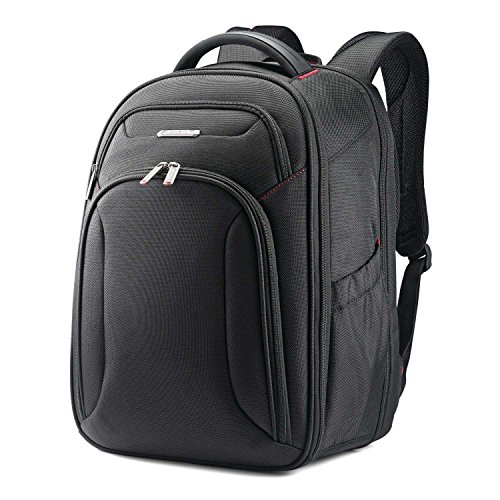
Samsonite Xenon 3.0 Laptop Backpack — Samsonite Xenon 3.0 Laptop Backpack, 1680D Ballistic Poly, Fits 15.6” Laptop, TSA Compatible, Air Mesh Back Padding, Tablet Pocket, Smart Sleeve, Quick Stash Pocket, Durable & Lightweight – Large. Check price on Amazon before you decide, because configurations and availability change often.

Samsonite Tectonic PFT Laptop Backpack — Samsonite Tectonic PFT Laptop Backpack, Black/Red, 17-Inch. Check price on Amazon before you decide, because configurations and availability change often.

Samsonite Kombi Business Backpack – Ballistic Nylon — Samsonite Kombi Business Backpack – Ballistic Nylon, 15.6” Laptop Compartment, Tablet Pocket, SmartSleeve™, Multi-Pocket Organizer, Padded Straps & Back, Top Handle, Fleece-Lined Accessory Pocket. Check price on Amazon before you decide, because configurations and availability change often.
Common Mistakes
- Carrying the laptop loose in a tote or gym bag with chargers and bottles sharing its compartment.
- Leaving the machine on a library desk during long breaks because asking a neighbour to watch it felt awkward.
- Keeping the only copy of coursework on the laptop because backup setup is still on the to-do list.
- Reusing the email password elsewhere, so one breached site hands attackers the keys to every reset email.
Pro Tips
- A bright, distinctive sleeve reduces both mix-ups in group study and the chance of walking off without it.
- Enable your browser’s and phone’s ability to locate and remotely lock the laptop, and practise finding the menu before you need it.
- Back up before travel, festivals and house moves; risk concentrates in transitions.
- If the worst happens, act fast: change passwords from another device, mark the laptop lost in its tracking service, and tell your university IT desk.
A Worked Example, From Start to Finish
Imagine the process applied to one ordinary owner rather than a test bench. They begin by writing down what success looks like in one sentence, work through the steps in order without skipping the preparation that feels skippable, and pause at the verification stage instead of declaring victory at the first encouraging sign. Two adjustments are usually needed: one step takes longer than expected, and one assumption made at the start turns out to be wrong in a small, correctable way. That is not failure; that is the normal texture of doing this properly, and it is why the guide separates preparation, execution and verification so deliberately. By the end, the result is checked rather than hoped for, the notes exist for next time, and the owner understands their own machine measurably better than when they started. Every reader’s details will differ from this example, but the shape of a good outcome rarely does: prepare honestly, change one thing at a time, verify under real conditions, and write down what you learned while it is still fresh enough to be accurate.
Putting It All Together
Work through the steps in order, test the result in your real routine for a few days, and adjust the one or two choices that your own use proves wrong rather than restarting the whole process. The guidance in this guide reflects how these machines behave across years of ownership, not just on day one, which is why the unglamorous details, placement, profiles, backups and habits, carry as much weight as the headline specifications. Keep your receipts, your notes and your original parts where parts were changed, revisit the related guides when your needs shift, and remember that a well-matched, well-kept laptop of any tier serves its owner better than a flagship that fights its owner’s life. That fit, more than any single feature, is what you were really choosing.
Threat Modelling for Students: What Actually Happens to Student Laptops
Protection works best when it is aimed at real incidents rather than at cinematic ones, so begin with the honest census of how student laptops actually suffer. The commonest catastrophe is not theft or hacking; it is liquid — a bottle leaking inside a bag, a drink meeting a keyboard in a crowded kitchen, rain arriving faster than a sleeve. Second comes impact: the bag dropped, the machine slid off a bed or a lecture-hall desk, the screen closed on an earbud or a pen. Third is loss in the broad sense — left in a library, a taxi, a society social — which shades into opportunistic theft, a crime of unattended minutes rather than of planning. Fourth is the slow internal threat: accounts compromised through reused passwords and convincing messages, which costs students money, work and dignity without the laptop ever leaving their hands. Malware, exotic intrusions and targeted attacks trail far behind all of these. Rank your protections by that census and you will spend your effort and money in the order the risks actually queue — which is the entire method of this guide in one paragraph.
Insurance, Warranties and University Schemes: Reading the Safety Nets
Three different nets are commonly confused, and knowing which is which decides claims in advance. The manufacturer’s warranty covers defects — the machine failing itself — and never covers your accidents, however new the machine is. Accidental damage cover, whether from the maker or an insurer, covers the census above: drops, spills and cracks, usually with an excess, claim limits and a process that rewards prompt reporting and proof of purchase. Contents or gadget insurance extends further, to theft and loss away from home, and students should check whether a family policy already covers their laptop before buying a duplicate, because overlapping policies pay once and confuse twice. Universities add a fourth, informal net: loan schemes and hardship routes that keep a student working while a claim or repair proceeds, worth discovering in freshers’ week rather than in crisis. Read any policy for the exclusions that matter to student life — unattended-in-public clauses, bicycle and travel conditions, the requirement to report theft promptly to the police for a reference — because those clauses, not the headline cover, are where claims live and die.
Digital Protection in Depth: The Attack You Will Actually Meet
The message will look like the university, the library, the accommodation office or a delivery company, and it will arrive when you are busy. Student accounts are targeted precisely because they guard valuable things — course access, library resources, personal data, and a trusted address from which further messages can be sent. Your defences are the unglamorous ones from the main guide, and they work because they do not depend on your vigilance being perfect: unique passwords held in a manager, so one leaked service cannot unlock the rest; two-step verification, so a harvested password alone is a key without a door; updates applied promptly, closing the known holes; and a settled habit of reaching services through your own bookmarks and the official app rather than through links in urgent messages. Add one social defence: agree with housemates and family that money requests and account emergencies get verified by a second channel, always, because the most convincing message in your inbox this year may be from a compromised friend. None of this requires expertise. It requires deciding in advance, while calm, how you will behave when rushed — which is what protection means in every section of this guide.
Travel, Placements and Study Abroad: Protection Away From Base
A student laptop’s riskiest miles are travelled away from its home turf: placements, fieldwork, conferences, society tours and terms abroad, where unfamiliar rooms, shared transport and tired evenings multiply every risk in the census. Prepare the machine before it travels rather than insuring it with hope. Confirm backup is current and that you can reach your files from another device if the laptop and you are separated, because that single capability converts theft abroad from a catastrophe into an expensive inconvenience. Check that any insurance actually covers the destination and the activities involved, since territorial and activity exclusions love travel claims. Carry the machine in a padded, unbranded bag that does not advertise its contents, keep it with you in transit rather than in checked or unattended storage, and use accommodation safes and locked rooms with the seriousness their designers intended. Note the serial number and your institution’s IT contact in your phone. None of this is paranoia; it is the standard kit of anyone whose work travels, learned by students exactly once, either in a guide like this or in a police station in a foreign city — and the guide is the better classroom.
The First Hour After Something Goes Wrong
If it is lost or stolen
Act in order and act promptly. Use the device-finding and locking tools from any other device or a friend’s phone, and mark the machine lost so its data protects itself. Change the passwords that matter, beginning with email, from a safe device. Report to the police where you are and obtain the reference your insurer will require, and tell your institution’s IT team, who can protect your accounts from their side and advise on loan equipment. Do not chase the device yourself if its location appears; that information is for the police, and no laptop is worth a confrontation.
If it is damaged
Stop using a machine with a swelling battery, a cracked screen shedding fragments or liquid inside it, and photograph the damage before moving anything, because insurers and repairers both work better with evidence. For liquid, power off and resist the temptation to test it repeatedly; every power-on in a wet machine is a fresh roll of the dice. Contact the cover provider or repairer promptly, since some policies set reporting windows, and ask your institution about loan equipment the same day rather than after the repair estimate arrives.
If an account is compromised
From a clean device, change the affected password and revoke other sessions, then work outward to any account sharing that password — which, if you followed the main guide, will be none — and tell the institution if its systems are involved. Speed matters more than completeness in the first hour; elegance can follow once the doors are closed.
Rehearse that hour mentally once, now, while nothing is wrong. People do not rise to occasions; they fall to the level of their preparation, and a student who has read the plan in calm weather executes it in a storm without having to invent it.
Protecting the Work Inside the Machine: Beyond Backup
Backup, the main guide’s hero, deserves its supporting cast named. Version history — the ability to recover not just a file but the file as it was last Tuesday — rescues students from the commonest data disaster of all, which is not deletion but enthusiastic overwriting hours before a deadline. Turn it on where your storage offers it and learn the restore gesture before you need it in anger. For collaborative work, agree ownership and copies explicitly: a group document living in one member’s account is a single point of failure wearing a team jersey, so keep a shared copy in the group’s own space with more than one administrator. For irreplaceable material — portfolios, fieldwork recordings, primary research data that cannot be re-collected — apply the stricter rule of three homes: the laptop, the cloud and one physical copy kept in a different building, because fire and theft do not respect the distinction between your machine and its backup drive sitting beside it. Finally, protect the accounts that guard the backups with the same seriousness as the backups themselves; a perfectly backed-up student who loses control of the account holding the copies has built a vault and handed away the key.
Dorm Rooms, Shared Houses and Libraries: The Social Geography of Risk
Student theft and damage are overwhelmingly crimes and accidents of place, so learn the geography honestly. The library risk is the unattended table during the kind, normal errands of study life; the answer is the cable lock where furniture allows, the machine taken along for longer absences, and the mutual-watch pact with neighbouring students, which costs nothing and works because libraries are communities. The shared-house risk is the party, the unfamiliar guest and the kitchen-table workstation beside the drinks; the answers are a door that locks, a machine that lives in your room rather than in the social spaces during events, and housemate norms agreed in September’s goodwill rather than after the first incident. The bedroom risk is the bed itself — machines asleep under duvets overheat, slide and fall — answered by a desk habit for charging and a hard surface for working. None of these measures requires suspicion of your friends. They require respect for statistics: most loss happens among people and places you like, on evenings you were enjoying, which is precisely why it must be planned for in advance rather than resented afterwards.
What Protection Cannot Do, and the Calm That Follows
Honesty requires a closing limit: no combination of cases, locks, covers and habits makes a student laptop invulnerable, and pursuing invulnerability produces anxious students and over-insured machines. What good protection does is change the category of every plausible incident — from disaster to errand, from lost degree to lost afternoon, from unrecoverable to merely annoying. A stolen laptop with proven backup and prompt account action is a bad week. The same laptop without them is a bad year. That difference, purchased with a sleeve, a password manager, an automatic backup and a handful of habits, is one of the highest-value transactions in student life, and it is available to every student regardless of budget because its most important components are free. Protect in proportion, rehearse the bad hour once, and then — this matters — stop thinking about it. The protected machine’s job is to disappear into your education, and a protection regime that demands daily anxiety has failed at the only task that counts, however impressive its inventory of locks.
Teaching the Household: Protection as a Shared Culture
Student laptops live among people, and their safety is partly a social achievement. Housemates who know the machine on the kitchen table is someone’s degree treat it differently from an anonymous gadget; flatmates who have agreed the front-door and laptop-basics pact — doors locked, machines not left in hallways, guests’ belongings respected as their owners would wish — prevent more loss than any device you can buy. Have the conversation early, lightly and reciprocally, offering the same care for their equipment that you hope for yours, and include the digital half: never share your sign-ins even with trusted friends, because accounts lent in friendship have a way of appearing in incidents neither party intended, and log out of shared machines as a reflex rather than a judgement. Culture scales where hardware cannot. A house that protects its laptops collectively will still have accidents — but it will have fewer, smaller ones, and it will respond to them as a team with a plan, which is the closest thing to safety that shared living honestly offers.
Protecting a Laptop on a Shoestring: The Free Tier That Does Most of the Work
It is worth stating, for every student reading this on a tight budget, that the highest-value protections in this guide cost nothing but attention. Automatic cloud backup through your institution’s storage, switched on and test-restored, is free and is the single greatest protector of your degree. A password manager’s free tier, unique passwords and two-step verification are free. A full, proper restart habit, prompt updates and a screen that locks when you walk away are free. Carrying the machine in any padded bag you already own, keeping drinks a forearm’s length from the keyboard, locking your door and taking the laptop with you on long library absences are free. Even the cable lock’s job can be partly done by the mutual-watch pact with the students around you. Paid protection — the rigid case, the accidental cover, the extended warranty — buys down the remaining, physical risks, and it is worth buying when the budget allows, in the order the census in this guide suggests. But no student should finish this article believing protection is a product they cannot afford. The core of it is a set of decisions, and decisions are the one currency every student in this guide’s audience already holds.
Seasonal Risks: Freshers’ Week, Exam Season and the Summer Gap
Risk keeps a student calendar. Freshers’ week concentrates unfamiliar places, new acquaintances, celebration and exhaustion — the exact recipe for left-behind machines and borrowed-account incidents — so the protections from the main guide deserve installation before the social whirlwind rather than after its first casualty. Exam season concentrates the opposite: machines worked to their limits in libraries for long hours, unattended-table risks at their annual peak, and consequences at their least forgivable, which is why backup verification and the library pact belong in the revision timetable itself. The summer gap is the quiet season of risk: machines stored in empty houses, left with friends, or travelling internationally, with insurance and account security alike prone to lapsing unnoticed. A two-minute seasonal check — cover current, backup healthy, accounts secured, machine’s whereabouts deliberate — at each of those three hinges of the year will catch most of what the calendar throws at student laptops, and it costs less time than one lost machine’s first phone call.
A Protection Audit You Can Run in Fifteen Minutes
- Backup: open the backup, confirm last night’s work is there, and restore one file to prove the chain works end to end.
- Accounts: email and banking carry two-step verification; the password manager holds unique passwords; no course-critical account shares a password with anything.
- Machine: encryption on, screen locks quickly, finding and remote-lock tools enabled and tested from your phone.
- Physical: case or sleeve in daily use, drinks rule observed at your actual desk, serial number and paperwork photographed and filed in backed-up storage.
- Cover: you know, today, whether you have accidental and theft cover, what its excess and exclusions are, and what your institution’s loan route is.
- Habits: library pact understood, door locked by reflex, first-hour plan from this guide read once while calm.
Run that audit at the start of each academic year and after any change of house, machine or circumstances, and your protection stops being a pile of good intentions and becomes a verified state — the same transformation this whole series pursues, whether the subject is a screen, a battery or a degree. Verified beats assumed, every time, in every domain a student laptop touches.
The Long View: Protection Across a Whole Degree
Zoom out and protection reveals its true shape: it is not a product or a setting but a posture maintained across four changing years. The fresher who installs the free tier in week one becomes the second-year whose library habits are reflexes, the placement student whose travel routine is unthinking, and the finalist whose backup verification sits inside the dissertation timetable like a seminar. Each stage’s risks differ, and the audit habit is what carries protection across the transitions, because it forces the question — what changed, and does my safety still match it — at exactly the moments when last year’s arrangements quietly expire. Students imagine protection fails dramatically, in thefts and floods. Far more often it fails by drift: the lapsed policy, the paused backup, the new house whose door nobody locks. Drift is defeated by rhythm, and rhythm is cheap. That is the deepest comfort this guide can offer: the protection that lasts a degree is not the most expensive kind. It is the kind that is checked, briefly and regularly, by a person who understood from the start that their laptop is not really the thing being protected at all.
Protect the work, in other words, and the machine becomes replaceable — which is the paradox at the heart of this whole subject. The students who can replace a laptop in an afternoon, calmly, from backup, with accounts intact and cover in place, are the ones who least need to fear losing one. Build that position once, audit it briefly each year, and then give your whole attention to the degree the machine was bought to serve. Protection, done properly, is the art of making itself unnecessary to think about — and by that measure, a student who has read this far is already most of the way there.
Hold that thought as your standard whenever a new gadget, policy or scare story competes for your protection budget: does this make my work more recoverable, my accounts harder to misuse, or my machine likelier to survive the census of ordinary accidents? If it does none of the three, it is decoration. Buy the three, in order, keep them verified, and your degree’s hardware chapter will be mercifully short — which is the finest outcome any protection guide can honestly promise.
That standard has a final, practical corollary worth keeping with your paperwork: when you graduate, hand the machine on or sell it only after the verified wipe this series describes, and remove it from your accounts and finding services at the same sitting. Protection ends as it began — with the work and the identity secured, and the hardware, by then an old and trusted friend, free to start its next life with a clean conscience on both sides of the transaction.
And with that, the subject can rest. A protected student laptop is not the one wrapped in the most accessories; it is the one whose owner made a dozen small, correct decisions early, verified them once, and then forgot about protection entirely in favour of the education it was guarding. Join that company, and let your own machine earn the same unremarkable, invaluable verdict: nothing ever happened to it that mattered.
Nothing happening, term after term, is not the absence of a story. It is the story — of preparation meeting ordinary luck and winning quietly, every single week of a degree. May your own machine’s biography be exactly that boring, and may every exciting chapter of your student life happen, as it should, somewhere other than in a repair queue.
Keep the audit habit after graduation, too, because the census changes but never closes: workplaces, travel and family life will present their own versions of the spilled drink and the unattended table, and a person who learned protection as rhythm rather than as products will meet each new version with the same calm, verified readiness that carried a degree.
Remember, in the years ahead, that the audit takes fifteen minutes and the incidents it prevents take weeks, and let that single ratio govern every protection decision you ever delegate, postpone or skip. Ratios like that are the closest thing adult life offers to a cheat code — and unlike most cheat codes, this one was printed in the manual all along, waiting for a student willing to read it before the exam.
Related Guides
- our roundup of the best laptops for engineering students under 1000
- our roundup of the best laptops for college student under 800
- our roundup of the best laptops for programming under 1000
- how to set up a student laptop
- how to choose a student laptop
Frequently Asked Questions
Is a laptop lock worth using in the library?
A cable lock deters the casual opportunist in genuinely public spaces and some students find it worthwhile for long library sessions. It does nothing against a determined thief and nothing at all for your data. Most students get more protection per effort from never leaving the machine unattended, a sleeve for transport and solid backups. If your library provides lockers or your course lends lock cables free, use them; buying one is a personal judgement, not a necessity.
What should I do immediately if my laptop is stolen?
From another device, change the password on your email first, then your school account and banking, because email controls the resets for everything else. Mark the device lost or lock it through its tracking service, report the theft to campus security and the police with your serial number, and inform your university IT desk, which can watch for the account being used. Then breathe: if your backups were running, your coursework survives, and a loan machine can carry you while insurance or replacement is sorted.
Does my laptop need a VPN as a student?
On trusted home and university networks, a VPN is optional for most students. On public café and travel Wi-Fi, modern websites already encrypt their traffic, so the added protection is modest, though a reputable VPN does no harm. The higher-value security steps are unique passwords, two-step verification and phishing scepticism. Be wary of free VPN apps, some of which monetise your data; if you use one, choose a known provider, possibly through your university.
How can I protect my laptop in shared student housing?
Keep it in your room and out of sight when you are out, close your door during parties, and avoid leaving it charging in communal spaces overnight. Most shared-house losses are guests-of-guests and opportunity, not your housemates. A screen lock that engages in a minute and encryption protect the data even if the machine wanders. If your house has a history of break-ins, a lockable drawer and insurance stop being optional extras.
Is accidental damage cover worth the money for students?
It depends on your history with objects and the cost of replacement relative to your budget. Students who commute by bike, work in labs or cafes, or have already killed a phone screen are the natural buyers. Read what the plan actually covers, spills and drops are the student classics, and compare the manufacturer’s plan with standalone gadget insurance and your home contents policy, which sometimes already includes it. One avoided replacement usually pays for years of premiums.
What is the single most protective thing I can do today?
Turn on automatic cloud backup of your coursework and confirm it works by restoring one file. It takes fifteen minutes, costs nothing with a school account, and it converts theft, spills, drive failure and most accidents from academic disasters into logistical errands. Physical protection saves the machine; backup saves the degree. If you do only one thing from this guide, that is the one.