Learning how to secure a business laptop is not an IT-department luxury — for most small businesses and professionals, the laptop is where the client data, the banking access, and the company email all live, which makes it the single most valuable target an attacker could want. The good news: the controls that stop the overwhelming majority of real-world incidents are built into the laptop you already own. They just need switching on, in the right combination.
This guide builds your security in layers: physical access, encryption, accounts and passwords, software hygiene, network safety, and the backup that makes every other failure survivable. If the laptop is employer-managed, work with your IT team rather than around them; if it is yours, you are the IT team, and this page is your checklist.
Disclosure: As an Amazon Associate, kajuandouglas.com earns from qualifying purchases. Links to Amazon on this page are affiliate links; they cost you nothing extra. Listing details such as price and availability change often, so check the current Amazon listing before you buy.
What You Need: A Layered Mindset
No single tool secures a laptop. Security works in layers because each layer covers the failures of the others: encryption protects data if the laptop is stolen despite your care; backups protect data if ransomware gets past your software defenses; unique passwords contain the damage when one account leaks. Your job is to make each layer present and boring — switched on, automatic, and not dependent on your daily vigilance.
You need no purchases to complete this guide. A password manager subscription is the one optional spend, and free tiers from reputable providers cover the basics. What you do need is an hour of focused setup and the honesty to treat your work laptop as what it is: a container of other people’s information as well as your own.
In this guide
How to Secure a Business Laptop, Layer by Layer
Step 1: Encrypt the drive and guard the recovery key
Turn on full-disk encryption — BitLocker on Windows, FileVault on macOS — and confirm it reports active, not merely available. Save the recovery key in your password manager and, for company devices, in the system IT designates. Encryption converts a stolen laptop from a data breach into a hardware insurance claim; without it, a sign-in password alone does not protect files from someone holding the physical drive.
Step 2: Fix the account structure
Work daily from a standard user account, with a separate administrator account whose password is strong and unique. Enable fingerprint or face sign-in for convenience, set the screen to lock after a few minutes, and require sign-in on wake. Remove accounts of former employees and any shared logins. Most malware inherits the permissions of whoever is signed in; a standard account starves it.
Step 3: Make passwords unique with a password manager
Install a reputable password manager, move every work login into it, and replace reused passwords with generated unique ones — starting with email, banking, and your Microsoft or Apple account, because those reset everything else. Turn on two-factor authentication everywhere it is offered, preferring authenticator apps or security keys over text messages. Password reuse is how one breached website becomes your whole business.
Step 4: Automate updates and keep protection on
Set operating system, browser, and application updates to automatic, and actually restart when asked — pending restarts are unpatched vulnerabilities on hold. Leave the built-in firewall and security tools enabled and set to scan regularly. The majority of successful attacks exploit flaws that were patched weeks earlier; update discipline is unglamorous and decisive.
Step 5: Secure the network habits
Avoid sensitive work on public Wi-Fi where you can; when you must use it, route through your company’s VPN or a reputable one you control, and verify you are joining the real venue network, not a similarly named impostor. Turn off automatic connection to open networks, and disable file sharing and network discovery on untrusted networks — both operating systems offer a ‘public network’ profile that does exactly this; use it.
Step 6: Back up like you mean it
Run automatic backups to a destination that is not permanently attached to the laptop — an attached drive gets encrypted by the same ransomware that hits the laptop. Cloud backup or a rotated external drive both work. Test restoring a file quarterly. Backup is the layer that converts worst-case scenarios from existential to merely expensive, and it is the layer most often discovered missing after the incident.
Step 7: Prepare for loss before it happens
Enable find-my-device so a lost laptop can be located, locked, or wiped remotely. Record the serial number in your asset register. Know, in advance, the order of operations if it vanishes: remote lock, password changes starting with email, session revocations, police report, insurer. Writing that list now, calmly, is what makes the bad day manageable.
Gear for This Guide
Security is mostly settings, but one verified physical item earns its place:

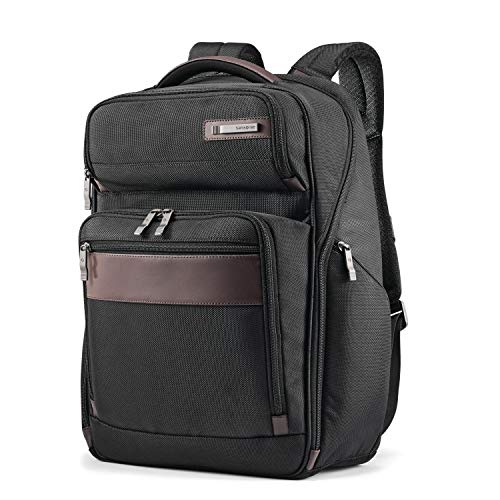
Samsonite Kombi Business Backpack – Ballistic Nylon, 15.6” Laptop Compartment, Tablet Pocket, SmartSleeve™, Multi-Pocket Organizer, Padded Straps & Back, Top Handle, Fleece-Lined Accessory Pocket — A business backpack with a padded, dedicated laptop compartment — physical security starts with the laptop surviving the commute and staying on your person. Check price on Amazon.
Common Mistakes That Undo Good Security
The most common mistake is partial security performed confidently: encryption on, but the recovery key in a note on the laptop; two-factor enabled, but the email account — the master key to every reset — still using a reused password from years ago. Attackers probe for the weakest layer, not the average. The second mistake is convenience erosion: disabling the lock timeout, postponing updates indefinitely, or sharing one sign-in across a team because it is easier. Each feels small; together they dismantle the system.
A subtler mistake is treating security as a one-time project. Laptops accumulate software, accounts, and data; employees join and leave; threats evolve. The settings in this guide need a brief recurring review — quarterly is enough for most small operations — or they quietly drift out of date while everyone believes the machine is ‘the secured one.’
Pro Tips for Small Teams
Write a one-page laptop policy, even if the team is three people: encryption on, updates automatic, no shared accounts, incidents reported immediately without blame. The no-blame clause matters — the fastest incident reports come from people who are not afraid to say they clicked something. Keep one spare secured laptop so a compromised machine can be isolated instantly without stopping someone’s work.
When an employee leaves, treat account closure as same-day work: disable their accounts, change shared credentials they knew, and recover the device. Most small-business security failures are not sophisticated hacks; they are yesterday’s access still working today.
Email and Phishing: The Door Most Attacks Actually Use
For all the hardware in this guide, the majority of business compromises begin with a message: a convincing email, a fake sign-in page, a malicious attachment wearing an invoice’s clothes. Laptop security therefore includes message hygiene. Keep your email client and browser updated, let their built-in phishing protections stay enabled, and treat unexpected attachments and sign-in links as guilty until proven innocent — navigate to services by your own bookmarks, not by links in messages that pressure you.
The two-factor authentication from the account layer is what saves you on the day a phish succeeds: a stolen password alone should not open the account. Verify that protection is actually on for the email account itself, because email is the reset point for everything else. One phished email account with no second factor is a skeleton key to the business.
Small teams should normalize verification for money-moving requests: any message asking for payment changes, gift cards, or credential entry gets confirmed through a second channel — a call to a known number, not a reply to the message. Attackers exploit hierarchy and haste; a stated policy gives every employee permission to pause, which is the entire defense.
Physical Security and the Office Environment
Digital layers assume the laptop itself is present and unmolested, so give the physical layer its due. In the office, laptops should lock — cable locks at shared desks, a locked drawer or cabinet overnight in public-facing premises, and a clean-desk habit for the documents around them. A laptop stolen from an unlocked office is not a sophisticated attack; it is an invitation accepted.
At home, the work laptop deserves the same seriousness: a household member’s casual borrowing is how work machines acquire games, toolbars, and occasionally malware. Keep work and personal use separated by account at minimum, and by device where the data is sensitive. The boundary protects the business and the family equally.
Travel compresses these risks, so rehearse the posture: laptop in hand luggage, never left visible in a car, privacy screen on in public, lock timeout short, find-my-device verified before departure. Physical security is mostly choreography — unglamorous, rehearsed, and decisive on the one day it matters.
Incident Response: The Plan You Write Before You Need It
Security includes the response, and a one-page plan written calmly outperforms improvisation under stress. The plan names: who is contacted first, the order of password changes (email, then banking and finance, then everything else), how the laptop gets isolated or remotely locked, and which obligations — clients, insurers, regulators — get notified if their data may be involved. Print it or keep it in the password manager; a plan stored only on the compromised laptop is a plan you do not have.
Rehearse the first hour mentally once: disconnect the machine from networks, do not delete anything, do not keep working on it, and start the password sequence from a clean device. Evidence matters if the incident grows, and the instinct to tidy up destroys it. Professional help, when client data is at stake, is not an overreaction — it is the proportionate one.
After any incident, close the loop with a blameless review: which layer failed, which layer held, and what single change prevents the repeat. Security postures improve exactly this way — one honest incident at a time — and organizations that punish reporting simply stop hearing about incidents while continuing to have them.
Software Sources and the Download Discipline
A remarkable share of compromised laptops were infected by software their owners chose to install — bundled, repackaged, or outright fake versions of legitimate tools downloaded from the wrong place. The discipline is absolute: software comes from the vendor’s official site, the operating system’s store, or your company’s portal, and from nowhere else. Search-engine advertisements for popular downloads are a known malware channel; navigate by known addresses, not by clicking the first result with a download button.
Browser extensions deserve the same scrutiny as applications, because they are applications — with access to everything you read and type in the browser. Install few, from the official store, from publishers you can name, and audit the list quarterly. An extension bought by a new owner can change its behavior overnight, which is why the audit exists.
Keep an inventory of what is installed and why. Software nobody can explain is software nobody should run, and the inventory doubles as the rebuild list if the machine ever needs one. Security is partly the art of having a short, known list of things to trust.
Backups Tested, Not Assumed: The Restore Drill
This guide has prescribed backups repeatedly; here is the step that makes them real. Once a quarter, restore one file — an ordinary document, chosen at random — from the backup to a test location, open it, and confirm it is whole and current. The drill takes three minutes and detects every silent failure mode: the backup that stopped running, the folder that was never included, the account whose storage filled in March.
Extend the drill annually to the disaster case: if this laptop were gone tonight, walk the plan — where is the replacement backup restored from, in what order, by whom, with which credentials? Any step that produces a blank stare is a step to fix while the laptop still exists. Organizations call this a tabletop exercise; a solo professional can do it over coffee, and it is the highest-value coffee in security.
Document the drill’s result in the asset record with the date. A backup with a recent, dated, successful restore test is a control. A backup without one is a hope wearing a control’s clothing — and attackers, accidents, and entropy all specialize in disappointing hopes.
Threat Models for Ordinary Businesses: What You Are Actually Defending Against
Security advice floats uselessly until it names its enemy. For most small businesses and solo professionals, the realistic threats are unglamorous, well understood, and almost entirely addressed by the layers in the main guide — provided those layers are aimed deliberately.
The opportunistic thief and the lost bag
The commonest catastrophe is physical: a laptop taken from a car, a café, or a train. Against this enemy, encryption is the whole game, because a powered-off, encrypted laptop is a paperweight to its thief, while an unencrypted one is your client list, your accounts, and your inbox in a stranger’s hands. The recovery-key discipline and the loss preparation in the main steps exist precisely for this day, and they convert a business crisis into an insurance claim and an inconvenience.
The credential phisher and the patient impersonator
The second enemy never touches the machine: they persuade the human in front of it to hand over a password or approve a sign-in. Unique passwords and a password manager shrink the blast radius of any single success, while phishing-resistant sign-in methods and the verification habits covered later in this guide attack the persuasion itself. This enemy is beaten by layers working together, which is why no single product, however marketed, substitutes for the structure in the main steps.
Ransomware and the destructive stranger
The third enemy encrypts or destroys data for extortion, arriving usually through a malicious attachment, a compromised download, or an unpatched exposure. Against this one, the defences are the update discipline, the download discipline, and above all the tested backup, which transforms the attack from an existential event into a restore operation. Businesses survive ransomware on the quality of their backups, not on the quality of their regrets, and the restore drill in the main guide is therefore not an optional refinement — it is the point.
The insider-shaped risks: departures, mistakes, and curiosity
Not every threat wears a stranger’s face. Departing employees with lingering access, honest mistakes that share the wrong folder with the wrong client, and simple curiosity around screens left unlocked cause a large share of real small-business data incidents. Standard accounts, prompt offboarding, screen-lock habits, and need-to-know sharing answer these without paranoia, because they are designed as hygiene rather than as suspicion — the correct emotional register for securing a workplace you also have to live in.
Passwords and Sign-In, Taken Further
The main steps establish the password manager as the centre of the system. This section deepens the practice around it, because sign-in is where most real-world security is won or lost on ordinary days.
Multi-factor authentication, prioritised honestly
Enable the second factor everywhere it exists, but sequence the work by value: the email account first, because it resets everything else; then banking and finance; then the password manager itself; then work systems and cloud storage. Prefer app-based or hardware-backed factors over text messages where the service allows, since messages can be intercepted or redirected through number fraud — while remembering that a text-message factor still defeats the overwhelming majority of casual attacks, and the perfect should never delay the good by a single day.
Passkeys and the direction of travel
Modern sign-in is moving toward passkeys — cryptographic credentials stored on your devices that cannot be phished, reused, or leaked from a server in usable form. Where your services offer them, adopt them, and let the password manager hold and sync them as it does passwords. The practical advice is transitional: use passkeys where offered, strong unique passwords with a second factor everywhere else, and expect the balance to shift steadily in the passkey direction across the laptop’s working life.
The master password and the recovery plan
The password manager’s master secret deserves ceremony: long, unique, memorised, and backed by a recovery method stored with the business’s other critical documents, because the manager concentrates risk exactly as it concentrates protection. Decide, in writing, what happens if the primary user is unavailable — who can reach the recovery material, under what authority — since businesses discover the absence of this plan at the worst possible moments. Concentration with a plan is strength; concentration without one is a single point of failure wearing a security product’s clothes.
Network Security Beyond the Office Walls
The main steps cover network habits; the modern business laptop lives on networks its owner does not control, and the details deserve expansion.
Home networks: the forgotten office infrastructure
The home router is now business infrastructure and should be treated with a fraction of the seriousness an office would receive: its administration password changed from the default, its firmware updated, its wireless protected with current encryption, and its guest network used for visitors and smart gadgets so the work laptop shares air with as little as possible. None of this requires expertise beyond an hour with the router’s manual, and it closes the odd situation of a carefully secured laptop spending its nights on a network secured by a password printed on a sticker in 2016.
Travel and public networks, revisited practically
On public networks, the hierarchy of safety is: your own phone’s hotspot first, trusted venue networks second, open networks last and briefly. The laptop’s firewall stays on, sharing stays off, and sensitive work waits for a connection you trust or travels through the virtual private network your setup provides. Captive portals — the sign-in pages of hotels and airports — deserve a sceptical eye, because they train users to type credentials into unexpected pages, which is the phisher’s entire curriculum; verify the network name with the venue where the stakes justify it.
Bluetooth, cables, and the physical perimeter of data
Wireless conveniences are also doors. Bluetooth left discoverable, unknown charging cables accepted gratefully at conferences, and found storage drives plugged in hopefully have all carried real attacks. The habits are cheap: Bluetooth off when unused, your own cables and charger as a matter of policy, and found media treated as contaminated until a technician says otherwise. Physical-layer discipline sounds excessive right up to the incident report in which it would have been decisive, and it costs nothing but the decision to practise it.
Securing the Work Beyond the Laptop: Accounts, Cloud, and Shared Data
The laptop is the door, but the valuables increasingly live beyond it, in accounts and shared storage the laptop merely visits. A complete security pass follows the data to its actual homes.
The email account is the master key
Whoever controls the business email controls password resets for nearly everything else, which makes the mailbox the most security-critical account the business owns — more critical than the laptop itself. It deserves the strongest available protection: a unique password in the manager, the strongest second factor offered, recovery options reviewed and current, and sign-in alerts enabled where the service provides them. Audit its rules and forwarding settings occasionally, because a compromised mailbox is often quietly configured to forward copies onward, and that configuration survives a password change if nobody looks for it.
Shared drives and the permission creep problem
Shared storage accumulates permissions the way shared houses accumulate keys: generously given, rarely reviewed, never retrieved. Periodically audit who can reach the folders that matter — client data, finance, personnel — and whether the sharing links created for one project last year still open the business’s filing cabinet to anyone holding the link. The discipline is need-to-know, applied kindly and reviewed on the same quarterly rhythm as accounts, because access that nobody remembers granting is access nobody is watching.
Personal devices and the boundary problem
Work that leaks onto personal phones, home computers, and family tablets escapes every protection this guide builds. The answer is rarely prohibition, which merely drives the behaviour underground; it is provision — making the secured route the easiest route, with the work account accessible through managed applications on personal devices where the business’s tools allow, and a clear, short policy about what may never leave the managed world. Security that ignores human convenience gets routed around; security that designs for it gets used.
The Human Layer: Habits, Training, and a Culture That Reports
Every technical layer in this guide is operated by a person, and the person’s habits are either the strongest layer or the hole in all the others. Building the human layer is mostly a matter of tone.
Training that respects its audience
Short, specific, and occasional beats long, generic, and annual. Teach the three behaviours that carry the business — verify unusual requests through a second channel, let updates finish, report anything odd immediately — with real examples from businesses like yours rather than with hacker mythology. People protect what they understand, and they understand stories about businesses they recognise far better than statistics about industries they do not.
The reporting culture is the security product
The single most valuable security behaviour in a small team is the fast, unembarrassed report: I clicked something, I sent something, the laptop is doing something strange. Businesses where reporting is thanked get incidents in minutes, when they are cheap; businesses where reporting is punished get them in weeks, when they are not. Whoever leads the team sets this price personally, in the moment of the first report they ever receive, and should set it deliberately: gratitude first, questions second, blame never — because the next report is being decided by how this one was received.
The owner as the weakest or strongest link
In most small businesses the owner’s laptop is the least secured machine in the building, exempted by its owner from the disciplines everyone else follows. Attackers do not respect the exemption. The standard account, the updates, the backup, the second factors — the owner goes first in adopting them, visibly, because a security culture is caught from the top more than it is taught from a document. This is not moralising; it is threat modelling that includes the org chart.
Securing a Laptop That Travels: Borders, Hotels, and Borrowed Desks
The main guide prepares for loss; this section prepares for the subtler exposures of a machine that works in the world, among strangers, networks, and jurisdictions not its own.
Before the journey
Travel preparation is a security ritual: confirm the backup is current before departure, because the road is where laptops are lost; verify encryption with your own eyes rather than from memory; and consider what data the journey actually requires, leaving the rest behind in the office systems where it belongs. A laptop carrying only what the trip needs is a smaller target in every sense — less to steal, less to expose, less to explain. Charge the machine, pack your own cables and charger as the physical-layer discipline demands, and note the serial number somewhere separate from the bag.
In the hotel and the conference room
Hotel rooms feel private and are serviced daily by strangers; the laptop is locked when you are out of the room, every time, and locked in the room’s safe or secured to furniture when the day’s work is done, not because hotel staff are suspects but because unlocked rooms have many keys. Conference and client-site work adds the audience problem: screens angled away from corridors, privacy filters earning their keep, and the discipline of never leaving the machine signed-in among strangers while coffee calls. None of this is paranoia. It is the ordinary professionalism of people whose laptops hold other people’s information.
Crossing borders and the inspection scenario
Professionals who travel internationally should know their obligations and their organisation’s policy before a border official asks to inspect a device, because that conversation is not the place to improvise one. The general principles travel well: carry only necessary data, keep encryption lawful for the jurisdictions involved, know what your employer or your clients require you to protect and what you are permitted to disclose, and have the contact who can advise you reachable. Preparation here is legal and procedural rather than technical, and it belongs in a complete security guide precisely because the laptop’s protections end where authority begins — plan for that boundary in the calm of the office, not in the noise of an arrivals hall.
The Quarterly Security Hour: A Standing Appointment With Your Own Defences
Everything in this guide decays without attention, and the cure proposed throughout — a rhythm — deserves one concrete form to end on.
The checklist, walked
Once a quarter, in a single scheduled hour: confirm every laptop in the business is encrypted, updated, and backed up, and restore one file from each backup as the standing proof. Review who has accounts and access, and remove what departures and finished projects have left behind. Check the password manager for reused or weak survivors and fix the worst few. Read the incident plan once, so it stays familiar, and verify the contact details in it still reach living humans. Then write one line in the record: the date, and that it was done.
Why the hour works
The hour works because it is small, scheduled, and complete — three properties that distinguish systems that survive from resolutions that evaporate. Security maintained quarterly in calm is what allows a business to meet its one bad day — the theft, the click, the flood — with procedures instead of improvisation. That is the destination of every layer in this guide: not a laptop that cannot be harmed, which does not exist, but a business whose security is a habit rather than a hope, kept by an appointment it actually keeps.
Security for the Very Small Business: A Realistic Minimum Viable Setup
For the one-person business reading this guide with more anxiety than time, here is the whole structure compressed into an afternoon, in order, without apology for its brevity — because this minimum, actually done, defeats the overwhelming majority of what actually happens to businesses your size.
Turn on the drive encryption and record the recovery key somewhere that is not the laptop. Demote your daily account and keep the administrator separate. Install the password manager, move your ten most important accounts into it with unique passwords, and switch on the second factor for email, banking, and the manager itself. Set updates to automatic and let them finish. Arrange the backup, then restore one file from it with your own hands so the proof is personal. Write the incident plan’s first version on one page: who you call, what you disconnect, what you never pay and never click. That is the afternoon. Everything else in this guide is the deepening of those six acts, to be layered on quarterly as the business and your confidence grow — but the afternoon is the foundation, and a foundation poured beats a palace planned, in security as in building.
The mindset that holds it together
Security for a small business is not a product, a person, or a project with an end date. It is the same category of thing as bookkeeping: unglamorous, rhythmic, and fatal only when neglected for long stretches. Owners who file it mentally beside the accounts — a little, regularly, with an annual professional review — stop fearing it, because a maintained system does not generate the emergencies that make security feel frightening. The laptop on your desk, encrypted, updated, backed up, and guarded by unique passwords, is not a fortress. It is something better suited to real life: a well-kept house, in a decent neighbourhood of habits, with its doors locked and its lights on — and that, the incident statistics agree, is where almost all of the safety there is actually lives.
Stories the Layers Tell: Three Incidents, Three Outcomes
Abstract layers become memorable through cases, and these three — composites of the incidents small businesses actually report — show the structure of this guide deciding real outcomes.
The laptop left in the car
A consultant’s machine was taken from a car overnight, an event that began as a police report and an insurance call. Because the drive was encrypted and its key was on record, the incident ended there: no client notification, no data exposure, a replacement machine restored from a tested backup within two days. The same theft, against an unencrypted machine with no backup, is a different story in every particular — a disclosure, a liability, and a business interruption measured in weeks. The distance between those two stories is exactly the afternoon of setup this guide describes, and nothing else.
The invoice that was not an invoice
A bookkeeper opened an attachment that wore a supplier’s name, and the machine began encrypting files within the hour. The restore drill, practised in calm months before, ran in a grim afternoon: disconnect, preserve evidence, rebuild, restore from the backup that had been tested rather than assumed. The business lost a day. Its neighbour in the same attack, in the same season, without a tested backup, lost considerably more. Ransomware outcomes are decided before the attack, at the backup, which is why this guide treats the restore as a ceremony rather than a hope.
The departure that went quietly
An employee left on ordinary terms, and the offboarding checklist — rehearsed, unemotional, standard — removed accounts, recovered the laptop, and rotated the shared credentials the role had known. Nothing happened, which was the point. The businesses that suffer at departures are those improvising access removal under emotional weather; the checklist exists so that a routine HR event never has to become a security event, and its quiet success, repeated across years, is the least visible and most valuable outcome in this entire guide.
Begin today, with the afternoon’s six acts, and let the quarterly hour keep what the afternoon built. Security kept this way does not announce itself; it simply means that the worst day your laptop ever has — the theft, the click, the flood, the departure — arrives to find a business that has already decided what happens next. That readiness, quiet and unglamorous, is the whole subject of this guide, and it is entirely within your reach before the week is out.
The Guide in One Breath
Encrypt the drive and guard its key. Work from a standard account. Make every password unique inside a manager, and put a second factor on the accounts that matter, email first. Let updates finish. Back up like you mean it, and prove it with a restore. Prepare for loss before it happens, teach the humans to report fast and without fear, and keep the whole structure alive with one honest hour each quarter. Do those things and your business laptop is secured — not perfectly, because perfection is not on offer at any price, but thoroughly, proportionately, and in a way that will hold on the only day it is ever truly tested.
One last encouragement for the reader who feels behind: every secured business in this guide’s stories began exactly where you are, with an ordinary laptop and a list that looked longer than the afternoon available. They did the afternoon anyway. The distance between vulnerable and defended, in the real world of small business, is rarely money or expertise — it is a single scheduled day of unglamorous acts, performed once and then kept. Schedule yours.
The locks are only the beginning of the story; the keeping of them is the story itself. Keep them, and go back to building the business the laptop was bought to serve — secured, backed up, and quietly ready for anything.
Start with the encryption. Everything else follows from a machine that can be lost without being read.
Locked, backed up, and ready: that is a business laptop’s proper state, and it is closer than you think.
Related Guides
- best business laptops in the top band
- best Dell business laptops
- best business laptops on a budget
- best compact business laptops
- best laptops for small business
- business laptop security features explained
- how to set up a business laptop securely from day one
Frequently Asked Questions
Is the built-in Windows or Mac security enough for a business laptop?
For most small businesses, the built-in tools — kept updated, combined with encryption, standard accounts, and unique passwords — provide a strong baseline, and larger organizations layer managed endpoint protection on top through IT. What no tool provides is protection against reused passwords and disabled updates, which is why this guide spends as much time on accounts and habits as on software.
What is the single most important security setting?
Full-disk encryption, because it is the only control that still works when everything else has failed and the laptop is physically gone. A close second is two-factor authentication on the email account, since email resets every other password. If you do nothing else today, do those two.
Should I use a VPN on my work laptop?
On networks you do not control — cafés, hotels, airports — yes: a company VPN or a reputable provider encrypts your traffic against local snooping and impostor hotspots. At home on your own secured network it matters less for security, though company policy may require it for accessing internal systems. The VPN protects the connection, not the laptop, so it complements rather than replaces the other layers.
How do I handle security when an employee leaves?
Disable their accounts the same day, change any shared passwords they knew, revoke their sessions and devices in your email and file systems, and recover the laptop. If the device cannot be recovered promptly, use remote lock or wipe. Document the steps once so the process does not depend on anyone’s memory during a stressful exit.
Are fingerprint and face sign-in actually secure?
Yes — on modern business laptops, biometrics are a secure and practical way to sign in, backed by dedicated hardware that stores the biometric data on the device itself. Their real security value is behavioral: because signing in becomes effortless, people keep strong passwords and short lock timeouts instead of weakening them for convenience. Keep a strong password as the fallback it is designed to be.
What should I do first if I think the laptop is compromised?
Disconnect it from networks to contain spread, then contact whoever handles your IT — or, if that is you, change critical passwords from a different, clean device, starting with email and banking. Do not keep working on a machine you believe is compromised, and do not try to clean it while it stays connected to your file shares. Preserve the machine for professional assessment if client data may be involved.
How often should a small business review its laptop security?
Lightly, quarterly; thoroughly, annually. The quarterly pass checks that updates, backups, and account lists are as they should be, and that no departed person’s access survives anywhere. The annual review revisits the whole structure in this guide — encryption, accounts, factors, restore test, incident plan — against the business as it now is. Security decays by drift rather than by drama, and a calendar is the specific cure for drift.
Is a privacy screen a security measure or a gimmick?
A real measure against a real, if modest, threat: visual access in trains, planes, and cafés, where sensitive work is routinely visible to strangers. It does nothing against any digital attack and should never displace the layers in this guide, but for professionals who work on confidential material in public, it closes the one channel — the human eye over your shoulder — that encryption cannot.
What should our business do about security when we cannot afford dedicated IT help?
Do the layers in this guide in order, because they were sequenced for exactly that constraint: encryption, standard accounts, a password manager with second factors, automatic updates, and a tested backup cover the overwhelming majority of real-world small-business incidents without any specialist involvement. Add an annual half-day with a reputable local consultant to audit your work if the budget allows one luxury — fresh eyes on a sound structure are worth more than products bought blind.