Learning how to choose an android phone matters more than it used to, because the gap between a good pick and a frustrating one rarely shows up in the first week. Almost every modern Android phone feels fast in the store, takes decent photos in good light, and lasts a day on a charge. The differences that decide whether you still like the phone in year three are update support, storage headroom, carrier band compatibility, and how the software treats you day to day. This guide walks through a decision process you can finish in one sitting, in the order that actually matters.
The short version: decide your carrier and budget tier first, then filter by years of promised updates, then by storage and screen size, and only then compare cameras and processors. Most buyers do the exact opposite — they fall for a camera demo, then discover the phone gets two years of updates or lacks the band their carrier uses for rural coverage. Work through the steps below and you will end up with a short list of two or three phones, any of which you can buy with confidence.
Disclosure: As an Amazon Associate, kajuandouglas.com earns from qualifying purchases. Links to Amazon on this page are affiliate links; they cost you nothing extra. Listing details such as price and availability change often, so check the current Amazon listing before you buy.
Quick answer: pick your carrier first and confirm the phone supports its key bands, choose a model with at least four years of security updates promised, buy one storage tier above what you think you need, and treat camera and processor comparisons as tiebreakers rather than the main event.
Gear for This Guide
These verified examples show the profiles discussed above — not a ranking, but reference points for what each tier looks like in practice.

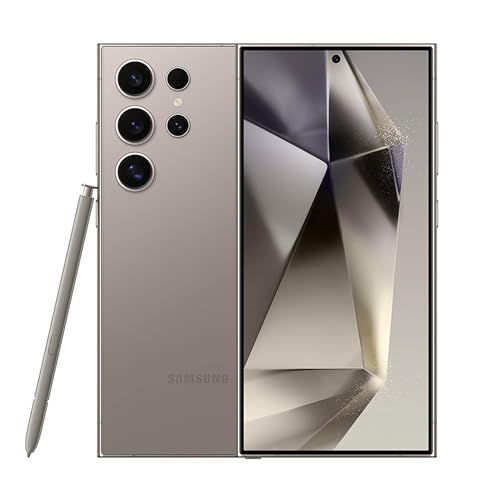
Samsung Galaxy S24 Ultra Cell Phone, 256GB AI Smartphone, Unlocked Android, 200MP, 100x Zoom Cameras, Fast Processor, Long Battery Life, Edge-to-Edge Display, S Pen, US Version, 2024, Titanium Gray — A flagship-tier example of the long-support approach: an unlocked US model with a stylus, a very bright display, and a manufacturer update commitment measured in years rather than months — the profile to look for if you keep phones a long time. Check price on Amazon.

OnePlus 12R, 8GB RAM+128GB, Dual-SIM, US Factory Unlocked Android Smartphone, 5500 mAh Battery, 50MP Camera, 80W Fast Charging, 2024, Iron Gray — A value-flagship example: fast charging, a large battery, and an unlocked dual-SIM design show how much of the flagship experience now exists a tier down if camera zoom is not your priority. Check price on Amazon.
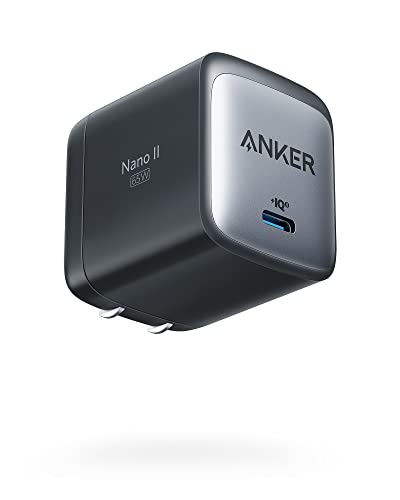
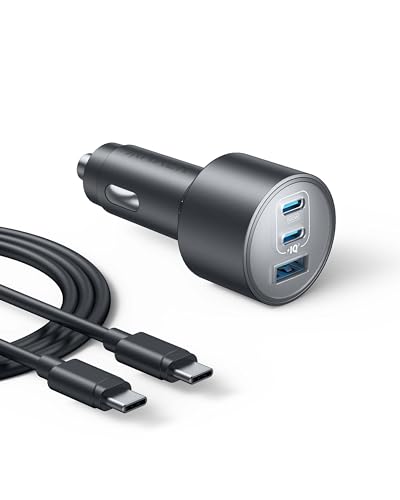
Anker Nano 65W GaN II PPS USB C Charger, Fast Compact Foldable Charger — Whatever phone you choose, a compact GaN USB-C fast charger covers modern Android fast-charging standards and replaces the charger many phones no longer include in the box. Check price on Amazon.

SANDISK 256GB Extreme microSD Card + Adapter, Up to 190MB/s Read Speeds — If your shortlisted phone has a microSD slot, a fast, high-endurance card like this turns it into cheap media storage for photos, video, and offline maps. Check price on Amazon.
In this guide
What You Need
- Your current carrier, or the carrier you plan to use, plus whether you will buy unlocked or through the carrier
- A realistic budget tier: entry, mid-range, or flagship — in words, not a hard number
- Your current phone, to check how much storage you actually use today
- A list of your three most-used activities: photos, video calls, gaming, navigation, messaging, work apps
- Any must-haves: headphone jack, microSD slot, stylus, wireless charging, compact size
You do not need benchmark charts or a spreadsheet. The single most useful piece of information is on your current phone right now: open Settings, look at storage used, and note which apps you open daily. That tells you more about your next phone than any spec sheet.
How to Choose an Android Phone: Step by Step
Step 1: Confirm carrier compatibility before anything else
An unlocked phone only works well if it supports the frequency bands your carrier actually uses where you live and travel. Check the phone model number against your carrier compatibility checker, and be careful with international variants sold online: they may connect, but miss a key low-band frequency used for indoor and rural coverage, or lack certification for features like Wi-Fi calling and VoLTE on that network. If you travel internationally, an unlocked model with broad band support and eSIM is the flexible choice. This step takes ten minutes and prevents the most expensive mistake in phone buying.
Step 2: Set your tier by how long you keep phones
If you replace your phone every two years, a solid mid-range model covers almost everyone: the displays, cameras, and processors in that tier are genuinely good now. If you keep a phone four or five years, the flagship tier earns its keep through longer update promises, better water resistance, brighter screens that stay readable as your eyes change, and batteries built for more charge cycles. Be honest about your replacement habit. Buying a flagship and replacing it in eighteen months wastes money; buying entry-level and nursing it for five years wastes patience.
Step 3: Filter by update policy — the hidden spec
Two phones with identical hardware can have completely different lifespans because one receives seven years of security patches and the other receives two. Security updates keep banking apps, work logins, and personal data protected, and major Android version updates keep new apps compatible. Check the manufacturer published update commitment for the exact model, not the brand in general, because commitments differ between a maker flagship and its budget line. This single filter eliminates more bad long-term purchases than any other step in this guide.
Step 4: Buy more storage than you think you need
Photos and video are the storage hogs, and they grow every year as cameras record at higher resolutions. A practical rule: take the storage you use today, double it, and buy at least that. If the model has a microSD slot, you can be more relaxed, because media can live on the card — but apps themselves increasingly must sit on internal storage, so do not go below a comfortable internal floor. Cloud storage helps, yet it is a subscription and a dependency on your connection; local headroom is a one-time decision you never think about again.
Step 5: Choose screen size by your hands and pockets, not the demo table
Large phones are easier to read and better for video, split-screen work, and maps. They are also harder to use one-handed, heavier in a pocket, and more likely to be dropped. If you can, hold the phone or a same-size dummy in a store: reach the far top corner with your thumb, type a sentence, and put it in your usual pocket or bag. Also check outdoor brightness if you navigate or work outside — a bright screen matters more in daily life than a small difference in resolution that your eyes cannot see at normal distances.
Step 6: Compare cameras on the shots you actually take
Marketing pushes zoom ranges and huge megapixel counts, but most people shoot people, pets, food, documents, and dim restaurants. Look for sample photos in low light and moving subjects — kids and animals — because that is where phones separate. A good main camera with strong image processing beats a long spec list of extra lenses you will rarely open. If you record video often, check stabilization samples while walking. And remember that your current phone camera probably disappoints you mostly in the dark; judge replacements on exactly that scenario.
Step 7: Check battery life claims the right way
Battery capacity in milliamp-hours is only half the story; processor efficiency and screen brightness habits matter just as much. Read reviews that test with mixed real use rather than looping video, and pay attention to charging speed, because a phone that recovers a big chunk of charge during a morning coffee is easier to live with than a slightly larger battery that charges slowly. If you are a heavy user, also confirm the phone does not throttle aggressively when warm, which shows up during long navigation or gaming sessions.
Step 8: Decide which extras are worth paying for
Wireless charging, an official water-resistance rating, a stylus, an in-display fingerprint reader versus a side reader, stereo speakers — none of these are essential, and all of them are lovely if they match your life. List your top two extras and let them break ties between finalists. What you should not do is pay flagship money for an extra you will use twice. Conversely, if you swim, hike, or work around water and dust, a proper ingress rating is not a luxury; it is insurance you will eventually collect on.
Common Mistakes
Buying an international variant to save money
Grey-market variants can lack your carrier key bands, warranty support in your country, and sometimes the correct charger in the box. The savings look real until the phone struggles for signal at home or a repair means shipping it overseas. Buy the version officially sold for your market unless you have verified every band and the warranty terms yourself.
Judging the camera in a brightly lit store
Store lighting flatters every camera. The photos that frustrate people are taken in living rooms, restaurants, and gymnasiums. Seek out low-light and motion samples in reviews, or test a display unit by photographing a shaded corner and a moving hand. Two minutes of realistic testing beats twenty minutes of spec comparison.
Ignoring the return window
Every carrier and retailer has one, and it is your safety net for the things no review can tell you: how the phone feels in your hand at hour six, whether the fingerprint reader likes your thumb, whether the screen tires your eyes. Buy from a seller with a clear return policy, set the phone up promptly, and actually test it hard in the first days instead of leaving it in the box.
Paying for storage in the cloud instead of on the phone
Cloud plans feel cheap monthly and expensive forever, and they strand your full-resolution memories behind your connection. They are a fine backup — you should absolutely have one — but they are a poor substitute for enough local storage. The one-time step up to the next storage tier is usually the best-value upgrade on the entire spec sheet.
Forgetting your accessories and accounts
A new phone can mean new cases, possibly a new charger standard, and an hour of signing back into apps with two-factor codes. Budget a little time and keep your old phone nearby during setup until every account is confirmed working on the new one. People lose access to authenticator apps and banking logins by wiping the old phone too early — a boring mistake with very un-boring consequences.
Pro Tips
Time your purchase around your current phone health, not launch hype. A phone bought three months after launch has reviews, case availability, and known quirks — and it will serve you exactly as long.
If two finalists are close, choose the one with the longer update commitment and the better return policy. You are buying years of Tuesdays, not a launch-day headline.
Keep your old phone as a backup for a month. It is a free insurance policy for drops, losses, and warranty repairs, and it makes an excellent dedicated device for navigation, music, or a child later.
Turn on automatic updates and a cloud backup on day one, whatever you buy. The best phone choice in the world cannot protect data that was never backed up.
Start With How You Actually Use a Phone, Not With a Spec Sheet
The most common buying mistake is starting from specifications and working backwards to a life the phone must fit. Reverse it. Write down your five most frequent phone activities in a typical week — messaging, photography, navigation, video calls, gaming, reading, music, work email — and rank them honestly. A phone that serves your top three activities brilliantly and your bottom two adequately will make you happier than a phone that is theoretically excellent at something you do twice a month. Reviewers optimise for measurable things; you should optimise for your Tuesday.
Next, identify your pain point with your current phone, because replacement purchases are usually driven by one specific frustration: the battery dies by afternoon, the camera misses your children’s indoor moments, storage warnings interrupt your week, or the screen is unreadable in sunlight. Name that frustration precisely. It becomes your highest-weighted criterion, and it protects you from being upsold on improvements to things that never bothered you. A buyer whose only complaint is battery life should weight battery and charging above all else and let camera bragging rights go to someone else.
The three-year test
Most people keep a phone far longer than they planned when they bought it. Apply a three-year test to every candidate: will this storage still be enough after three years of photos, will this battery — which will age — still clear your day in year three, and will this phone still be receiving security updates then? A phone that passes the three-year test comfortably is usually a better purchase than a marginally cheaper one that fails it in year two, because the cost of replacing early dwarfs the saving. This test is also why update policy, covered elsewhere on this site, deserves real weight in the decision rather than being treated as fine print.
Performance Tiers in Human Terms
Processor tiers matter less than marketing suggests and more than enthusiasts admit. For messaging, browsing, banking, maps, and video, every current mid-range processor is genuinely fast, and the difference between tiers shows up in specific places: how quickly the camera processes demanding shots, how smoothly demanding games hold their frame rates over a long session, and how the phone feels in year three as apps grow heavier. If you do not game heavily and do not push computational photography, a mid-range chip buys you years of smooth service and usually better battery efficiency as a bonus.
Memory and storage: the quiet deal-breakers
Memory affects how many apps stay ready in the background; too little and apps reload constantly, which feels like slowness even on a fast chip. Storage is the harder constraint because it cannot be expanded on most modern phones. Audit your current phone: check what your photos, videos, and apps occupy today, then add headroom for growth, especially if you shoot video of family events. Video consumes storage at a startling rate, and a phone that fills up begins failing in annoying ways — updates stall, cameras refuse to open, messages stop syncing. Buy storage for the phone’s whole life, not for its first month.
Cameras: Judging What You Will Actually Shoot
Camera marketing emphasises the main sensor, but your real album is mostly indoor family photos, food, documents, pets, and the occasional landscape. Judge a phone’s camera by those scenes. Indoor low-light performance, shutter responsiveness — whether the phone captures the moment you tap or a moment later — and colour consistency across lenses matter more to most albums than extreme zoom. If you photograph children or animals, prioritise fast capture and good autofocus tracking; motion blur ruins more real photos than any sensor limitation. If you travel, an ultrawide earns its place; if you attend concerts or school events from the back row, a genuine telephoto does.
Video, front cameras, and the unglamorous essentials
Video calls have made the front camera a daily tool for many people, and its quality in mediocre indoor light decides whether you look present or ghostly on calls with family and work. Stabilisation matters if you film while walking. Microphone quality, almost never advertised, decides whether your videos are watchable. These unglamorous details rarely headline a launch event, yet they shape daily satisfaction. Where possible, handle a candidate phone in a shop and shoot your actual subjects: the shop’s lighting flatters nothing, which is exactly why it is a useful test.
Screen, Size, and the Hands You Actually Have
Screen quality is brightness first for most people, because a screen you cannot read at a bus stop fails at its basic job, while resolution differences beyond a comfortable sharpness are invisible in normal use. Refresh rate makes scrolling and animation feel smoother and is genuinely pleasant, though it trades against battery. Size is a personal ergonomic decision: a large screen delights for video and reading and punishes one-handed use and small pockets. There is no correct answer, only your hands, your pockets, and your habits. If you read on the phone for an hour a day, weight matters too — a heavy phone is a wrist workout.
Build, water resistance, and repairability
Glass backs look premium and crack expensively; a case erases most practical differences, so buy the build you like and case it if you are clumsy. Water resistance ratings protect against accidents, not swimming sessions, and the protection fades after repairs or hard drops. Repairability deserves a thought: a phone whose battery can be replaced affordably at a local shop gains an extra year or two of useful life, which for many buyers beats a small specification advantage. Ask about local service before buying an obscure model, because a phone nobody nearby can repair is a phone one cracked screen away from replacement.
Software Experience and the Ecosystem Around You
Two phones with identical hardware can feel entirely different because of their software. Some interfaces are minimal and quiet; others are feature-rich with duplicate apps and enthusiastic notifications. Neither is objectively right. If you value calm and simplicity, lean minimal. If you love customisation, automation, and squeezing features, lean rich. What matters is knowing your temperament before the phone teaches it to you. Also weigh the accessories and services you already own — earbuds, watch, car system, home speakers — because a phone that integrates with your existing kit saves friction every single day.
A final decision routine
- List your top five activities and your single biggest frustration with your current phone.
- Set your total budget including a case, a charger if none is bundled, and any accessory you truly need.
- Shortlist three phones that fix your frustration and pass the three-year test on storage and updates.
- Handle each in person if you can; check screen brightness, one-handed comfort, and camera shutter speed on a moving subject.
- Choose the one whose weaknesses sit in areas you ranked lowest, and stop researching after you buy.
That last step matters. Every phone has a forum thread declaring it flawed; the phone that fits your ranked priorities is the right phone, and post-purchase research only manufactures doubt.
Scenario Shopping: Five Buyers, Five Different Right Answers
The parent filming school plays from the back row needs reach above all: a genuine telephoto lens, a bright screen for reviewing shots outdoors, and storage for video that accumulates far faster than anyone expects when a season of performances, matches, and recitals is recorded in high quality. Their wrong phone is the small, elegant handset with the modest zoom and the small battery, however glowing its reviews, because it fails at the exact moments the phone was bought for. The delivery driver needs something else entirely: battery stamina that survives a full shift of navigation, a screen readable in harsh sunlight through a windscreen, a loud speaker for instructions in a noisy cab, and durability, because this phone is a work tool that will be dropped on concrete. Their wrong phone is the delicate flagship with the beautiful glass back and the fragile price. The student needs value measured across years: mid-range performance that stays smooth, the longest update support the budget allows, and enough money left afterwards for a case, a charger, and a term’s worth of coffee. Their wrong phone is last year’s discounted flagship whose update runway is nearly spent, however impressive its camera once was.
The grandparent whose phone exists mainly for video calls with grandchildren needs a large, clear screen, loud and clear speakers, the simplest software available, and — decisively — relatives nearby using the same system who can help in its language. Camera subtleties are irrelevant to this buyer; screen size and speaker volume are everything, and a mid-range phone with a big display beats a small flagship on every measure that matters to them. The frequent traveller needs dual-SIM or eSIM flexibility, radio bands that work in the countries actually visited, offline maps that behave, and a camera good enough to be the trip’s only record. Their wrong phone is a carrier-locked bargain that sulks abroad and cannot take a local SIM. Notice what these five buyers teach: none of them is served by a single universal ranking of phones, because each scenario reorders the same criteria — battery, camera, screen, storage, support, durability — into a different winner. The honest method of choosing always starts with a life and ends with a model, never the reverse, and the time spent describing your own life accurately is worth more than any hour spent reading rankings written for an average person who does not exist.
Buying a phone for someone else
Choosing for a parent, a child, or a partner adds one rule that overrides the buyer’s own taste: the recipient’s habits outrank your preferences, always. The enthusiast who buys a parent a feature-rich phone because it is objectively superior has usually bought themselves a support burden and the parent a source of low-grade daily anxiety; the simpler phone the parent can operate confidently, whose menus they can learn once and trust, is the genuinely better gift. For children, the ranking inverts again: durability, repairability, effective parental controls, a screen you can afford to replace, and a price you can contemplate losing without grief dominate every specification that excites reviewers — and a hand-me-down from your own upgrade often beats a new budget model outright, because its camera, screen, and build are better and its cost is already sunk. Whatever the relationship, ask the recipient what frustrated them about their last phone, even when you are certain you know. The answer regularly surprises the buyer, and buying against the real frustration rather than the assumed one is the whole craft of gifting a phone well.
The Money Conversation: Total Cost, Timing, and Trade-Ins
A phone’s shelf price is merely the first instalment of its cost, and choosing well means pricing the whole ownership. Add the case it will live in, the charger if none is bundled, the storage tier you actually need rather than the one on offer, any care plan you will genuinely use, and the paid apps or subscriptions that will not transfer from an old platform. Then divide that total by the years you will realistically keep the phone, using the maker’s update policy as the honest ceiling on those years, because a phone should not be your main device after its security support ends. This cost-per-year figure routinely reverses shelf-price rankings: the phone that costs noticeably more but serves four fully supported years is cheaper per year than the bargain replaced after two, and it was the better phone on every day of those years besides. Trade-in values complicate the maths further, in your favour if you buy from makers with generous programmes and keep the phone cased and undamaged — a case fitted from day one is, among its other virtues, a trade-in investment that pays out at upgrade time.
When in the release cycle to buy
Timing is a real discount that costs nothing but patience. A phone is at its best value relative to its remaining life just after its successor launches, when retailers clear stock while the update runway is still long. It is at its worst value in the weeks immediately before that launch, sold at full price for a runway about to shorten by a year. Last year’s flagship at a cleared price often beats this year’s mid-range model on screen, camera, build, and speakers, while losing on length of future support — a trade worth making consciously, with the support dates checked, rather than by accident. Carrier offers deserve arithmetic rather than excitement: a phone described as free across a long contract on an expensive plan can cost substantially more in total than the same phone bought outright and paired with a modest plan, and the comparison takes five honest minutes with the real figures. Write the figures down; memory is a notoriously optimistic accountant where phones are concerned.
Hands-On Tests That Reveal More Than Reviews
In a shop, ignore the looping demo video and test your actual life on the phone. Type a full paragraph on its keyboard, because a keyboard that frustrates you under shop lights will frustrate you for years at home. Photograph a moving person — a companion walking past — under the shop’s mixed lighting, and check whether the face survived with its expression intact; this single test predicts your satisfaction with the camera better than any specification. Open the maps application and scroll and zoom; stutter there predicts stutter everywhere. Hold the phone one-handed and reach for the far corner of the screen, because your thumb’s verdict on size is final and no reviewer’s hand substitutes for yours. Play thirty seconds of video at the volume you would use in a noisy kitchen and judge the speakers honestly. Step toward the door or the brightest window and check the screen outdoors, since a display you cannot read at a bus stop fails at its basic job. None of this requires expertise, shop permission beyond politeness, or more than ten minutes — and all of it is information about the pairing of this phone with this person, which is the only pairing you are actually buying.
Using the returns window as the real review
Where the retailer allows returns, treat the first week as the true review period and use the phone as your only phone: commute with it, photograph your real subjects in your real light, live on its battery through your longest ordinary day, and take the calls and messages of your actual life on it. Keep the packaging pristine, keep the old phone unerased and working, and keep the receipt findable. Most buyers never exercise the return, because the phone is fine — which is precisely the point. The window is not a licence for indecision; it is insurance against the rare, real mismatch that only daily life reveals and no shop test can. Knowing the window exists also improves the purchase itself: it lets you choose with less agonising and more accuracy, because the decision is no longer irreversible on day one.
Common Choosing Mistakes, Collected From Regretful Owners
- Buying the camera for the one annual holiday and ignoring the battery that must survive every working day.
- Choosing storage for today’s photo library and watching the phone fill itself by next spring.
- Paying for performance tiers your applications will never touch, then skipping the case that would have saved the screen in month two.
- Ignoring the update policy entirely and discovering in year two that the bargain was a short loan, not a purchase.
- Copying a friend’s phone whose life, hands, and priorities are nothing like yours.
- Forgetting the accessories and accounts you already own, and drifting into a second, incompatible ecosystem by accident.
- Buying at full price days before a successor launches, purchasing a shorter support runway at a premium.
Every item on that list describes a good phone bought for the wrong life, which is the most common failure in this entire subject. The phones were rarely at fault; the choosing was. Slow down on paper, before the shop, where mistakes are still free — rank your activities, name your frustration, price the whole ownership, test with your own hands — and the phone that emerges will still be pleasing you in year three, when the launch reviews are long forgotten and the phone is simply, unremarkably, right.
The Second Opinion: How to Use Reviews Without Being Used by Them
Reviews are evidence, not verdicts, and the skill of using them is the final choosing skill worth learning. Read reviews for facts you cannot test yourself — how the battery behaves across a month, whether updates arrived on schedule, how the screen fares after a season of pockets — and discount their conclusions, which are calibrated to a reviewer’s life rather than yours. Weight long-term reviews over launch reviews, because phones reveal themselves across months: the update that fixed the camera, the battery that faded, the software that improved or cluttered. Read the complaints in user reviews for patterns rather than volume; a hundred people describing the same specific behaviour is information, while a hundred people expressing general disappointment is weather. And when a review criticises a phone for lacking something, always ask the only question that matters: lacking it for whom? A phone panned for its gaming performance may be the perfect phone for a person who has never played a game on a phone and never will. Your ranked list of activities, written before the research began, is the filter that turns the internet’s noise back into signal.
The last five minutes before you pay
At the point of purchase, run the final check that catches the unglamorous errors: the storage tier is the one you chose, not the one in the display unit; the colour and model are correct; the update policy you researched belongs to this exact model and not its sibling; the box contains or omits the charger as you assumed when budgeting; and the returns terms are what you were told. Then buy it, case it, set it up using the methods elsewhere on this site, and keep the old phone unerased for a week as your safety net. Choosing well ends not with the payment but with that calm first week — after which the phone stops being a purchase and becomes, simply, your phone.
The Phone as a Five-Year Relationship: A Closing Perspective
It helps, finally, to think of the purchase in the units it will actually be lived in: not specifications but mornings. This phone will wake you, navigate you, photograph your people, hold your money, and mediate your work and your family for years of mornings. The choosing method that honours that reality is the one this guide has built in layers: rank your life first, let your current phone’s frustrations name your priorities, price the whole ownership across the support runway, test with your own hands and your own subjects, and use reviews as evidence rather than as orders. A phone chosen that way rarely delights on day one in the showy sense — it simply fits, and keeps fitting, while flashier purchases reveal their mismatches by month three. Fit compounds. Choose for the mornings, and the specifications will take care of themselves, because they were only ever servants of the mornings in the first place.
Choosing in a Household of Phones: Compatibility at Home
Few phones are bought into a vacuum; most join a household fleet, and the fleet’s composition is a legitimate choosing factor that individual reviews ignore. A household standardised on one brand shares chargers, cases knowledge, troubleshooting wisdom, and the small economies of familiarity — a parent can be talked through a setting by a child who owns the same interface. Deliberate variety has its own case: different phones for different members’ needs, and a household that understands several systems is resilient when any one maker stumbles. Either strategy beats the accidental fleet, assembled purchase by purchase with no thought for the whole, in which every phone is a foreign country and every charger a diplomatic incident. Before choosing your next phone, glance at the household’s current fleet and decide whether you are reinforcing a standard or founding a variety — then buy accordingly, with the chargers, knowledge, and spare parts of the fleet in mind.
The old phone’s role in the new phone’s choice
Your current phone participates in the decision twice: once as the source of the frustrations that ranked your priorities, and once as an asset whose trade-in value, hand-me-down value, or spare-duty value offsets the new purchase. Price all three honestly before buying. A phone worth a strong trade-in argues for buying from the maker offering it; a phone perfect for a child’s first device argues for keeping it and pocketing the difference in expectations; a phone fit only for the drawer argues for recycling and a clean start. The new phone’s true price is its shelf price minus the old phone’s best use, and that simple subtraction, performed before the shop rather than after, has settled many a wavering choice between two finalists.
The Confidence to Stop Shopping
There is a moment in every good purchase when the research has done its work and further research only corrodes it, and learning to recognise that moment is the last choosing skill. It arrives when your ranked priorities are written, your frustration is named, your three finalists are tested by your own hands, and one of them has won on the criteria you set before the marketing reached you. Beyond that moment, every additional review read is a coin flipped against your own judgement, and the internet — which contains a passionate case against every phone ever made — will happily supply the corrosion. Buy the winner, set it up well, keep the old phone for a week as your net, and let the choice close. A year from now you will not remember the runner-up’s specifications. You will remember whether the phone fit your mornings, and if you chose by the method in this guide, it will have.
Related Guides
- best android phones for under 100 dollars
- best android phones for under 300
- best android phones for older under 200
- best android phones for under 250
- best android phones for under 300 dollars
- how to set up an android phone
- how to speed up an android phone
- how to back up an android phone
Frequently Asked Questions
Should I buy unlocked or from my carrier?
Unlocked gives you freedom to switch carriers, travel with local SIMs or eSIMs, and usually a cleaner software experience with no carrier bloatware. Carrier purchases can spread payments and include promotions, but the phone may be locked until paid off and updates can arrive later. If the total cost is similar, unlocked is the safer long-term choice. Either way, confirm the exact model supports your carrier bands before paying.
How much RAM do I actually need?
For everyday messaging, browsing, photos, and social apps, the RAM in any current mid-range phone is sufficient, and Android manages memory well. More RAM helps if you switch between many heavy apps, play demanding games, or plan to keep the phone many years as apps grow. It is rarely the spec that should decide between two phones — storage and update support will affect your daily life sooner.
Is a refurbished flagship better than a new mid-range phone?
It can be, especially for cameras and build quality, but check three things: battery health guarantee, remaining years of security updates, and warranty length. A refurbished flagship with only one year of updates left is a worse long-term buy than a new mid-range phone with five. Buy refurbished only from sellers who state battery condition and offer a real return window.
Do I need 5G in my next Android phone?
Nearly every new Android phone includes 5G now, so it is rarely a separate decision. What matters more is that the phone supports your carrier specific 5G bands — especially the mid-band frequencies that deliver the big speed gains — which any current US-market model from a major brand will. Our 5G guides linked below go deeper if coverage is your main concern.
When is the best time to buy?
Prices on Android phones ease as models age, and previous-generation flagships often become the best value in the entire market once their successor launches. If your current phone works, waiting for that moment is the single easiest saving available. If your phone is broken, buy the best-supported model in your tier today rather than limping along — a phone is a tool you use hundreds of times a day.
What should I do with my old phone?
First, keep it until the new phone is fully set up and every account works. Then factory-reset it and trade it in, hand it down, or keep it as a backup. Remove your SIM and any microSD card you plan to reuse, sign out of your Google account before resetting if a family member will use it, and recycle it responsibly if it is truly dead — phones contain batteries that should never go in household trash.