Learning how to choose a tablet starts with a simple truth: there is no single best tablet, only the right tablet for the jobs you actually do. A tablet bought mainly for reading and video needs a very different screen, processor and battery from one bought for drawing, schoolwork or replacing a laptop at a desk. This guide walks through the decisions in the order that matters, so you spend on the things you will notice every day and skip the specifications that only look impressive on a box.
We will cover the operating system choice first, because it decides which apps you can run and how long the tablet stays updated. Then we will work through screen size and quality, performance, storage, battery life, stylus and keyboard support, and connectivity. By the end you will have a short checklist you can apply to any model, at any tier, without needing to decode marketing names.
Disclosure: As an Amazon Associate, kajuandouglas.com earns from qualifying purchases. Links to Amazon on this page are affiliate links; they cost you nothing extra. Listing details such as price and availability change often, so check the current Amazon listing before you buy.
How to Choose a Tablet: Start With the Job, Not the Brand
Write down the three things you will do most. Streaming and reading reward a bright, sharp screen and good speakers, but ask little of the processor. Note-taking and drawing reward stylus support and a responsive display far more than raw speed. Games and video editing are the demanding end: they need a strong processor, plenty of memory and a screen with a fast refresh rate. School and office work sit in the middle, where a keyboard accessory and reliable multitasking matter more than benchmark numbers.
Also decide where the tablet will live. A tablet that rarely leaves the sofa can be larger and heavier; one that travels in a bag every day should be light enough that you never hesitate to take it. Portability is the feature people most often overbuy in reverse — they choose the biggest screen for films, then leave it at home because it is awkward to carry.
In this guide
Pick the Operating System First
The three real choices are iPadOS on Apple iPads, Android on tablets from Samsung, Lenovo, Google and others, and Fire OS on Amazon’s Fire tablets, which is a simplified branch of Android built around Amazon services. If you already use an iPhone, an iPad shares your apps, messages and photo library with almost no setup. If you use an Android phone, an Android tablet keeps the same app store, accounts and habits.
Fire tablets are the simplest and most limited option: excellent for streaming, reading and children’s use, with a curated app store rather than the full Google Play catalogue. Windows tablets exist too, but they behave like laptops with touchscreens and are usually heavier and shorter on battery life. Whichever you choose, check how many years of software updates the maker promises — a tablet that stops receiving security updates becomes a poor place to do banking or email, however fast it still feels.
Gear for This Guide
These four verified listings show the realistic spread of the market — one per ecosystem, plus the home-focused option. Use them as reference points while you apply the checklist below.
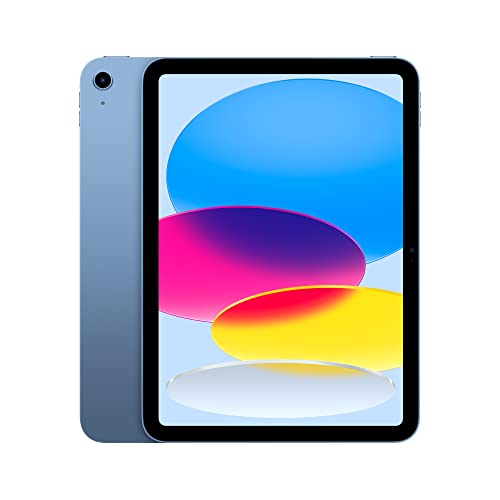
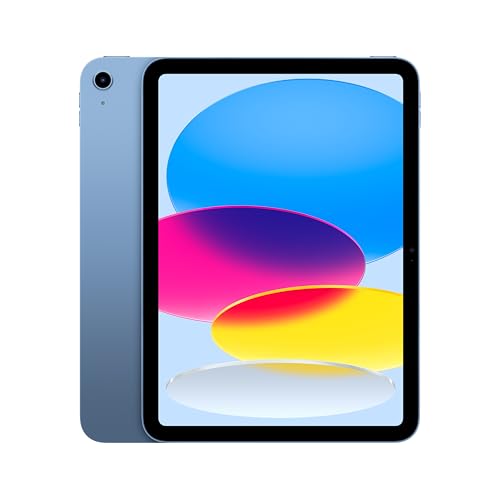
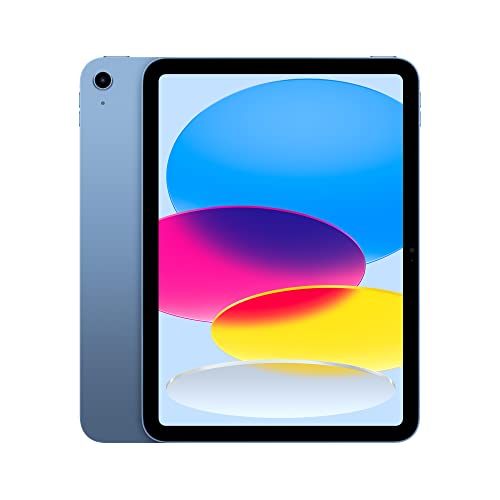
Apple iPad (10th Generation): with A14 Bionic chip, 10.9-inch Liquid Retina Display, 64GB, Wi-Fi 6, 12MP front/12MP Back Camera, Touch ID, All-Day Battery Life – Blue — Apple’s standard iPad is the reference point for the category: a 10.9-inch Liquid Retina display, Touch ID and a huge app library make it the safe default for mixed family and study use. Check price on Amazon.

Samsung Galaxy Tab S9 11” 128GB WiFi 7 Android AI Tablet, Snapdragon 8 Gen 2 Processor, AMOLED Screen, Durable Design, S Pen Included, Long Battery Life, Auto Focus Camera, US Version, 2023, Graphite — Samsung’s Galaxy Tab S9 pairs an AMOLED screen with an included S Pen, which suits buyers who want Android flexibility plus serious note-taking and drawing out of the box. Check price on Amazon.

Amazon Fire Max 11 tablet (newest model) vivid 11” display, all-in-one for streaming, reading, and gaming, 14-hour battery life, optional stylus and keyboard, 64 GB, Gray — Amazon’s Fire Max 11 is the streaming-first option, with an 11-inch display and optional stylus and keyboard support for lighter productivity. Check price on Amazon.

Google Pixel Tablet – Android Tablet with 11-Inch Screen and Extra-Long Battery Life – Hazel – 8 GB RAM – 128 GB — Google’s Pixel Tablet takes a different angle, doubling as a home display, which suits households that want one screen for video calls, photos and casual browsing. Check price on Amazon.
Screen Size and Quality
Tablets cluster into three sizes. Compact models around 8 inches suit one-handed reading and travel. The mainstream 10- to 11-inch class balances screen space and portability for most people. Large 12- to 13-inch models shine for split-screen work, drawing and films, but are two-handed devices. Resolution matters less than brightness and panel type at normal viewing distances: an OLED or AMOLED panel gives deeper blacks for films, while a good LCD is perfectly fine for reading and browsing.
If you plan to write or draw with a stylus, look for a laminated display, where the glass sits close to the panel — it makes the pen tip feel connected to the line. A higher refresh rate (90Hz or 120Hz) makes scrolling and pen strokes feel smoother, and it is one of the upgrades you notice immediately in daily use.
Performance, Memory and Storage
For browsing, video and light apps, almost any current processor is fast enough; the differences show up in games, large documents and how many apps stay open at once. Memory (RAM) drives that multitasking smoothness — more is better for work tablets, while casual models get by with less. Storage fills faster than people expect once offline video, photos and games accumulate, so choose more than you think you need, or confirm the tablet accepts a microSD card for media, as many Android models do and iPads do not.
Be honest about cloud habits. If everything you own already lives in streaming services and cloud photos, storage matters less. If you download films for flights or keep a large local music and book library, it matters a lot, and upgrading storage later is impossible on almost every tablet.
Battery, Stylus, Keyboard and Connectivity
Manufacturers quote battery life for video playback at moderate brightness; real mixed use lands lower, so treat the figures as comparisons between models rather than promises. For stylus use, confirm the exact pen the tablet supports — pens are rarely interchangeable between brands, and some tablets only support basic capacitive pens with no palm rejection, which makes handwriting frustrating. Keyboard cases turn a tablet into a light laptop for email and documents, but check the key size and whether the keys are backlit if you type in dim rooms.
Finally, decide between Wi-Fi-only and cellular models. Wi-Fi is right for home and office use, especially since phones can share a hotspot connection. Cellular earns its keep for people who work in the field, commute without reliable Wi-Fi, or want a tablet that is simply always connected without draining a phone battery.
Common Mistakes When Choosing a Tablet
Most regrets come from these avoidable errors:
- Buying on screen size alone: a large dim screen is worse for films than a smaller bright one; panel quality beats diagonal inches.
- Ignoring update support: a bargain tablet abandoned by its maker becomes insecure and loses app compatibility years before the hardware wears out.
- Assuming any stylus will work: pen support is model-specific; check for an active pen with palm rejection if you plan to write.
- Underbuying storage: offline video and games fill space quickly, and most tablets cannot be upgraded later.
- Paying for cellular you will not use: if the tablet never leaves Wi-Fi range, the cellular model and its data plan are wasted money.
Pro Tips Before You Buy
Hold the tablet, or at least check its weight, if you read in bed or commute — a few dozen grams decide whether a device gets used daily. Read the accessory list before ordering, because a case, pen and keyboard can change the real cost of ownership significantly between two similar tablets. And if you are buying for a child, prioritise parental controls, a rugged case option and simple charging over screen specifications; our linked guides to family models below go deeper on that specific case.
Reading the Specification Sheet Like an Editor
Specification sheets are written to sell, so read them adversarially. Processor names hide generations: a chip with a higher number is not always newer or faster, so search the chip name plus the word ‘released’ to learn its age — a two-year-old flagship chip usually beats a brand-new budget one. Display specifications quote peak brightness measured on a small patch of screen; sustained full-screen brightness is lower, which is why two tablets with the same headline figure can look different outdoors. Treat every number as a claim to be ranked against rivals, not as an absolute experience.
Memory and storage figures deserve the same scepticism. The storage printed on the box includes the operating system and preinstalled apps, so a tablet’s usable space is always less than the headline — one more reason to buy a tier above your estimate. Memory figures matter mainly in combination with the processor: a modest chip with generous memory often feels smoother in daily multitasking than a fast chip starved of memory, because apps stay resident instead of reloading. When two models tie on price, prefer the balanced one over the lopsided one.
Finally, weigh the specifications you cannot see. Speaker quality decides whether films and calls are pleasant; microphone quality decides whether you sound clear on video calls; Wi-Fi generation decides how well the tablet performs on modern home networks. None of these headline well, all of them are felt daily. Reviews that test speakers, microphones and real Wi-Fi throughput are worth more than benchmark charts when you are choosing between close rivals.
Three Buyer Scenarios, Worked Through
The student: lectures, PDFs, handwritten notes, essays and streaming in the evening. The checklist resolves to a mainstream 10- to 11-inch tablet with genuine active-pen support, enough storage for a course’s worth of documents and downloads, and a keyboard case bought at the same time. Operating system follows the phone in the student’s pocket and the platform the university supports. Processing power is the least important line — almost any current model handles coursework — so the budget goes to the pen, the case and storage instead.
The family tablet: shared streaming, children’s games and homework, video calls with relatives, recipes in the kitchen. Priorities shift to a bright screen, loud clear speakers, robust parental controls and a rugged case from day one. Storage should be generous because children’s games and downloaded shows multiply silently. This is the scenario where mid-tier Android and Fire tablets shine, and where an expensive flagship is mostly wasted — the money serves better spent on the case, a second charger for the kitchen, and storage headroom.
The creative: drawing, photo editing, music or video work. Now the screen leads — size, colour accuracy and lamination — followed by the best pen the platform offers and a processor that will not stutter under large canvases or timelines. Storage must hold project files locally, and the app library becomes decisive, which is why this buyer most often lands on a flagship iPad or Galaxy Tab. The checklist still applies; it simply ranks its lines in a different order, which is exactly what a good checklist should do.
Your Final Pre-Purchase Checklist
Before ordering, run these ten checks in order. One: the operating system matches your phone and your essential apps exist on it. Two: the update commitment is stated and long enough. Three: the size class matches your dominant activity. Four: the screen is bright, laminated if you will use a pen, and the right shape for your content. Five: storage is one tier above your estimate, or expandable by card. Six: pen support is the active kind, verified for the exact model. Seven: the keyboard option exists and its keys are near full size. Eight: battery claims compare well against rivals in the same class. Nine: the total cost includes case, pen and keyboard. Ten: the return policy gives you a week to change your mind. A tablet that passes all ten is rarely regretted.
Accessories and the Ecosystem Around the Tablet
A tablet is bought into an accessory ecosystem whether you plan it or not. Cases, pens, keyboards, stands, chargers and docks differ in availability and price between platforms and even between models of the same brand. Flagship tablets enjoy deep accessory markets — every case style, every pen nib, every keyboard variant — while obscure budget models may have exactly one ill-fitting case available anywhere. Before choosing an unusual model, search for its case and screen protector; if you cannot find them easily today, you will not find them in two years either.
Charging is part of the ecosystem too. Tablets that charge over standard USB-C share cables and bricks with modern phones and laptops, simplifying travel to one charger for everything. Proprietary or ageing connectors strand you with a single cable whose loss is an emergency. Similarly, check whether the tablet supports video output over its port if a monitor or TV connection might ever matter — for presentations, hotel TVs or a desk setup — because support varies silently between models that look identical.
None of this should outweigh the core checklist, but between two finalists it is often the honest tiebreaker: the tablet whose accessories you can buy anywhere, whose charger you already own, and whose pen you can replace in a day is the tablet that will inconvenience you least over five years of ownership.
When to Buy: Timing and Model Cycles
Tablet lines refresh on predictable cycles, and buying just before a refresh means paying launch-era prices for a model about to be succeeded, while buying just after one means the newest hardware at its highest price or the previous model newly discounted. If your need is not urgent, learning your shortlisted model’s release rhythm is worth money: the outgoing generation, bought as its successor launches, is frequently the best value in the entire category, with years of update support still ahead of it.
Refurbished tablets from the manufacturer’s own store deserve consideration in this calculation — they carry proper warranties, new batteries in many programmes, and prices a tier below new. For children’s and secondary tablets especially, manufacturer-refurbished is often the rational purchase. What to avoid is the grey zone of ungraded second-hand tablets with unknown battery health and no warranty, where the saving is real but so is the risk.
Whenever you buy, register the tablet, keep the receipt, and note the warranty end date somewhere you will find it. The choosing process ends not at checkout but at the moment the device is set up, protected and documented — the guides linked below cover exactly those steps.
Operating Systems in Everyday Life, Beyond the Brochure
What living inside each ecosystem actually feels like
- Choosing a tablet operating system is really choosing the services, app store, and update habits you will live with for years. If your phone, photos, messages, and cloud storage already live with one provider, a tablet from the same family will sign in once and feel familiar within minutes, sharing purchases and syncing notes, photos, and passwords without effort. That convenience is real value, and it is the main reason most buyers should start with the system their phone already uses unless they have a specific reason to cross over.
- Crossing over is not a mistake, but it has a texture worth knowing. Some apps you own will need buying again, a few will not exist at all on the other side, and habits like where your ebooks live or which voice assistant answers will change. None of that is fatal, yet it argues for choosing the second system deliberately, for a feature you genuinely want such as a particular pen, a memory card slot, or a desktop-style mode, rather than drifting across because a single model caught your eye in a shop.
Updates, longevity, and the second-hand question
- A tablet’s useful life is set less by its processor than by how long its maker keeps sending system and security updates. Once updates stop, banking and work apps gradually withdraw support and the tablet retires to video duty whether you planned it or not. When comparing models, look up how long each maker commits to updates for that range and count from the model’s launch date, not from the day you buy it, because a tablet launched two years ago has already spent part of its supported life on the shelf.
- This also transforms second-hand buying. A slightly older flagship still inside its update window is often a wiser purchase than a brand-new entry-level model from a maker with a short support record. Check the exact model’s update status before buying used, confirm it has been properly signed out by its previous owner so activation locks will not block you, and factor a fresh case and possibly a battery service into the true cost of the bargain.
Family sharing, kids’ profiles, and multiple users
- Homes rarely have one tablet user. Some platforms handle multiple user profiles gracefully, letting each person keep separate apps, wallpaper, and recommendations, while others are built around a single owner with a children’s mode layered on top. If the tablet will pass between adults, profile support matters more than screen specifications. If it is mainly for a child, look at the parental controls in detail: time limits, app approvals, content filters, and whether the controls are managed from your own phone.
- Also consider how accounts behave at hand-me-down time. A tablet that will eventually pass to a parent or child benefits from easy factory reset and re-setup, and from a case and storage size chosen for the second owner as well as the first. Buying with the whole household lifecycle in mind prevents the familiar drawer of abandoned tablets that were perfect for one person for one year and wrong for everyone thereafter.
Screens in Practice: Brightness, Coatings, and Eye Comfort
Why brightness and reflections matter more than resolution
- Beyond a certain sharpness, which most modern tablets reach, what separates a pleasant screen from a tiring one is brightness range and reflection handling. A screen that cannot go bright enough fights sunlight near windows and in gardens, while one that cannot go dim enough is uncomfortable for reading in bed. Anti-reflective coatings vary enormously and are rarely listed in specifications, so judge them in person by tilting the tablet under shop lights and looking for a milky wash over dark scenes.
- Colour behaviour matters for some jobs more than others. If you will edit photos, sketch in colour, or choose fabrics and paints from the screen, favour models known for accurate colour and a laminated display, where the image sits close to the glass and parallax under a pen is minimal. For reading, video, and browsing, almost any current screen is genuinely good, and you should let price, size, and battery decide instead of paying for colour performance you will never use.
Refresh rate, touch response, and pen feel
- Higher refresh rates make scrolling smoother and pen strokes track more closely under the nib, which artists and note-takers feel immediately. Writers who annotate documents all day and students who handwrite notes benefit most; readers and video watchers benefit least, because films and books do not change the screen sixty times a second in the same way. If two otherwise similar models differ mainly in refresh rate, your handwriting habits should make the call.
- Touch response also includes the unglamorous question of palm rejection. A tablet that reliably ignores your resting palm while the pen writes is essential for note-taking, and it depends on the pen system, not the bare screen. Test in a shop by writing a full page, not a signature: most pen problems, from stray marks to lag at the edge of the screen, appear within a page of natural writing and remain invisible in a ten-second scribble.
Performance Translated: What the Numbers Feel Like
Processors, memory, and the tasks that stress them
- Tablet processors are described in tiers for a reason: everyday browsing, video, reading, and light games run well on almost any current chip, while heavy photo editing, large spreadsheets, split-screen multitasking with big files, and demanding games separate the tiers quickly. Memory matters in a quieter way: more memory means apps and browser tabs stay where you left them instead of reloading, which is the difference between a tablet that feels fast and one that feels forgetful even with a quick processor.
- Storage deserves the same realism. System files and apps grow over the years, photos and downloaded video accumulate, and games can be enormous. Buy storage for the tablet’s third year, not its first week, unless the model accepts a memory card for media. If you stream everything and keep photos in the cloud, modest storage is honestly fine; if you travel offline with downloaded films and work files, it is the first specification to increase and the hardest to forgive later.
- Start with the operating system your phone uses, unless a specific feature justifies switching.
- Count update support from the model’s launch date, and check it before buying used.
- Judge screens by brightness range, reflections, and a full page of pen writing, not resolution alone.
- Buy storage for year three; increase it first if you travel with offline media.
- Test family profiles and parental controls if the tablet will be shared.
The Total Purchase: Cases, Pens, Keyboards, and Warranties
Accessory maths that changes the right choice
- Two tablets with similar headline prices can end hundreds apart once the pen, keyboard case, and protective case you actually need are added, and those accessories are not interchangeable between brands. Price the complete kit for each finalist, including the charger if one is not in the box, and compare totals rather than tablets. Sometimes the model that looks expensive is the complete bargain once its pen is included, and the apparent bargain becomes the costly one accessory by accessory.
- Also check accessory availability before committing. A tablet whose keyboard case is discontinued, whose pen tips are hard to find, or whose cases exist in only one fragile design will annoy you for years. Makers with healthy accessory ecosystems, including good third-party options, give you choices at every replacement and upgrade point, and that ecosystem is part of what you are buying even though it never appears in a specification table.
Warranties, accidental damage, and repair reality
- Tablets are glass sandwiches that travel, so the repair question is not whether damage is possible but what it costs when it happens. Before buying, look up the maker’s screen replacement route and whether independent repairers can service the model. Accidental-damage cover can be sensible for a tablet carried daily by a student or used by children, and poor value for one that will live on a coffee table; decide by lifestyle, not by fear at the checkout.
- Finally, time your purchase with your head rather than the calendar’s pressure. New models arrive on predictable cycles for the big brands, and the outgoing model usually drops in price while remaining excellent. If your current tablet still works, waiting for that transition is the most reliable discount in the whole market, and it costs you nothing but patience.
Buyer Scenarios Worked Through in Full
The student who writes everything by hand
- A student choosing a tablet is really choosing a note-taking instrument that also reads, researches, and entertains. The pen is therefore the first specification, not an accessory: it should be included or affordable, store attached to the tablet so it is present in every lecture, and write with low lag on a laminated screen. Storage matters less than students fear because notes and documents are small, but battery matters more, since a full day of lectures, library work, and revision cannot depend on finding a socket at lunch. Weight matters too, because the tablet rides in a bag with everything else, every day, for years.
- The trap for students is buying for the course they imagine rather than the one they have. If your subject is text-based, almost any mid-range tablet with a good pen serves beautifully; if you study design, engineering, or media, the calculus changes toward screen quality, colour, and the specific applications your department teaches with. Ask older students on your course what they actually use. Their answers, grounded in the same lectures and software, are worth more than any general ranking, and they will tell you which accessories the teaching assumes you own.
The parent buying for the whole family
- A family tablet lives a harder, more varied life than any personal device: homework, video calls with grandparents, recipes, streaming in the bath’s vicinity, and games in the back of the car. Durability and replaceable protection outrank finesse, battery should survive a day of mixed use, and the platform’s family controls should be set up by an adult who has tested them, not discovered them after an incident. Screen size in the middle of the range suits the widest span of hands and laps, from a seven-year-old’s homework to a grandparent’s video call.
- Parents should also decide the account structure before purchase. A tablet signed into a parent’s full account exposes messages, photos, email, and one-tap purchasing to every small hand that picks it up. A family account structure, with children as members rather than guests on an adult’s identity, takes an hour to arrange and prevents the classic disasters. Buy the case and a spare charger at the same time, because the family tablet’s charger will begin its mysterious travels around the house within the week.
The professional who wants one device fewer
- A professional hoping a tablet can replace a laptop for travel should start from the software, not the hardware. List the exact applications and tasks of a normal working week, including the awkward ones: the spreadsheet with macros, the document that must be signed and returned, the system that only works through a particular browser, the video call with screen sharing. Test each against the tablet platform honestly. Tablets now handle a remarkable share of knowledge work, but the remaining gaps are specific, and they are exactly where a trip gets ruined.
- If the test passes, invest in the keyboard and the larger screen, because those are what make the difference between a tablet that can work and one that works comfortably for six hours. If the test fails on one essential task, accept the honest answer early: keep the laptop for that work and buy a lighter, cheaper tablet for reading, notes, and media, rather than an expensive flagship that still cannot do the one job that mattered.
The reader, viewer, and listener
- For a tablet bought mainly for books, films, music, and browsing, the decision simplifies pleasantly. Screen quality and speakers carry the experience, weight decides whether it gets held for a whole film or propped and forgotten, and modest performance is entirely sufficient. This buyer should resist paying for flagship processors and instead spend on the screen, comfortable storage for downloads, and a case that stands at good viewing angles on a tray table and a kitchen counter.
- Battery behaviour deserves attention in a specific way: how much charge the tablet loses overnight doing nothing. A media tablet that wakes each morning a little emptier eventually trains its owner to leave it plugged in, which defeats its portability. Reviews and owner reports mention standby drain when it is a problem, so look for it. The best media tablet is the one that is always charged, always to hand, and never the subject of a settings investigation.
Final Judgement: Tests to Run Before You Commit
The ten-minute shop test
- In a shop, ignore the demonstration loop and open the things you will actually use: a heavy web page, your email, a document, a video with dark scenes, and the notes app with the pen if you will write. Scroll slowly and quickly, type a paragraph, and hold the tablet one-handed for two full minutes, because weight tells the truth slowly. Check the speakers with dialogue rather than music, since dialogue exposes thin, boxy sound instantly, and look at the screen from the angle of a person sitting beside you, which is how family viewing actually happens.
- Ask about the unglamorous terms while you are there: the returns window and who pays return postage, the warranty length and where repairs are done, and whether the pen and keyboard for this model are in stock today. A tablet is a multi-year relationship with a maker as much as a purchase of glass and aluminium, and the answers to those questions are part of the product. If a model fails your ten-minute test, believe the test rather than the specification sheet; you will repeat those ten minutes thousands of times.
Deciding between two finalists
- When two models remain and comparison has gone in circles, change the question from which is better to which is better for your worst day. The traveller’s worst day is a long delay with a dying battery and work to finish; the student’s is a full day of lectures far from a socket; the parent’s is a wet, dropped tablet in a car park. Run each finalist through your own worst day honestly and the choice usually resolves itself, because headline performance rarely differs where it matters and resilience does.
- Then check the ecosystem one last time: the apps you cannot live without, the accessories you already own, the services your family shares. A slightly less impressive tablet inside your ecosystem will make you happier than a marginally finer one outside it, because friction is daily and specifications are occasional. Choose, buy the protection and accessories in the same order so the tablet is complete from its first day, and stop reading comparisons; the research has done its work.
What Ownership Teaches That Reviews Cannot
The second year is the real review
- Almost every tablet delights in its first month. The honest differences appear in year two: whether the battery still lasts the day, whether updates still arrive promptly, whether the case and pen you need are still sold, and whether the tablet has slowed under the weight of its own software history. You cannot test year two in a shop, but you can research it by reading owner discussions about the previous generation of the same range. A maker’s track record with last year’s model is the best available preview of this year’s ownership, and it is free to consult.
- Weight your decision toward makers whose older tablets are still in cheerful service. Forums full of three-year-old tablets running current software tell a more trustworthy story than any launch presentation. Conversely, a range whose owners complain of abandoned updates and unavailable accessories is warning you in advance, however impressive the new model looks under shop lighting.
One tablet, several lives
- Finally, remember that a good tablet rarely has one job for its whole life. It begins as your main device, becomes the household’s shared screen, retires to the kitchen or a child’s desk, and ends as a reader or photo frame. Choosing a model with a healthy update horizon, a replaceable case ecosystem, and enough storage headroom is choosing well for all of those lives at once. The cheapest tablet that serves this year often becomes the expensive one when it must be replaced for the next role, while a thoughtfully chosen mid-range model keeps finding work for the better part of a decade.
A Note on Gifts and Buying for Someone Else
Choosing for another person’s hands
- Buying a tablet for someone else adds one rule above all others: choose for their ecosystem, their hands, and their habits, not for your own preferences. A grandparent embedded in one platform’s photos and messages needs that platform’s tablet however strongly you favour the other; a child needs the platform whose controls the parents already manage. Ask what phone they use, what they will do first with the tablet, and whether anyone will help them with it, because the helper’s familiarity is a feature too.
- Include the unglamorous completion: the case fitted, the protector on, the charger in the box, and setup help offered rather than assumed. A tablet given complete and configured is a gift; the same tablet given raw can become an obligation. If you are torn between two models for a gift, choose the one whose support, returns, and accessories are easiest where the recipient lives, since they, not you, will live with the consequences of the choice.
Related Guides
- best tablets for note taking
- best tablets for gaming
- best tablets for students
- best tablets for work
- best tablets for travel
- best tablets for productivity
- how to set up a tablet
- what is a good tablet screen size
- tablet stylus types explained
Frequently Asked Questions
Which tablet operating system is best for beginners?
The one that matches the phone you already use. iPads pair naturally with iPhones, Android tablets with Android phones, and both share apps, passwords and photo libraries with minimal setup. Amazon Fire tablets are the simplest of all for streaming and reading, but their smaller app store makes them a weaker choice for school or work apps.
How much storage do I really need?
Light users who stream everything can live with the base configuration, but offline video, photos and games fill space quickly. If you download films for travel or keep large app libraries, step up one storage tier or choose an Android tablet with a microSD slot for media files, since internal storage cannot be added later.
Is a bigger tablet screen always better?
No. Larger screens help films, drawing and split-screen work, but they add weight and make one-handed reading tiring. Most people are happiest in the 10- to 11-inch mainstream class, which balances screen space with the portability that makes a tablet different from a laptop in the first place.
Do I need a cellular tablet?
Only if you regularly use the tablet away from Wi-Fi — field work, commuting without reliable networks, or travel where tethering would drain your phone. At home and in offices, a Wi-Fi model plus an occasional phone hotspot covers nearly everyone at lower total cost.
How long should a tablet last?
With current update policies, a well-chosen tablet should stay secure and useful for four to six years. Battery wear is usually the first limit, followed by the end of software updates. Choosing a maker with a long, stated update commitment is the simplest way to extend that lifespan.
Should I buy a keyboard case at the same time?
If you plan to write emails, essays or documents, yes — typing on glass slows most people down and covers half the screen. Check that the case’s keys are full-size enough for your hands and whether it supports the viewing angles you use on a desk and on your lap.
How much storage do most people actually need in a tablet?
Streamers who keep photos in the cloud and install a modest set of apps are comfortable with the base storage tier on most ranges. Downloaders, gamers, and anyone storing work files or a photo library locally should step up at least one tier, because storage cannot be added later on most models and a full tablet slows down, refuses updates, and becomes a daily irritation.
Is a refurbished tablet a sensible buy?
Manufacturer-refurbished models with a proper warranty are often excellent value, especially one generation back. Check that the battery health is covered, that the device has been removed from the previous owner’s account, and that the model still has years of software updates ahead of it. Those three checks separate a genuine bargain from someone else’s problem.
Should I buy the newest model or last year’s?
Last year’s model, bought as the new one launches, is frequently the smartest purchase in the category: the performance difference in daily use is small, accessories are cheaper and plentiful, and any early faults are known and documented. Buy the newest only when it adds a specific feature you will use, such as a better pen, a brighter screen for outdoor work, or a longer update commitment.